Avamar:如何使用 REST API 重設資料移動應用程式管理的原則
Summary: 本文說明如何使用 DDOS REST API,在 DDOS 6.0 的 Avamar 上重設資料移動的「應用程式管理」原則。
This article applies to
This article does not apply to
This article is not tied to any specific product.
Not all product versions are identified in this article.
Instructions
如何使用 REST api 在 DDOS 6.0 的 Avamar 上重設資料移動應用程式管理的原則:
環境:
-
Avamar 7.4.1-58
-
Data Domain:6.0
問題:
Avamar 上的雲端層功能已啟用。遇到問題後,Data Domain (DD) 的 Avamar UI 中未開啟雲端層功能,但在 DD 端,顯示 mtree 具有應用託管策略。
範例:
data-movement policy show
Mtree                             Target(Tier/Unit Name)   Policy          Value
-------------------------------   ----------------------   -------------   -------
/data/col1/avamar-1234567891      Cloud/cloudunit1        app-managed     enabled
管理主控台伺服器 (MCS) 現在無法啟用雲端層。
在 MCS 中出現錯誤:
WARNING: com.avamar.asn.service.ServiceException: Failed with HTTP error code : 400 additional information : {"details": "**** Data Movement Policy exists for the mtree.", "code": 5437}
解決方案:
必須使用 DDOS REST API 來重設資料移動原則,因為只有在 DDOS 6.0 中使用 REST API 才能使用重設功能。
DDOS REST API 可用來刪除現有原則,然後重新啟用雲端層。
以下提供一些可呼叫 DD REST 應用程式的範例:
注意:在 Avamar 中執行其餘呼叫,否則可能會發生一些握手失敗。
host=[your dd host]
ddr_username=[your username]
ddr_password=[your password]
token=`curl --insecure -H "Content-Type: application/json" -X POST -d "{\"auth_info\":{\"username\":\"$ddr_username\",\"password\":\"$ddr_password\"}}" -w '\n' -i -s https://$host:3009/rest/v1.0/auth |grep 'X-DD-AUTH-TOKEN:'`
echo $token
#### 列出資料移動原則:
curl --insecure -X GET --header 'Content-Type: application/json' --header 'Accept: application/json' --header "$token" -w '\n' "https://$host:3009/rest/v1.0/dd-systems/0/data-movement-policies"
#### 刪除前設定 ID:
#### 此處的 id 是上面列出的資料移動之一:透過以下方式尋找 ID mtree_name.
id="" [root@localhost text]
curl --insecure -X DELETE --header 'Content-Type: application/json' --header 'Accept: application/json' --header "$token" -w '\n'  https://$host:3009/rest/v1.0/dd-systems/0/data-movement-policies/$id
Additional Information
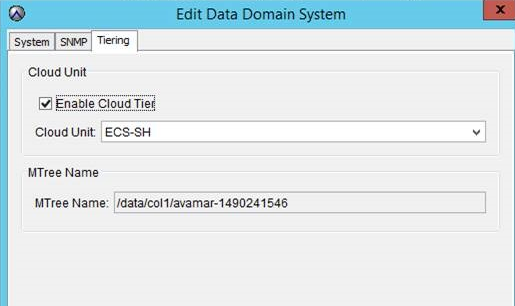
MCS UI 中的「Enable Cloud Tier」選項:
Affected Products
Data DomainProducts
Avamar Server, Data Domain, Cloud Disaster RecoveryArticle Properties
Article Number: 000014126
Article Type: How To
Last Modified: 13 Aug 2025
Version: 8
Find answers to your questions from other Dell users
Support Services
Check if your device is covered by Support Services.