NetWorker: REST API 요청이 실패하고 오류 메시지가 표시됩니다. HTTP 상태 404 - "요청된 리소스를 사용할 수 없음"을 찾을 수 없음
Summary: 다음 오류 메시지와 함께 NetWorker REST API 쿼리가 실패합니다. HTTP 상태 404 - "요청된 리소스를 사용할 수 없습니다. 원본 서버가 타겟 리소스에 대한 현재 표현을 찾지 못했거나 존재하는 것을 공개할 의사가 없습니다."
This article applies to
This article does not apply to
This article is not tied to any specific product.
Not all product versions are identified in this article.
Symptoms
NetWorker REST API 요청이 실패하고 다음과 같은 오류 메시지가 표시됩니다. HTTP 상태 404 - "요청된 리소스를 사용할 수 없음"을 찾을 수 없음
[root@NETWORKER_SERVER]:~# curl -ik GET -u **userid**:'***Password***' -H "Content-Type: application/json" 'https://NETWORKER_SERVER:9090/nwrestapi/v3/global/clients'
curl: (6) Could not resolve host: GET; Name or service not known
HTTP/1.1 404
Content-Type: text/html;charset=utf-8
Content-Language: en
Content-Length: 790
Date: Tue, 04 Jul 2023 12:11:41 GMT
Server: NSR SERVICES for Authentication
HTTP Status 404 – Not Foundbody {font-family:Tahoma,Arial,sans-serif;} h1, h2, h3, b {color:white;background-color:#525D76;} h1 {font-size:22px;} h2 {font-size:16px;} h3 {font-size:14px;} p {font-size:12px;} a {color:black;} .line {height:1px;background-color:#525D76;border:none;}
HTTP Status 404 – Not Found
Type Status Report
Message The requested resource [/nwrestapi/v3/global/clients] is not available
Description The origin server did not find a current representation for the target resource or is not willing to disclose that one exists.
Apache Tomcat/9.0.52 NetWorker 서버 설치에 nwrestapi 디렉토리가 없습니다.
Linux: /nsr/authc/webapps/nwrestapi/

Windows: C:\Program Files\EMC NetWorker\nsr\authc-server\tomcat\webapps\nwrestapi
restapi.log가 없거나 업데이트되지 않습니다.
Linux: /nsr/logs/restapi/restapi.log

Windows: C:\Program Files\EMC NetWorker\nsr\logs\restapi\restapi.log
Cause
nwrestapi 경로가 없습니다. REST API 쿼리는 엔드포인트를 찾거나 다른 NetWorker 데이터베이스에서 데이터를 어떻게 제공해야 하는지 상관관계를 파악할 수 없습니다.
Resolution
nwrestapi는 Java Runtime Environment를 사용하는 NetWorker의 인증 서비스와 함께 구성됩니다. 인증을 구성할 때 잠재적인 Java 관련 문제를 방지하려면 NRE(NetWorker Runtime Environment)를 사용하는 것이 좋습니다. 최신 NRE 패키지는 Dell Support NetWorker 드라이버 및 다운로드 페이지에서 다운로드할 수 있습니다 .
리눅스:
Windows:
참고: Java 인스턴스가 여러 건 설치되어 있을 수 있습니다. 예를 들어 NRE와 Oracle JRE가 모두 서버에 설치될 수 있습니다. 위의 단계에서는 NetWorker가 사용하는 Java 설치를 확인합니다.
리눅스:
- NetWorker 서버에 로그인하고 루트로 전환합니다.
sudo su -
- NRE가 설치되어 있는지, 어떤 Java 인스턴스 NetWorker를 사용하도록 구성되어 있는지 확인합니다.
rpm -qa | grep nre
cat /nsr/authc/conf/installrc

[root@networker-mc]:~# rpm -qa | grep nre
nre-8.0.15-1.x86_64
[root@networker-mc]:~#
[root@networker-mc]:~# cat /nsr/authc/conf/installrc
JAVA_HOME=/opt/nre/java/latest
참고: Java 인스턴스가 여러 건 설치되어 있을 수 있습니다. 예를 들어 NRE와 Oracle JRE가 모두 서버에 설치될 수 있습니다. 위의 단계는 NetWorker가 사용하는 Java 설치를 확인합니다.
- 다음 스크립트를 실행하여 NetWorker authc 서버를 재구성합니다.
/opt/nsr/authc-server/scripts/authc_configure.sh

[root@networker-mc]:~# /opt/nsr/authc-server/scripts/authc_configure.sh

Specify the directory where the Java Standard Edition Runtime Environment (JRE) software is installed [/opt/nre/java/latest]:

The installation process will install an Apache Tomcat instance. For optimum security, EMC NetWorker Authentication Service will use a non-root user (nsrtomcat) to start the Apache Tomcat instance.
If your system has special user security requirements, ensure that proper operational permissions are granted to this non-root user (nsrtomcat).
Please refer to NetWorker Installation Guide.

WARNING: Port 9090 is already in use.

Do you wish to specify a different port number [y]? n

The Apache Tomcat will use "networker-mc.emclab.local" as the host name.
The Apache Tomcat will use "9090" as the port number.

The NetWorker Authentication Service requires a keystore file to configure encryption and to provide SSL support.

EMC recommends that you specify a keystore password that has a minimum of six characters.

Do you want to use the existing keystore /nsr/authc/conf/authc.keystore [y]?

Specify password for the existing keystore:
The install will use the existing certificate "emcauthctomcat" for Apache Tomcat.
The install will use the existing certificate "emcauthcsaml" for Authentication Service.

Creating the installation log in /opt/nsr/authc-server/logs/install.log.

Performing initialization. Please wait...

The installation completed successfully.
참고: 인증을 다시 로드하려면 NetWorker 서비스를 재시작해야 합니다. 이 작업은 다음 systemctl 명령으로 수행할 수 있습니다.
systemctl stop networker
and
systemctl start networker.
- 다음 폴더가 생성되었는지 확인합니다.
/nsr/authc/webapps/nwrestapi

[root@networker-mc]:~# ls -l /nsr/authc/webapps/nwrestapi/
total 0
drwx------. 2 nsrtomcat nsrtomcat  44 Jul  6 12:22 META-INF
drwx------. 3 nsrtomcat nsrtomcat  21 Jul  6 12:22 v1
drwx------. 3 nsrtomcat nsrtomcat  21 Jul  6 12:22 v2
drwx------. 3 nsrtomcat nsrtomcat  21 Jul  6 12:22 v3
drwx------. 6 nsrtomcat nsrtomcat 107 Jul  6 12:22 WEB-INF
- nwrestapi 디렉토리가 생성된 경우 REST API 쿼리를 실행합니다.
Windows:
- NRE가 설치되어 있는지, 어떤 Java 인스턴스 NetWorker를 사용하도록 구성되어 있는지 확인합니다.
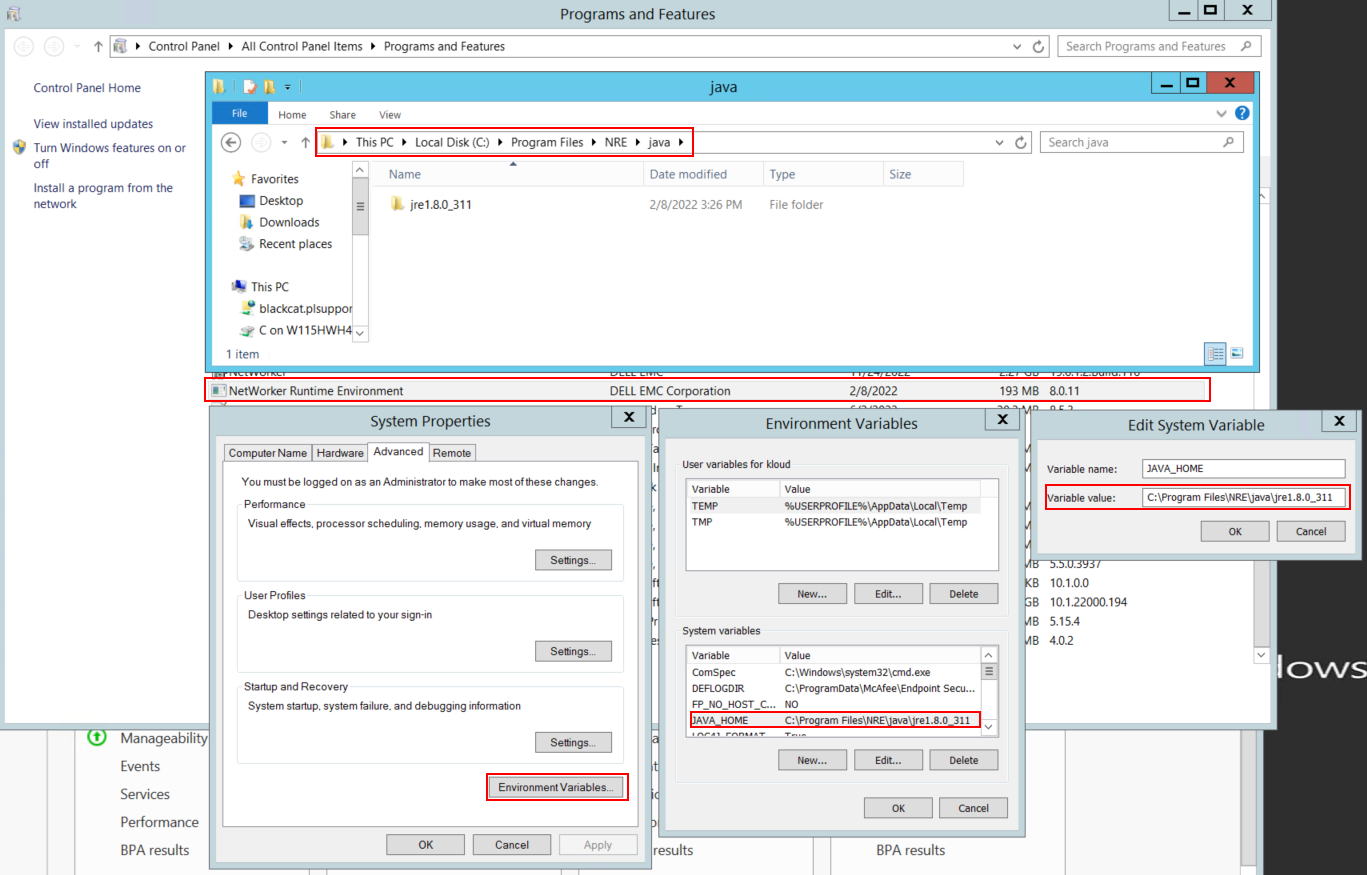
그림 1: NetWorker가 사용하는 Java 인스턴스를 확인합니다.
참고: Java 인스턴스가 여러 건 설치되어 있을 수 있습니다. 예를 들어 NRE와 Oracle JRE가 모두 서버에 설치될 수 있습니다. 위의 단계에서는 NetWorker가 사용하는 Java 설치를 확인합니다.
- NetWorker 패키지를 제거합니다. 이렇게 하면 NetWorker 데이터베이스 또는 구성 리소스가 제거되지 않습니다.
- 기존 설치 경로를 통해 NetWorker를 재설치합니다. NetWorker를 재설치하면 NetWorker의 인증 서비스가 재구성됩니다.
- 다음 경로가 있는지 확인합니다.
C:\Program Files\EMC NetWorker\nsr\authc-server\tomcat\webapps\nwrestapi

그림 2: NetWorker 인증 경로가 존재하는지 확인합니다.
- nwrestapi 디렉토리가 생성된 경우 REST API 쿼리를 실행합니다.
Affected Products
NetWorkerProducts
NetWorker Family, NetWorker SeriesArticle Properties
Article Number: 000215602
Article Type: Solution
Last Modified: 27 Mar 2025
Version: 7
Find answers to your questions from other Dell users
Support Services
Check if your device is covered by Support Services.