PowerStore: Filesystem usage capacity alerts disabled after upgrade.
Summary: After upgrading an appliance from PowerStoreOS 2.1 (or earlier) to PowerStoreOS 3.0 (or later version), Filesystems that were created before the upgrade will not trigger FS's usage capacity alerts. The Health Check thin package has a check to detect this condition. ...
This article applies to
This article does not apply to
This article is not tied to any specific product.
Not all product versions are identified in this article.
Symptoms
After upgrading an appliance from PowerStoreOS 2.1 (or earlier) to PowerStoreOS 3.0 (or later version), Filesystems that were created before the upgrade will no longer trigger FS's usage capacity alerts.
The Health Check thin package has a check to detect this condition.
Example screenshot for System Check:
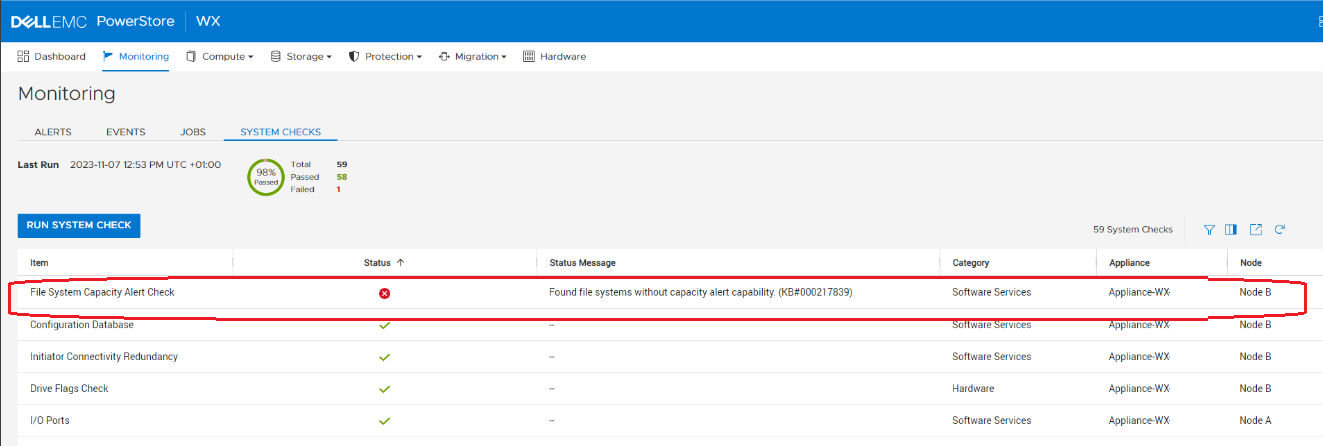
Example output for System Health Service Script (svc_health_check) using an SSH connection:
The Health Check thin package has a check to detect this condition.
Example screenshot for System Check:
Example output for System Health Service Script (svc_health_check) using an SSH connection:
$ svc_health_check run -rhc sdnas_capacity_alert_check
Name                               Location  Status     Description
File System Capacity Alert Check   node_a    Passed
File System Capacity Alert Check   node_b    Failed     Found file systems without capacity alert capability. (KB#000217839)


SUMMARY Status: Failed
   Passed:      1
   Failed:      1
   Total:       2
Cause
Due to a change in SDNAS in PowerStoreOS 3.0, the space alert thresholds settings are reconfigured. A new capability to have per-filesystem thresholds is introduced and during the upgrade are not properly initialized to the proper defaults.
In case the appliance runs out of space, all Filesystems that were created in 2.1 or earlier versions, before the upgrade to 3.0.x or later, will no longer trigger Filesystems usage capacity alerts.
Resolution
The issue is fixed in 3.6.1.0.
To resolve this issue if it has occurred, upgrade to 3.6.1.0 code or later.
If system was upgraded from version 2.1.x (and earlier versions) to a version prior to 3.6.1.0 and no alert was received for capacity issues, upgrade to 3.6.1.0 or later. If upgrade cannot be performed to 3.6.1.0 or later, contact support to verify the issue and for a fix to be applied. Reference this KB Article for expedited assistance.
To resolve this issue if it has occurred, upgrade to 3.6.1.0 code or later.
If system was upgraded from version 2.1.x (and earlier versions) to a version prior to 3.6.1.0 and no alert was received for capacity issues, upgrade to 3.6.1.0 or later. If upgrade cannot be performed to 3.6.1.0 or later, contact support to verify the issue and for a fix to be applied. Reference this KB Article for expedited assistance.
Affected Products
PowerStoreArticle Properties
Article Number: 000217839
Article Type: Solution
Last Modified: 14 Jun 2025
Version: 8
Find answers to your questions from other Dell users
Support Services
Check if your device is covered by Support Services.