PowerStore: System Checks detects that the platform data service information is out of date
Summary: This System Check verifies the accuracy of the platform data service information, mitigating the risk associated with using outdated data that could result in irreparable volume discrepancies. ...
Symptoms
System Check may display a message "Platform data service information is not up to date. (KB#000224714)"
If the condition is present, then pressing the "System Check" button from the PowerStore Manager's Monitoring window yields the following output: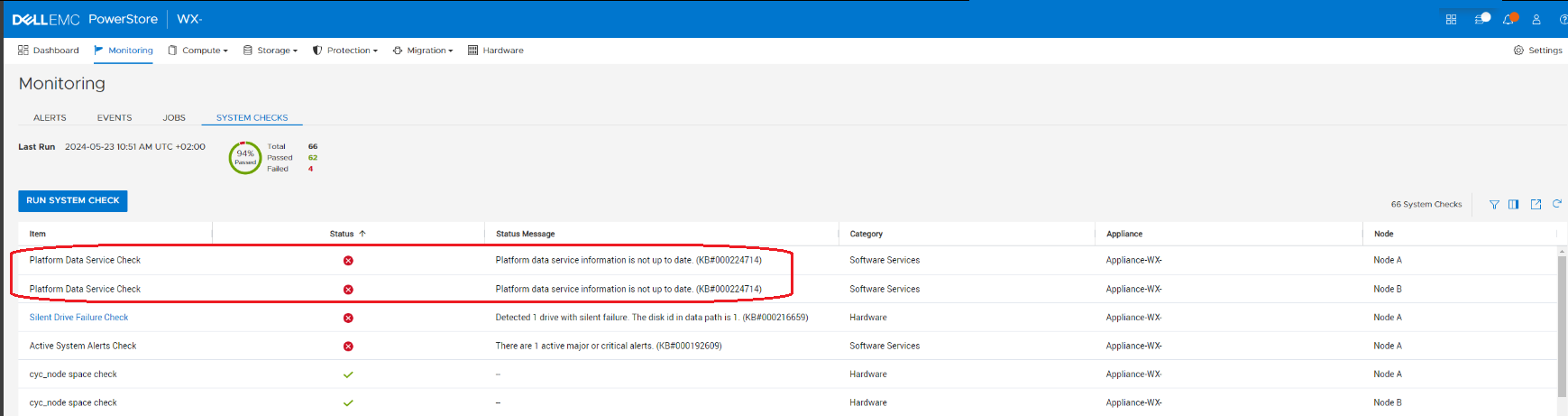
If the condition is present, then running the service script svc_health_check yield the following output:
[BSC:svc@ABCDEDF-A cyc]$ svc_health_check run -rhc ppds_dsb_check
Name                               Location  Status     Description
Platform Data Service Check        node_a    Failed     Platform data service information is not up to date. (KB#000224714)
Platform Data Service Check        node_b    Failed     Platform data service information is not up to date. (KB#000224714)


SUMMARY Status: Failed
   Passed:      0
   Failed:      2
   Total:       2
Cause
Reimaging a node after replacing its primary M.2 drive may inadvertently reintroduce outdated DSB information from the cyclical configuration backup file. When the node becomes operational, this outdated information could cause overwriting of current data, leading to data integrity issues.
Resolution
Do not replace the primary M.2.
Contact Dell Technical Support to resolve this issue. Reference this KB Article for expedited handling.