Dell OptiPlex 7050 Windows 10 Driver Installation Guide
Summary: This article is a guide to the drivers required to run the Windows 10 operating system on a Dell OptiPlex 7050 family of desktops.
Symptoms
A device driver or software driver is a computer program allowing higher-level computer programs to interact with a hardware device. For the OptiPlex 7050, all the drivers' installation for their devices is similar except that some system may have more devices than the other.
After a clean installation of the Microsoft® Windows 10 operating system, you must install the following drivers/software packages:
Table of Contents:
 |
||
OptiPlex 7050 Driver installation guide
Microsoft® Windows 10
 Note: Use this page as a reference for what the drivers should look like in Device Manager when installed. Drivers can be downloaded from the Dell Support Site.
 Notice: See article ID: SLN128938 Drivers and Downloads FAQ for help identifying Video controllers and other hardware components.
 Note: The drivers' installation for Windows 7, Windows 8.1 and Windows 10 are mostly identical. (Most of the device drivers will be pre-installed during the Windows 8.1 and 10 installation process.) For best results, we recommend installing the Intel Chipset driver utility first.
After a fresh copy of windows is installed, always install the Intel chipset driver utility first. After that, you can install the rest of the devices' drivers in any sequence. However, we would recommend you follow the convention below.
| Categories | Driver Name | Mini Tower | Small Form Factor | Micro Form Factor |
|---|---|---|---|---|
| Chipset Drivers | Intel Chipset Device Software Driver | ✔ | ✔ | ✔ |
| Chipset Drivers | Intel Management Engine Components Installer | ✔ | ✔ | ✔ |
| Chipset Drivers | Intel Serial IO Driver | ✔ | ✔ | ✔ |
| Chipset Drivers | USB 3.0 | Optional as Windows 8.1 will install the default native USB 3.0 driver. | Optional as Windows 8.1 will install the default native USB 3.0 driver. | Optional as Windows 8.1 will install the default native USB 3.0 driver. |
| Serial ATA | Intel Rapid Storage Technology Driver and Management Console | ✔ | ✔ | ✔ |
| Chipset Drivers | Realtek PCI-E Memory Card Reader Driver | ✔ (Optional) | ✔ | X |
| Video Drivers | Intel HD Graphics 510 / 530 / 630 | ✔ | ✔ | ✔ |
| Video Drivers | AMD Radeon R5-430 & R7-450 Discrete Graphics | ✔ (Optional) | ✔ (Optional) | X |
| Audio Drivers | Realtek High Definition Audio Driver | ✔ | ✔ | ✔ |
| Network Drivers | Intel I2xx / 825xx Gigabit Ethernet Network Controller | ✔ | ✔ | ✔ |
| Network Drivers | Intel 18265 8265 8265 3165 WiFi Driver | ✔ | ✔ | ✔ |
| Network Drivers | Intel 8265 / 8260 / 18265 / 18260 Bluetooth Driver | ✔ | ✔ | ✔ |
| Network Drivers | Qualcomm QCA61x4A QCA9377 WiFi Bluetooth | ✔ | X | X |
System Drivers
 Note: The driver list is based on driver installation from the Resource DVD or Support Site on a basic OptiPlex 7050 system without any additional optional cards fitted. Generally, Windows has comprehensive support for many items, but the following Dell™ - branded drivers and software must be installed for proper operation of the operating system if it has been removed and reinstalled:
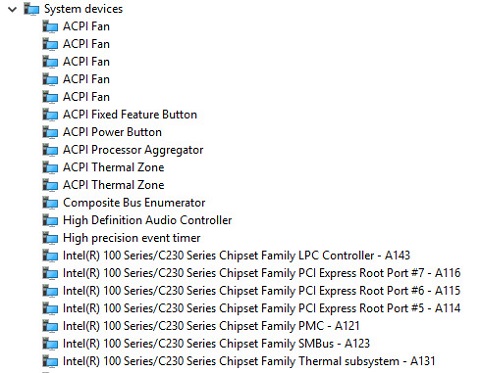
Check if the chipset driver is installed by looking at Device Manager - shown below. If not install the Intel chipset update from the Support Site.
>Chipset > Intel Chipset Device Software Driver.
| After Installation |
 |
Check if the Intel Management Engine Components Installer is installed by looking at Device Manager. If not install the latest driver available and follow the onscreen instructions.
>Chipset > Intel Management Engine Components Installer
Check if the Intel Serial IO driver is installed by looking at Device Manager. If not install the latest driver available and follow the onscreen instructions.
>Chipset > Intel Serial IO Driver
Check if the memory card reader driver is installed by looking at Device Manager. If not install the latest driver available and follow the onscreen instructions from the Support Site.
>Chipset > Realtek PCI-E Memory Card Reader Driver
 Note: This driver is Optional on the Mini Tower and is not required on the Micro Form Factor.
Check if the video driver is installed by looking at Device Manager. If not install the latest driver available and follow the onscreen instructions from the Support Site.
>Video > Intel HD Graphics 510 / 530 / 630
| After Installation |
 |
Check if you have a discrete video card driver installed by looking at Device Manager. If not and you have the card fitted, then install the latest driver available and follow the onscreen instructions from the Support Site.
>Video > AMD Radeon R5-430 & R7-450 Discrete Graphics
| Mini Tower | Small Form Factor | Micro Form Factor |
|---|---|---|
| AMD Radeon R5 430, 1GB AMB Radeon R5 430, 2GB AMD Radeon R7 450, 4GB |
AMD Radeon R5 430, 1GB AMB Radeon R5 430, 2GB AMD Radeon R7 450, 4GB |
None |
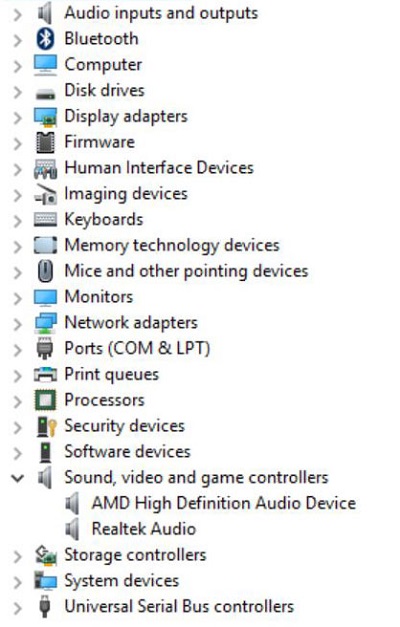
Check if the audio driver is installed by looking at Device Manager. If not install the latest driver available and follow the onscreen instructions from the Support Site.
>Audio > Realtek High Definition Audio Driver
| After Installation |
 |
Check if the Intel NIC driver is installed by looking at Device Manager. If not install the latest driver available and follow the onscreen instructions from the Support Site.
>Network > Intel I2xx/825xx Gigabit Ethernet Network Controller
| After Installation |
 |
Check if the optional Intel Wireless card driver is installed by looking at Device Manager. If not install the latest driver available and follow the onscreen instructions.
>Network > Intel 18265 8265 8265 3165 WiFi Driver
Check if the optional Intel Bluetooth driver is installed by looking at Device Manager. If not install the latest driver available and follow the onscreen instructions.
>Network > Intel 8265 / 8260 / 18265 / 18260 Bluetooth Driver
Check if the optional Qualcomm Wireless/Bluetooth card driver is installed by looking at Device Manager. If not install the latest driver available and follow the onscreen instructions.
>Network > Qualcomm QCA61x4A QCA9377 WiFi Bluetooth
 Note: The Qualcomm Wireless/Bluetooth card is only an option in the Mini Tower Chassis.
Check if the Intel Rapid Storage Software is installed by looking at Device Manager. If not Install the latest Driver Package from the Support Site.
>Serial ATA > Intel Rapid Storage Technology Driver and Management Console