How to Install Phi-3.5-mini-instruct for Use With Dell Pro AI Studio on Intel Platforms
Summary: This article covers the process to install Phi-3.5-mini-instruct on Intel for usage with Dell Pro AI Studio on a single device.
This article applies to
This article does not apply to
This article is not tied to any specific product.
Not all product versions are identified in this article.
Instructions
Affected Products:
- Dell Pro AI Studio
The steps below assume that you have already downloaded and extracted the needed prerequisites and installers. Before continuing, ensure that you have gathered the following:
- .NET Desktop Runtime x64 8.0.15 or higher
- ASP.NET Core Runtime x64 8.0.15 or higher
- C++ Redistributable x64 14.42.34438.0 or higher
- Dell Core Services
- Dell AI Framework
- Phi-3.5-mini-instruct
Note: Confirm that your Dell computer is in the Supported platforms section of the Dell Pro AI Studio Deployment Guide For MECM or Dell Pro AI Studio Intune Guide at Support for Dell Pro AI Studio Manuals & Documents.
- Right-click the Windows start menu and select Terminal (Admin).
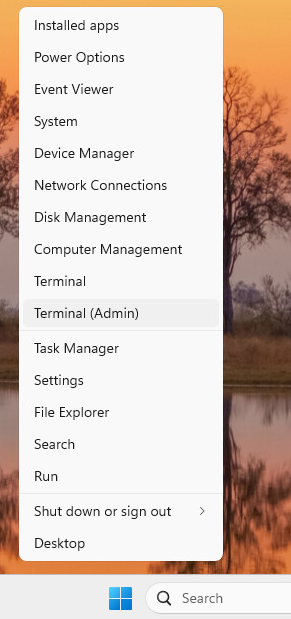 Note: Click Yes if prompted by User Account Control.
 - Change the directory in Terminal to where you extracted your files into. For example, type
cd C:\DPAIS\x64and then press Enter.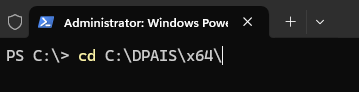
- In Terminal, type
.\windowsdesktop-runtime-8.0.15-win-x64.exe /install /quiet /norestartand press Enter.
- In Terminal, type
.\aspnetcore-runtime-8.0.15-win-x64.exe /install /quiet /norestartand press Enter.
- In Terminal, type
.\VC_redist.x64.exe /install /quiet /norestartand press Enter.
- In Terminal, type
.\Dell.Core.Services.Installer_64bit.msi /qn /norestartand press Enter.
- In Terminal, type
.\Dell.AI.Framework.x64.msi /qn /norestartand press Enter.
- In Terminal, type
.\Dell.Model.Phi-3.5-mini-instruct.NPU.OVGAI.x64.msi /qn /norestartand press Enter.
- Reboot your computer to finish the installation process.
Affected Products
Dell Pro AI StudioArticle Properties
Article Number: 000321662
Article Type: How To
Last Modified: 24 Oct 2025
Version: 3
Find answers to your questions from other Dell users
Support Services
Check if your device is covered by Support Services.