APEX Backup Services | SQL Transaction Log backup succeeds with errors
Summary: SQL log backup succeeds with errors when the backup of the log files of a few DBs got skipped. The log chain of the DB's that were skipped from backup appears broken.
Symptoms
Traceback
<Line 702: [2018-06-17 07:38:08,638] [INFO] roboSyncer: Sending log to Phoenix server with message : 'Could not backup log files for 12 DBs, WH-RPT02\ProjectQuoting, WH-RPT02\LFAudit_3EDocuments, WH-RPT02\3EDocuments, WH-RPT02\SSISDB, WH-RPT02\3EWorkFlow, WH-RPT02\ReportServer, WH-RPT02\Insite, WH-RPT02\ProjectQuoting_Test, WH-RPT02\WebTracksSQL, WH-RPT02\Helpdesk, WH-RPT02\ReportServerTempDB, WH-RPT02\InforDB
Line 552: [2018-06-17 07:37:57,923] [INFO] Log chain broken: WH-RPT02:Helpdesk

    Line 559: [2018-06-17 07:37:58,065] [INFO] Log chain broken: WH-RPT02:ProjectQuoting_Test

    Line 563: [2018-06-17 07:37:58,171] [INFO] Log chain broken: WH-RPT02:3EWorkFlow

    Line 566: [2018-06-17 07:37:58,272] [INFO] Log chain broken: WH-RPT02:SSISDB

    Line 569: [2018-06-17 07:37:58,404] [INFO] Log chain broken: WH-RPT02:Insite

    Line 572: [2018-06-17 07:37:58,477] [INFO] Log chain broken: WH-RPT02:InforDB

    Line 574: [2018-06-17 07:37:58,584] [INFO] Log chain broken: WH-RPT02:ReportServerTempDB

    Line 579: [2018-06-17 07:37:58,713] [INFO] Log chain broken: WH-RPT02:ReportServer
Cause
A third-party or native SQL log backup running on the server may have caused the log chain to break.
How to verify native SQL log backup
We can verify if native backups were run from the report “Backup and Restore events”. This report does calculations to show the data in a more readable format.
Launch SQL Server Management Studio (SSMS)
- Select the database
- Right click and select Reports
- Standard Reports-> Backup and Restore events
- Right click the report and export in CSV format.
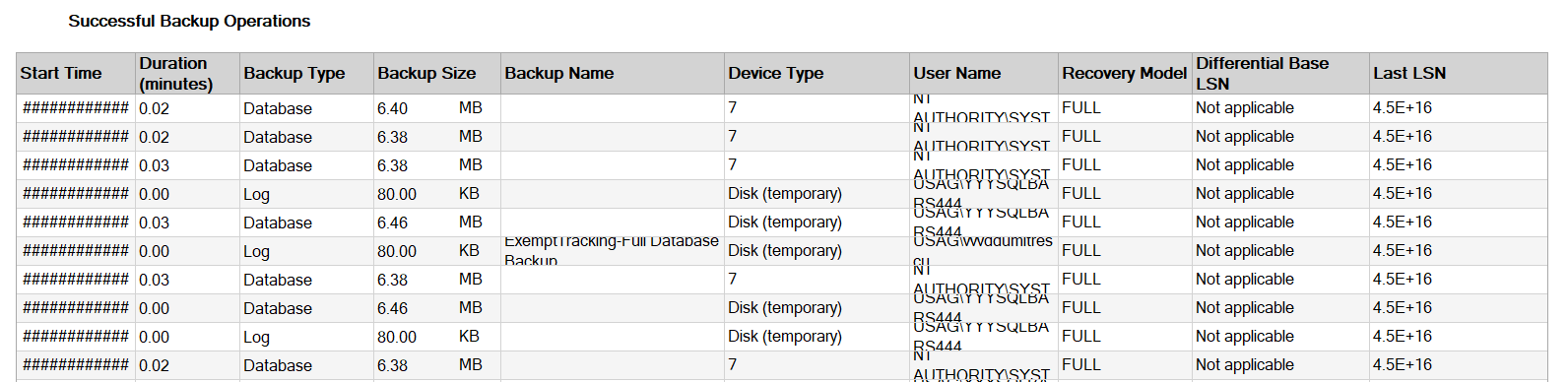
- Expand “Successful Backup Operations” section
- “Device type” column shows path of the physical backup file. If it is Disk, it implies that a native backup was taken.
- You can also verify the recovery model and username from this report.
Resolution
- Disable or delete third-party SQL log backups for the affected SQL instance (backup set), including SQL native backups, and initiate a manual backup from the Phoenix Management Console. Subsequent transaction log backups must complete successfully. Run Copy-Only native backups from SQL server if disabling third-party or native backups is not possible.
- If the above step is not possible, then the Endpoint protection/third party/antivirus backup software has an option to disable/exclude the specific VSS writer. So, please disable/exclude SqlServerWriter from the software settings. Then subsequent FULL/Diff SQL backup would resolve the issue.
- Another workaround is to have a policy such that always Phoenix SQL FULL/DIFF backup is triggered after Third Party/Native SQL(maintenance plan)/Endpoint protection backups.
- If the recovery model of a database needs to be changed for some reason, create another backup set for this SQL server. After the changes, only the backups for this backup set will fail, and the other backups will be unaffected.
Note: Before creating a new backup set for this database, deselect this database from the current backup set.