Windows Server: Multiple A16 GPUs May Cause Blue Screen Error During a PCI Scan
Summary: This article talks about that in Windows Server 2019, or 2022, with multiple A16 GPUs a blue screen error may show up during a PCI scan.
This article applies to
This article does not apply to
This article is not tied to any specific product.
Not all product versions are identified in this article.
Symptoms
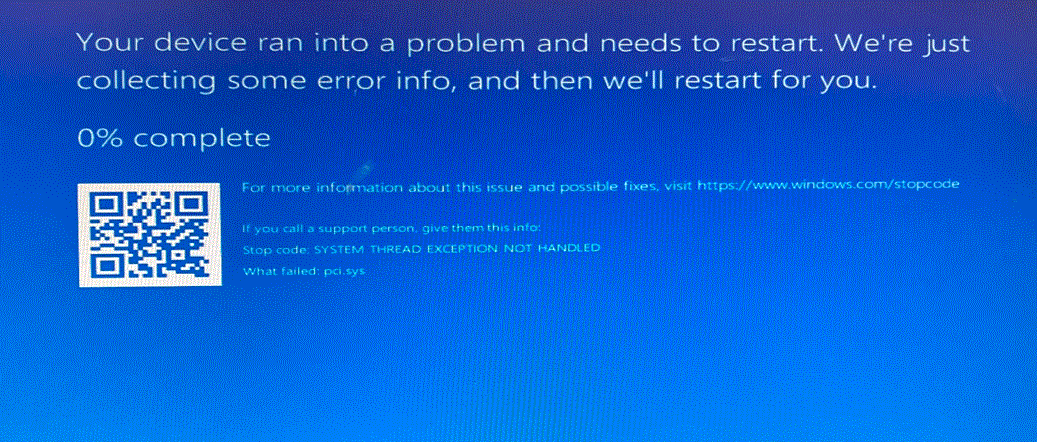
User may notice a Blue Screen Error with stop code SYSTEM_THREAD_EXCEPTION_NOT_HANDLED (7e) if there are multiple A16 GPUs installed.
Note: The system can boot back to the operating system after the blue screen error.
Note: Windows Server 2016 is also affected but is End-of-Life.
Steps to Reproduce:
Install two or more units of NVIDIA A16 in the server.
Install the Windows Server 2019 or Windows Server 2022 operating system.
Install the chipset driver, SWRAID (S140/S150/S160) driver, or perform PCI scan through Device Manger.
Cause
For Windows Server 2022 or earlier operating system versions, the OS follows a certain algorithm for ARI devices. If the child’s Max Payload Size (MPS) is smaller than the parent’s, the upstream port may send instructions that the child cannot answer.
If that happens, the endpoint produces an error and results in either a device disconnect or a blue screen error. In the failing case, the GPU displays MPS of 256 while the parent (USP and Rootport) is supporting the values of 512 for MPS.
Resolution
Review the following articles from Microsoft:
- Windows Server 2022 Fix: March 12, 2024 - KB5035857 (OS Build 20348.2340) - Microsoft Support
- HCI 23H2 Fix: March 12, 2024 - KB5035856 (OS Build 25398.763) - Microsoft Support

Videos
Affected Products
Microsoft Windows Server 2016, Microsoft Windows Server 2019, Microsoft Windows Server 2022Article Properties
Article Number: 000216458
Article Type: Solution
Last Modified: 18 May 2026
Version: 5
Find answers to your questions from other Dell users
Support Services
Check if your device is covered by Support Services.