SQL Server Trace Flag 1800 transaction log volume input/output (I/O) alignment
Summary: The Microsoft SQL Trace Flag 1800 is a setting that enables SQL Server 4k I/O alignment for the SQL transaction log volume. In this article, we explore the cause of transaction log misaligned I/O and the benefits of using the trace flag 1800. This applies to Dell and other vendor storage solutions with virtualized SQL solutions. ...
Symptoms
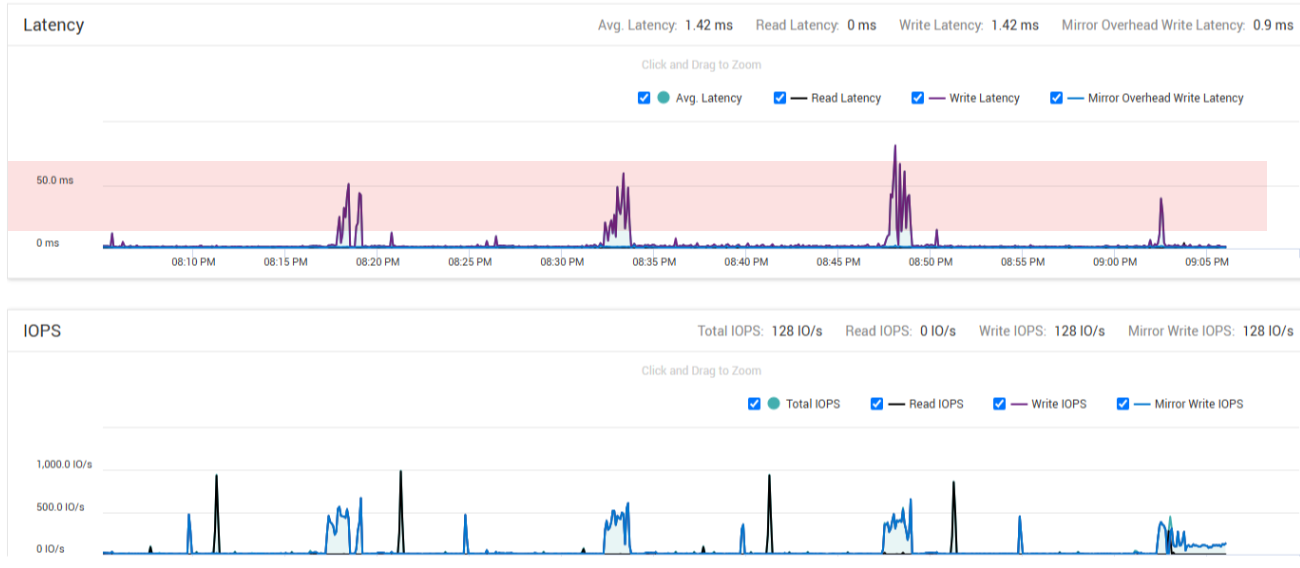
When misaligned I/O occurs, an application may experience elevated write latency for transaction log writes during periods of large data insertion into the database.
A detailed example of detecting the potential misalignment can be found in this Broadcom blog
The impact of I/O misalignment depends heavily on the workload pattern. In general, for larger sequential write I/O the impact has been observed more significant.
A latency example from a write performance perspective without the Trace Flag 1800:
With the Trace Flag 1800 set: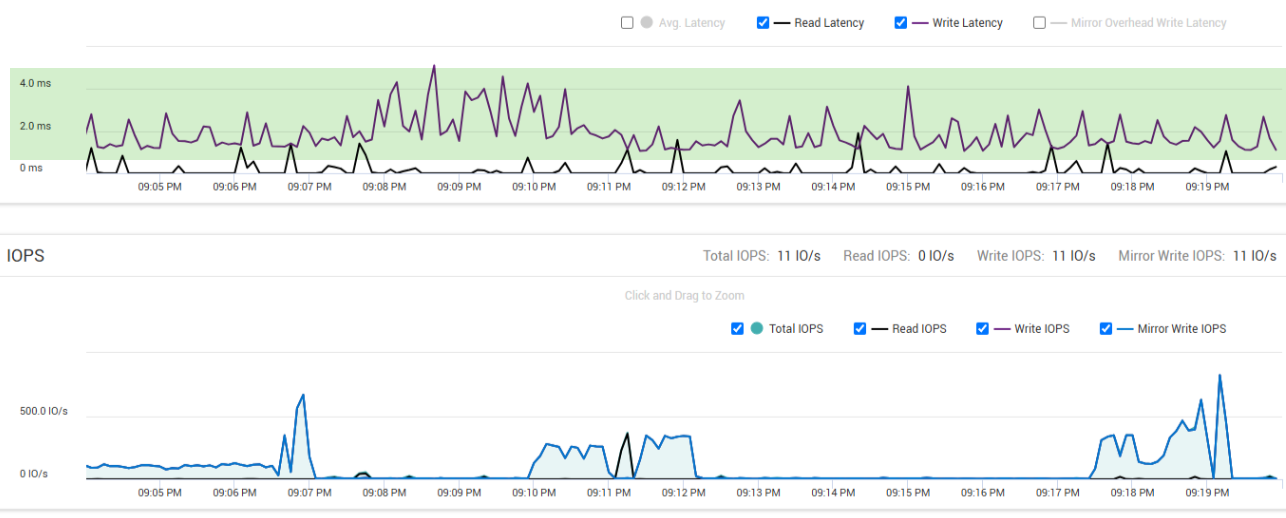
Cause
vSphere ESXi exposes VMware Virtual Machine Disks (VMDKs) to the Guest OS with the physical sector size of 512 bytes (512n formatting).
SQL Server uses an advanced mechanism to calculate the transaction log I/O block size. SQL takes the physical sector size of the presented VMDK where the transaction log files are placed to align the transaction log I/O block size. This is different for data volumes which are traditionally using the file system (NTFS) allocation unit size (user-controlled).
I/O disk alignment ensures that data is written to storage media in a way that aligns with the physical sectors of the disk. This helps to prevent misaligned I/Os, which can impact write performance.
Note: This is not Storage Solution specific, different solutions manage misaligned I/O in their own way and may not display the same symptoms. Regardless it is always recommended to align the IO as per the storage solution best practices.
Resolution
By using the trace flag 1800, you can ensure that your SQL transaction log volume is properly aligned with a 4k boundary. Depending on the volume block size of the underlying storage solution, this optimizes write performance.
Before enabling the trace flag 1800, consult with your Microsoft SQL team to confirm potential misalignment and configuration guidance.
Note: Trace Flag 1800 requires a restart of the SQL Server service. Applying the flag using the Database Consistency Checker (DBCC) "DBCC TRACE ON" command has no effect.
Additional Information
Microsoft references