EMSServiceHelper.exe 不會自動啟動
Summary: Dell 數據保護 |在嘗試存取加密 CD、DVD 或 USB 媒體上的資料時,加密外部媒體護蓋 (EMS) 使用者不會收到密碼提示。
This article applies to
This article does not apply to
This article is not tied to any specific product.
Not all product versions are identified in this article.
Symptoms
受影響的產品:
- Dell Data Protection | External Media Edition
- Dell Data Protection | Enterprise Edition
- Dell Data Protection | Personal Edition
Cause
當 EMSServiceHelper.exe 未在加密的端點或 C:\Windows\System32\EmsServicehelper.exe 升級后不存在時,可能會發生此問題。
Resolution
此問題已在 8.7 中解決。
若要解決此問題,請卸載外部媒體版應用程式。
- 卸載 Dell Data Protection | 如果您安裝了 Dell Data Protection ,請加密 (可透過新增/移除或程式與功能) |使用您必須使用與安裝版本相同的安裝媒體卸載腳本檔進行加密。
注意:不需要解密數據。
- 卸載外部媒體版本
- 執行類似於下列命令列的命令列:
DDPE_XXbit_setup.exe /s /x /v"/qn /l c:\ddpe_uninstall.log"
- 執行類似於下列命令列的命令列:
- 重新安裝外部媒體版應用程式。
注意:暫時的解決方案是手動覆寫EMSServiceHelper.exe。
- 前往位於 C:\Windows\system32\EMSServiceHelper.exe 的 EMSServiceHelper.exe。
- 以滑鼠右鍵按下檔案,然後選擇:
- 內容
- 然後按兩下 [Details] (詳細數據)。
- 查看詳細數據標籤,以瞭解遺失的資訊,例如:
- 檔案版本
- 產品名稱
- 產品版本
- 版權
- 語言
- 以滑鼠右鍵按下檔案,然後選擇:
請參考下圖,舉例來說,是EMSServiceHelper.exe 檔案 損毀 :
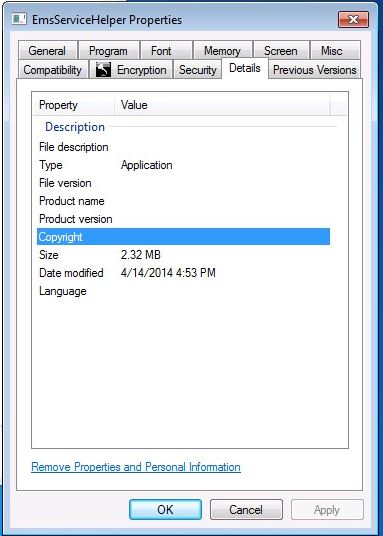
圖 1:(僅限英文版):EMSServiceHelper.exe 損毀
請參閱下圖,以建立 有效的 EMSServiceHelper.exe 檔案範例:
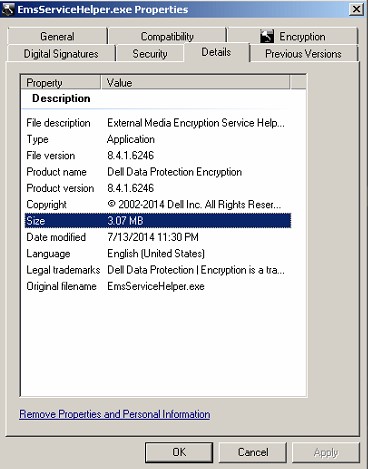
圖 2:(僅限英文版):Working EMSServiceHelper.exe
- 複製 EMSServiceHelper.exe 檔案,
C:\Program Files\Dell\Dell Data Protection\Encryption\EMS\EMSServiceHelper.exe。 - 貼 至 C:\Windows\system32\EMSServiceHelper.exe 以覆寫檔案。
- 將端點重新開機。
如要聯絡支援部門,請參閱 Dell Data Security 國際支援電話號碼。
請前往 TechDirect,以線上產生技術支援要求。
如需更多深入見解與資源,請加入 Dell 安全性社群論壇。
Affected Products
Dell EncryptionArticle Properties
Article Number: 000130996
Article Type: Solution
Last Modified: 19 Apr 2026
Version: 10
Find answers to your questions from other Dell users
Support Services
Check if your device is covered by Support Services.