Avamar: Introduction of TotalBytes, ModReduced, ModNotSent, and ModSent in the DPN Summary
Summary: This article introduces the TotalBytes, ModReduced, ModNotSent, and ModSent entries in the DPN Summary.
Instructions
The Data Protection Network (DPN) Summary is often used by Avamar administrators to check Avamar backup information.
-
TotalBytes
-
ModReduced
-
ModNotSent
-
ModSent
Perform the following steps to access to the DPN Summary report:
From Avamar Administrator Java Console:
1. Select Tools, Manage Reports.
2. Select Activities - DPN Summary from the navigation tree and click Run.
3. Select a date range and click Retrieve.
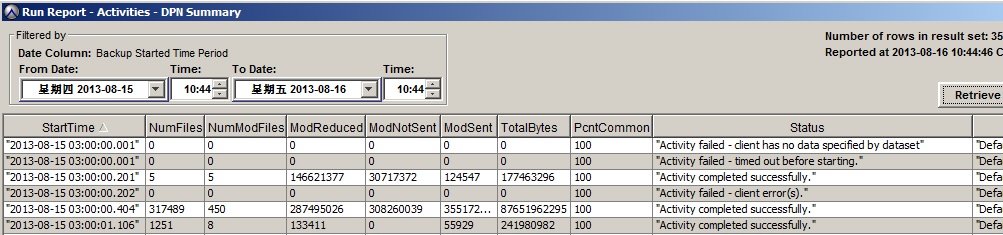
A report similar to the following is seen:
From Avamar Web User Interface (AUI):
1. Select Fitness Analyzer, then Reports.
2. Select Activities - DPN Summary.
3. Enter a date range, click Generate (and specify the required report type - xls, pdf or both)
4. Download the report once it has been generated.
The following is an example of an .xls version of the report:

-
Refers to the total bytes of data that must be scanned in the dataset
-
This includes the open files which cannot be backed up but does not include the files excluded by exclusion rules
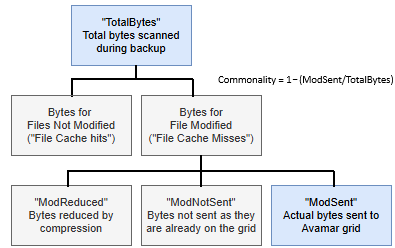
The chart below helps to explain ModReduced, ModNotSent, and ModSent:

- If so, it is skipped and the next file is checked.
- Otherwise, this indicates that this file has been modified or it is newly created since the last backup.
- Then this file is chunked, compressed, and hashed.
-
Refers to the total byte difference between before and after files are compressed for all the files that cannot be found in the file cache on the Avamar client
-
For example, if there are 20 files not found in the client file cache that were 500MB in total size (precompression), and 200MB (post compression), the ModReduced is 300MB
After the modified files are chunked, compressed, and hashed, they will be compared with the hash cache on the Avamar client.
- If the hash can be found in the hash cache, this indicates that a same chunk has previously been backed, so there is no requirement to send the chunk to Avamar Server. This kind of chunks is a part of ModNotSent.
- If the hash cannot be found in the hash cache on the Avamar client, this indicates that this chunk has not previously been backed up by this Avamar client.
- The Avamar client then queries if the chunk hash can be found on Avamar Server.
- If so, this indicates that this chunk has previously been backed up by Avamar Server, so there is no requirement to send the chunk to Avamar Server. This kind of chunks is the other part of ModNotSent.
- If the chunk cannot be found on Avamar Server, this indicates that this chunk has not been backed up by Avamar Server.
- The chunk is sent to Avamar Server.
- The hash of the chunk is also sent to and saved on Avamar Server.
(ModSent refers to the bytes of these kinds of chunks and their hashes sent to Avamar Server from the Avamar client.)
- The Avamar client then queries if the chunk hash can be found on Avamar Server.
Understanding these concepts allows the relationship between them easier to understand.
-
- TotalBytes (total bytes of the data scanned): Total bytes of all unmodified files since the last backup (found in the file cache on the Avamar client) + total bytes of all modified or newly created files since the last backup (not found in the file cache on the Avamar client)
- Total bytes of all modified or newly created file since last backup: ModReduced (the total byte difference between before and after files are compressed) + total bytes of compressed data
- ModNotSent: Total bytes of the chunks that do not need to be sent to Avamar Server as they are found in the Avamar client hash cache + total bytes of the chunks that do not need to be sent to Avamar Server since they have already been backed up by Avamar Server
- Total bytes of compressed data: ModNotSent + ModSent (total bytes sent by the Avamar client)
- TotalBytes: (total bytes of all modified or newly created files since last backup) = ModReduced + ModNotSent + ModSent
- Change rate = Deduplication rate = ModSent/TotalBytes, for file servers who perform daily backup, this value is usually below 2%.
- Commonality: 1 - ModSent/TotalBytes
Taking the first example from the Avamar Administrator Console:

-
-
- ModReduced is 146621377
- ModNotSent is 30717372
- ModSent is 124547
- TotalBytes is 177463296
-
-
- The change rate and deduplication rate: 124547/177463296 (0.07%)
- The commonality is 1 - 124547/177463296 = (99.93%)