Avamar: How to identify which Avamar clients have breached the backup soft and hard limits
Summary: Avamar: How to identify which Avamar clients have breached the backup soft and hard limits. These limits are also known as soft_quota_exceeded and hard_quota_exceeded.
Instructions
Avamar v7 introduced the concept of client 'hard' and 'soft' quotas.
Hard Limits:
- When a client breaches a hard limit, the Avamar Management Console Service (MCS) cancels the backup.
- The client log reports:
avtar Info <5314>: Command failed (1 warning, exit code 10019: externally cancelled by Administrator)
(The client has no concept of quotas as they are managed by the Avamar MCS).
- The backup activity's
hard_quota_exceededflag in the MCS Database (MCDB) activities table is tagged as true
- The Activity monitor status shows 'Hard limit exceeded':
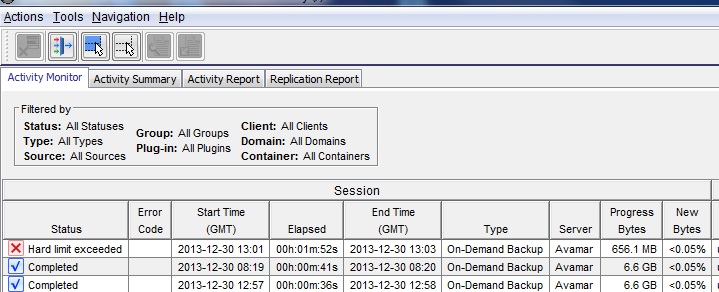
To identify which clients have breached the hard limit:
There is a report filter to allow effective reporting of clients whose hard limit has been exceeded:
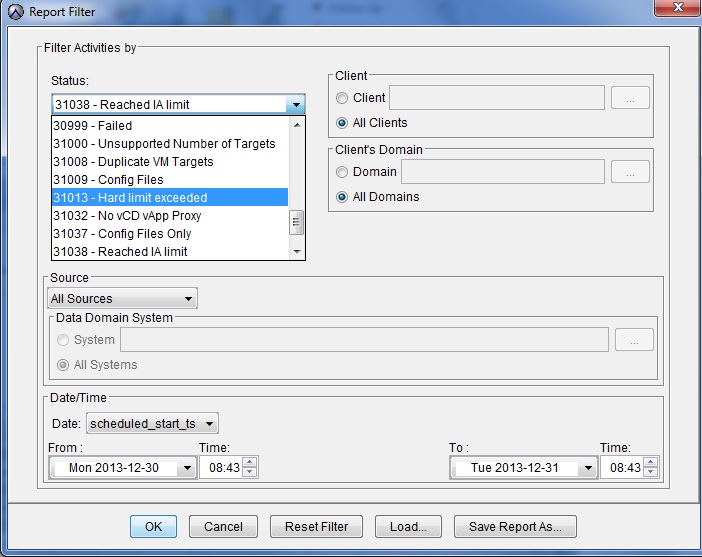
-- Or --
Connect to the MCDB database and run an appropriate SELECT query:
psql -p 5555 mcdb -c "select client_name, completed_ts, bytes_scanned, bytes_new, bytes_modified_sent, hard_quota_exceeded from activities where hard_quota_exceeded=true;"
Example output:
       client_name          |      completed_ts       |  bytes_scanned | bytes_new  | bytes_modified_sent | hard_quota_exceeded
----------------------------+-------------------------+----------------+------------+---------------------+---------------------
 testclient1.company.com    | 2013-12-30 12:58:31.14  |    97094762974 |    1242833 |              131489 | t
 testclient1.company.com    | 2013-12-30 14:52:42.995 |    67548942467 |   31245137 |              286313 | t
 testclient1.company.com    | 2013-12-30 14:12:49.359 |    67095146514 |     664973 |              144530 | t
 testclient1.company.com    | 2013-12-30 14:13:46.753 |    67095023064 |    1601981 |               36150 | t
 testclient1.company.com    | 2013-12-30 14:18:47.076 |    67541705632 |     127051 |               19644 | t
 testclient1.company.com    | 2013-12-30 14:16:09.359 |    67541705836 |  435203276 |               62833 | t
 testclient1.company.com    | 2013-12-30 14:20:40.637 |    67548945327 |    2050805 |             1760101 | t
 testclient1.company.com    | 2013-12-30 15:11:52.415 |    68952385028 | 1180518706 |           165100707 | t
Soft Limits:
- When a client breaches a soft limit, the backups are allowed to run normally.
- There is no indication in the client logs of a quota breach
- The Activity monitor does not report that the soft limit has been exceeded.
- The activity report contains a column
soft_quota_exceededon the right: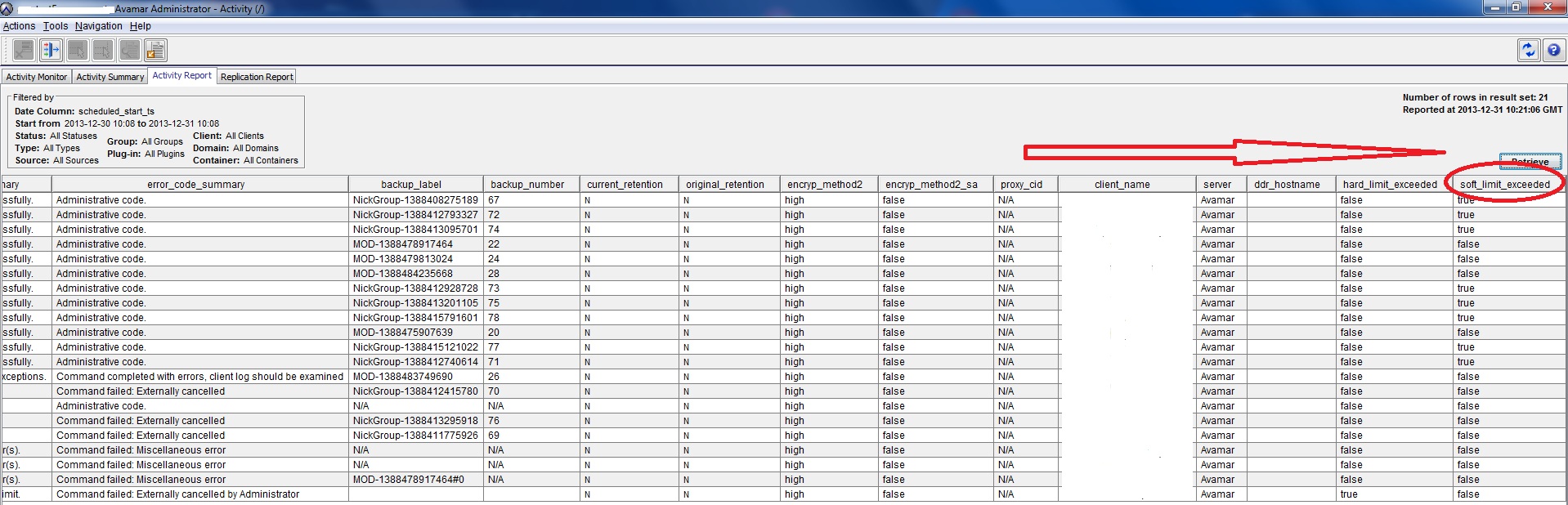
To identify which clients have breached the soft limit:
Sort the activity report using the soft_quota_exceeded column.
-- Or --
Connect to the MCDB database and run an appropriate SELECT query:
psql -p 5555 mcdb -c "select client_name, completed_ts, bytes_scanned, bytes_new, bytes_modified_sent, soft_quota_exceeded from activities where soft_quota_exceeded=true;"
Example output:
       client_name         |      completed_ts       | bytes_scanned | bytes_new  | bytes_modified_sent | soft_quota_exceeded
---------------------------+-------------------------+---------------+------------+---------------------+--------------------
 testclient.company.com    | 2013-12-30 12:58:31.14  |    7094762974 |     242833 |              131489 | t
 testclient.company.com    | 2013-12-30 14:52:42.995 |    7548942467 |    1245137 |              286313 | t
 testclient.company.com    | 2013-12-30 14:12:49.359 |    7095146514 |    3664973 |              144530 | t
 testclient.company.com    | 2013-12-30 14:13:46.753 |    7095023064 |    1601981 |               36150 | t
 testclient.company.com    | 2013-12-30 14:18:47.076 |    7541705632 |     127051 |               19644 | t
 testclient.company.com    | 2013-12-30 14:16:09.359 |    7541705836 |  435203276 |               62833 | t
 testclient.company.com    | 2013-12-30 14:20:40.637 |    7548945327 |    2050805 |             1760101 | t
 testclient.company.com    | 2013-12-30 15:11:52.415 |    8952385028 | 1180518706 |           165100707 | t
Additional Information
More information about behavior relating to Avamar soft and hard backup quotas: Avamar: The hard limit (quota) may not be enforced for backups which complete quickly.