Avamar: Space reclamation process Part 2: Crunching
Summary: This article describes the "crunching" portion of the Avamar space reclamation. Crunching is a critical background process which takes existing stripes and manipulates data within them to reuse space efficiently. ...
Symptoms
The article focuses on crunching, the activity which prepares garbage-collected stripes for reuse.
The full series of "Avamar space reclamation" articles is listed below:
- Avamar: Space reclamation process Part 1: Garbage Collection
- Avamar: Space reclamation process Part 2: Crunching
- Avamar: Space reclamation process Part 3: Remove Checkpoint process (RMCP)
- What happens during the Avamar 'crunching' maintenance process
- Why 'crunching' of stripes regularly is necessary on an Avamar system
Audience:
This article is intended for those who support or administer Avamar systems. It explains how Avamar's maintenance operations work together to store, protect, and clear expired data from the system. It is assumed that the reader is familiar with Avamar maintenance schedules, how data is stored on an Avamar system and how data stripes are constructed. It also assumes that the reader has read and understood the first article in this series which discusses Avamar garbage collection.
Symptoms typically encountered where crunching is not performing optimally:
-
High checkpoint overhead
-
Slower backup performance
This article discusses:
- What is crunching
- Why crunching is important
- An overview of how crunching works
- The two ways in which crunching can run
- Asynchronous Crunching
- Synchronous crunching
- Situations which can prevent asynchronous crunching from taking place
- Troubleshooting and useful commands that are related to crunching
- References, further reading, and related knowledge articles
Cause
Resolution
-
Crunching is an Avamar maintenance operation which modifies garbage-collected stripes in order to make the free space within those stripes contiguous.
-
By manipulating stripes to make their free space contiguous, Avamar efficiently reuses space for incoming backup data.
-
Garbage collection identifies data which is no longer referenced by any backups.
-
The chunk header descriptor is modified to indicate which chunks should be deleted. The data stripes, which contain those chunks, are unchanged.
-
The removal of these chunks occurs as a side effect of the crunching operation.
-
Think of crunching in a similar way to the classic defragmentation of hard disks.
-
Data must be moved from one place to another in order that the data containers can be more efficiently reused.
-
Disk defragmentation utilities move related elements of data to adjacent parts of a rotational hard disk to quicken sequential access times.
-
Crunching, however, moves data to the bottom of the stripe to make space for new incoming chunks.
-
Imagine a bus with one front entrance door and no exit door. People (chunks) enter the bus using the front door.
-
This is a special bus where people can only depart using Star Trek 'beam me up Scotty' technology.
-
The bus starts off full.
-
Once several people have dematerialized, the bus has space for more passengers.
-
Nobody else can fit on until the crowd has been moved away from the entrance. That is to say, 'crunched' towards the rear of the bus to make space near the front door.
Why crunching is important:
-
In preparation for accepting backup data, the Avamar selects the stripe on each data node which has the most contiguous free space.
-
The stripe is marked as the active stripe.
-
Any new incoming backup data is added to the active stripe.
-
When the stripe becomes full, the next, least full stripe, is marked as the active stripe.
-
A '
crunchable' stripe (garbage-collected but yet to undergo crunching), may be relatively empty. -
This relatively empty stripe would not be selected as the active stripe if there is another stripe which has more contiguous free space.
In the diagram below, both stripes in the diagram have been garbage collected but only data stripe 2 has been crunched:
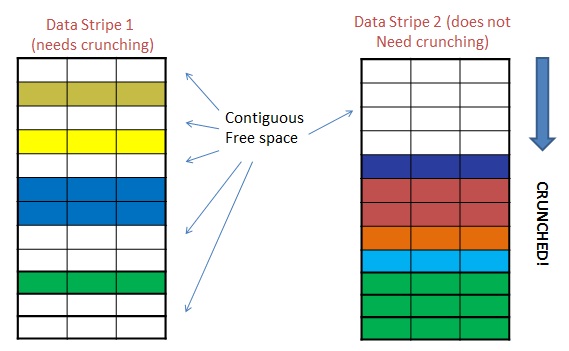
Even though data stripe 1 is emptier, stripe 2 has more useful contiguous space, so Avamar selects stripe 2 as the active stripe.
- As Avamar storage utilization increases, the active stripe is chosen from a pool of increasingly full stripes.
- If crunching is overdue, the reuse of stripes is inefficient.
- More stripes are required to capture the incoming data for an average day, even if that amount of data is unchanged.
- Using more stripes to capture the data results in higher checkpoint overhead than if stripes were more efficiently reused.
For this reason, always ensure that Avamar has the opportunity to perform sufficient crunching regularly.
How does crunching work?
-
Reads the data from the stripe file in the cur directory into memory
-
Determines which chunks are referenced by the chunk header
-
Rewrites the stripe file and chunk header to disk
The stripe file is populated only with items referenced by the chunk header
Modifying the stripe file breaks its hard link, increasing file system utilization.
From Avamar version 5.0 and later, stripes remain at their full size after crunching. This helps avoid file system fragmentation over time.
When does crunching occur?
Asynchronous crunching: This is the default, and preferred method, of performing crunching.
-
If the
asynccrunchingparameter is set to true -
If there are
crunchablestripes* -
AND if the crunching goal or daily limit has not been met*
-
If the system is writable and
disknoflushhas not been reached
Asynchronous crunching is a preemptive operation.
It uses dedicated time and resources to prepare stripes ahead of the backup window.
Synchronous crunching:
If asynchronous crunching is not able to pre-prepare enough stripes, or, if the asynccrunching parameter is set to false, crunching runs synchronously with backups.
Also known as on-demand crunching, this mode of crunching runs when needed and operates on a stripe, if the stripe is crunchable and being prepared to become a node's active stripe.
Allowing crunching to run synchronously with backups means increased competition for disk I/O resources.
On busy systems, this may cause backup jobs to take longer to complete.
Situations, such as when a system is experiencing high checkpoint overhead, Avamar is set up to perform only synchronous crunching. If this is done, inform the customer why it is necessary, and explain the trade-off.
What can prevent asynchronous crunching from taking place?
- The
asynccrunchingconfiguration parameter is false. -
Backups are in progress
-
The daily limit has been reached
-
Server is read-only
-
Server run-level is lower than "admin"
-
Stripe conversion is in progress
- The
disknoflushlimit has been reached - The Avamar server where it is applied, is running the
hfscheckinstance (sometimes called CGSAN) orhfscheckis starting
A summary of the two crunching modes:
-
Avamar server parameter setting is asynccrunching=true.
-
Higher backup performance if a normal day worth of data ingested.
-
Higher checkpoint overhead
-
Default mode of operation.
-
May be disabled to help lower checkpoint overhead during high operating system capacity situations.
-
Avamar server parameter setting is asynccrunching=false
-
Runs as needed
-
Lower checkpoint overhead requirements
-
Potentially longer backup times
-
Not the default mode of operation
How much work does crunching perform?
Pre-preparing stripes for use during the maintenance window enables Avamar to ingest data as quickly as possible during the backup schedule.
Crunching changes the contents of a stripe. Lots of crunching causes large differences with the data that is stored in the 'cur' directory.
This results in increased checkpoint overhead and higher consumption of space in the data node data/ partitions.
Avamar predicts how many stripes must be prepared in order to accommodate the amount of anticipated incoming data for the next day.
The calculations are based on the moving average of the previous N days (where N is up to 10 or 14, for example).
This self-tuning mechanism allows Avamar to crunch just enough stripes for backups to perform optimally without causing unnecessary amounts of checkpoint overhead.
If the change rate of the system suddenly increases, it takes Avamar several days to gradually adopt an increased crunching limit.
If asynchronous crunching does not prepare enough stripes, this is taken care of by synchronous crunching.