Dell APEX Cloud Platform for Red Hat OpenShift: The PowerFlex manager link does not work
Summary: In the APEX Cloud Platform (ACP) for Red Hat OpenShift extension UI, the PowerFlex Manager link fails to redirect to the intended destination, instead opening the OpenShift Container Platform (OCP) cluster page. This issue is caused by the ACP pod 'mcp-powerflex-operation' being unable to establish a connection to the PowerFlex Manager using the credential and certificate stored in the OCP secrets. ...
Symptoms
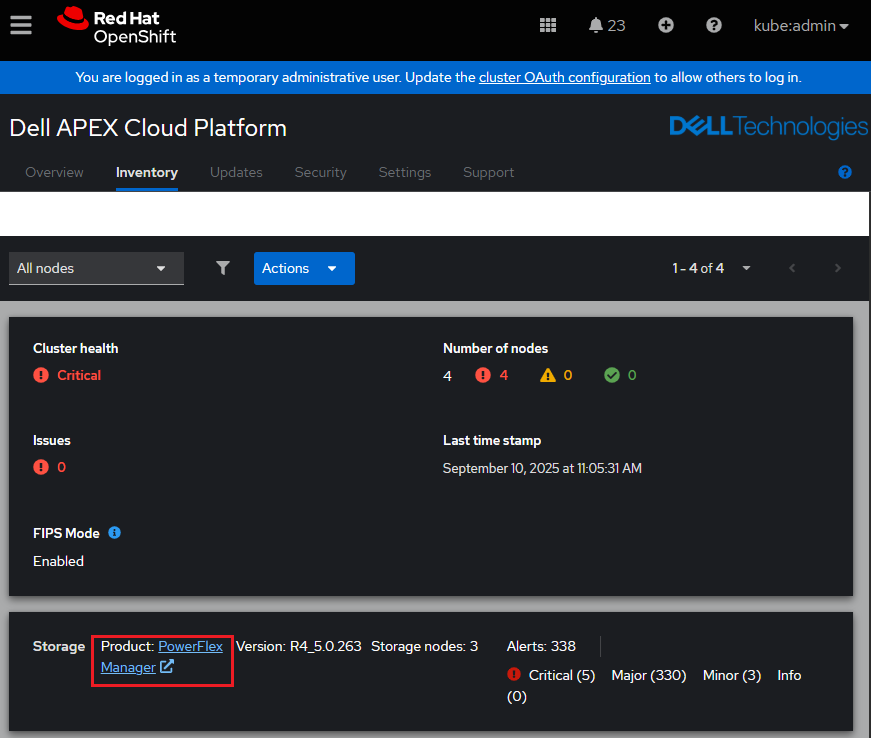
In the APEX Cloud Platform (ACP) for Red Hat OpenShift extension UI, the PowerFlex Manager link is not functioning as expected. Instead of directing users to the PowerFlex Manager UI, the link still opens the OCP cluster page.
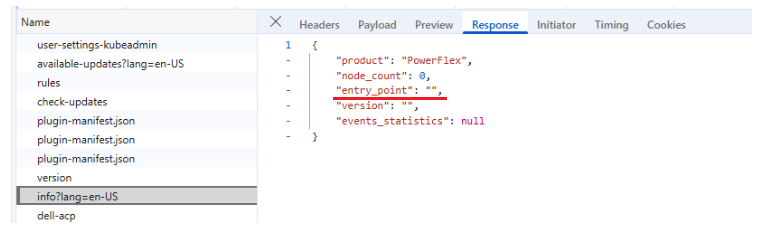
Open the browser inspect tool to review the network response, the entry_point shows an empty return instead of the PowerFlex Manager's IP address.
Cause
The ACP 'mcp-powerflex-operation' cannot connect to the PowerFlex Manager using the credential and certificate stored in the OCP secrets.
There are either network or firewall issues that block the connection, or the PowerFlex Manager's credential or certificate have been changed but they are not updated into the OCP secrets.
Resolution
1. Enter the ACP pod 'mcp-powerflex-operation-xxxxxxxxx' to verify the network connectivity is good from the ACP pod 'mcp-powerflex-operation' to the PowerFlex Manager.
For example:
##Get pod name
oc get pods -n dell-acp | grep mcp-powerflex-operation
mcp-powerflex-operation-596f4567d7-hvxtj                         2/2     Running   2              2d13h

##Enter the pod
oc exec -it mcp-powerflex-operation-596f4567d7-hvxtj -n dell-acp -- bash

##Inside the pod, test curl command using the correct PowerFlex Manager's username and password.
mcp-powerflex-operation-596f4567d7-hvxtj:/home/app>
mcp-powerflex-operation-596f4567d7-hvxtj:/home/app> curl -v -s -k -u "admin:<password>" https://<PowerFlex Manager IP>/api/login
*   Trying <PowerFlex Manager IP>:443...
* Connected to <PowerFlex Manager IP> port 443
... ...
... ...
... ...
< HTTP/2 200
< date: Tue, 16 Sep 2025 07:25:59 GMT
< content-type: application/json;charset=UTF-8
< content-length: 1459
< cache-control: no-cache
< permissions-policy: accelerometer=(), ambient-light-sensor=(), autoplay=(), battery=(), camera=(), cross-origin-isolated=(), display-capture=(), document-domain=(), encrypted-media=(), execution-while-not-rendered=*, execution-while-out-of-viewport=*, fullscreen=(), geolocation=(), gyroscope=(), keyboard-map=(), magnetometer=(), microphone=(), midi=(), navigation-override=*, payment=(), picture-in-picture=(), publickey-credentials-get=(), screen-wake-lock=(), sync-xhr=*, usb=(), web-share=(), xr-spatial-tracking=()
< content-security-policy: default-src 'self'; script-src 'self' 'unsafe-eval' 'sha256-wEjfu8jbv0QjgpzoBjFStdBGKLI4oBTlVy9H+Z55OLM=' 'sha256-2mvMk0Nvn96VqS1UEmAZSVSEkK0CkPNV60oBnurB4/c='; connect-src 'self'; img-src 'self'; style-src 'self' 'unsafe-inline';base-uri 'self';form-action 'self'; font-src 'self' data: fonts.gstatic.com
< x-content-security-policy: default-src 'self'; script-src 'self' 'unsafe-eval' 'sha256-wEjfu8jbv0QjgpzoBjFStdBGKLI4oBTlVy9H+Z55OLM=' 'sha256-2mvMk0Nvn96VqS1UEmAZSVSEkK0CkPNV60oBnurB4/c='; connect-src 'self'; img-src 'self'; style-src 'self' 'unsafe-inline';base-uri 'self';form-action 'self'; font-src 'self' data: fonts.gstatic.com
< x-webkit-csp: default-src 'self'; script-src 'self' 'unsafe-eval' 'sha256-wEjfu8jbv0QjgpzoBjFStdBGKLI4oBTlVy9H+Z55OLM=' 'sha256-2mvMk0Nvn96VqS1UEmAZSVSEkK0CkPNV60oBnurB4/c='; connect-src 'self'; img-src 'self'; style-src 'self' 'unsafe-inline';base-uri 'self';form-action 'self'; font-src 'self' data: fonts.gstatic.com
< pragma: no-cache
< expires: Thu, 01 Jan 1970 00:00:00 GMT
< cache-control: no-store
< x-id: 20ff0adcfd41365d
< strict-transport-security: max-age=15724800; includeSubDomains
< x-xss-protection: 1; mode=block
< x-frame-options: DENY
< x-content-type-options: nosniff
< vary: accept-encoding
<
"eyJhbGciOiJSUzI1NiIsInR5cCIgOiAiSldUIiwia2lkIiA6ICJmdXBCN1Z0SEVOdWVhSDk2WkNIcUU0eXF6VmFGZkc3SUd1UklVWlBDeF9RIn0.eyJleHAiOjE3NTgwMDg0NTksImlhdCI6MTc1ODAwNzU1OSwianRpIjoiNjc1YTZiODctMjZmZS00MDE5LTk1ZWItY2ZjZDE1MzRjNmFmIiwiaXNzIjoiaHR0cHM6Ly8xNzIuMzEuMTAwLjE3NC9hdXRoL3JlYWxtcy9wb3dlcmZsZXgiLCJhdWQiOlsiUG93ZXJmbGV4U2VydmljZXMiLCJhY2NvdW50Il0sInN1YiI6ImQwMTk1OWMzLTM4MjItNDcxYi1hNDc4LTZmYjJiZGNiZGZkZCIsInR5cCI6IkJlYXJlciIsImF6cCI6InBvd2VyZmxleFJlc3QiLCJzZXNzaW9uX3N0YXRlIjoiOGY5MDc2MGItZTQxNi00MzNiLTk1ODItMDhkN2Y1NTNlZDhkIiwiYWNyIjoiMSIsImFsbG93ZWQtb3JpZ2lucyI6WyIqIl0sInJlYWxtX2FjY2VzcyI6eyJyb2xlcyI6WyJTdXBlclVzZXIiXX0sInJlc291cmNlX2FjY2VzcyI6eyJhY2NvdW50Ijp7InJvbGVzIjpbIm1hbmFnZS1hY2NvdW50IiwibWFuYWdlLWFjY291bnQtbGlua3MiLCJ2aWV3LXByb2ZpbGUiXX19LCJzY29wZSI6Im9wZW5pZCBwcm9maWxlIGVtYWlsIiwic2lkIjoiOGY5MDc2MGItZTQxNi00MzNiLTk1ODItMDhkN2Y1NTNlZDhkIiwiZW1haWxfdmVyaWZpZWQiOnRydWUsInBvd2VyZmxleCI6eyJwZXJtaXNzaW9ucyI6eyJTdXBlclVzZXIiOlsiR0xCOkdMQiJdfX0sIm5hbWUiOiJhZG1pbiBhZG1pbiIsInByZWZlcnJlZF91c2VybmFtZSI6ImFkbWluIiwiZ2l* Connection #0 to host <PowerFlex Manager IP> left intact
If it fails to establish the connection, check if there are any firewall rules blocking the connection.
2. If the step1 curl command inside the ACP pod 'mcp-powerflex-operation-xxxxxxxxx' can successfully connect to the PowerFlex Manager, follow KB 000217834 to update the PowerFlex Manager credential and/or certificate in the OCP secrets.