Dell Unity: Cannot Add ESXi hosts to Host Groups
Summary: Adding autoregistered ESXi hosts to a General or ESXi host group type fails, resulting in the error: "Failed: One or more hosts does not match the host group type (Error Code: 0x900a810)." ...
This article applies to
This article does not apply to
This article is not tied to any specific product.
Not all product versions are identified in this article.
Symptoms
The autoregistered ESXi hosts are not visible and cannot be added to an ESXi type host group. This issue typically occurs after Fiber Channel (FC) zoning, when initiators autoregister with the Unity array.
If the host group type is changed to general, and auto registered ESXi hosts are being added to the host group, the following error occurs.
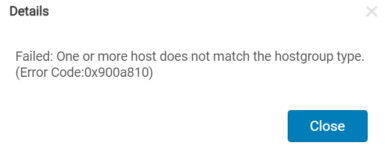
Cause
UnityOS 5.1 could not properly handle the "Type" parameter (General or ESXi) for the Create Host Group process.
Resolution
Fix:
This issue is fixed in UnityOS 5.2.0.0.5.173 and newer.
Workaround:
1. Through the host UI: Register vCenter server with Unity array and discover or add hosts under ACCESS > VMware> ESXi hosts.
2. Through user interface (No vCenter server/Auto registration from ESXi host): Auto registered ESXi hosts under ACCESS> Hosts must be deleted and manual ESXi host profiles must be created instead.
3. Through CLI (Existing hosts with Logical Unit Numbers (LUNs)): Use below command to create an ESXi host group.
This issue is fixed in UnityOS 5.2.0.0.5.173 and newer.
Workaround:
1. Through the host UI: Register vCenter server with Unity array and discover or add hosts under ACCESS > VMware> ESXi hosts.
2. Through user interface (No vCenter server/Auto registration from ESXi host): Auto registered ESXi hosts under ACCESS> Hosts must be deleted and manual ESXi host profiles must be created instead.
NOTE: In the Host Group creation wizard, Type must be selected as "ESXi."
3. Through CLI (Existing hosts with Logical Unit Numbers (LUNs)): Use below command to create an ESXi host group.
uemcli -d x.x.x.x -u admin -p xxxx /remote/hostgroup create -name xxxxx -type ESX -hosts xxxxx
NOTE: Hosts parameter accepts host identification numbers (Host IDs) and not host names (example: Host_7/8)
Affected Products
Dell EMC Unity, VMware ESXiArticle Properties
Article Number: 000198405
Article Type: Solution
Last Modified: 10 Oct 2025
Version: 6
Find answers to your questions from other Dell users
Support Services
Check if your device is covered by Support Services.