Vba: VBA/EBR에서 관리자 계정의 암호를 변경하는 방법
Summary: VBA/EBR에서 관리자 계정의 암호를 변경하는 방법 Vba: OS 암호를 재설정하는 방법
This article applies to
This article does not apply to
This article is not tied to any specific product.
Not all product versions are identified in this article.
Instructions
참고: VBA(VMware Backup Appliance)는 더 이상 VMware 보호에 사용되지 않습니다. 이제 NetWorker VMware Protection(NVP) vProxy가 VMware 보호에 사용됩니다. NetWorker 19.7.x부터는 더 이상 vProxy 어플라이언스를 사용하여 VBA 기반 VM 백업을 복구할 수 없습니다.
다음 지침에 따라 VBA의 OS 암호를 재설정합니다.
- VBA VM이 꺼져 있는지 확인합니다.
- 콘솔을 열고 부팅 로더가 로드되는 즉시 VBA 빈 콘솔에서 'Esc' 키를 누를 준비를 합니다.
- vCenter에서 VBA 어플라이언스 전원을 켭니다.
- 콘솔을 클릭하고 부팅 로더가 로드되는 즉시 'Esc' 키를 누릅니다. 경고 메시지가 표시되면 'Esc'를 다시 누르십시오.
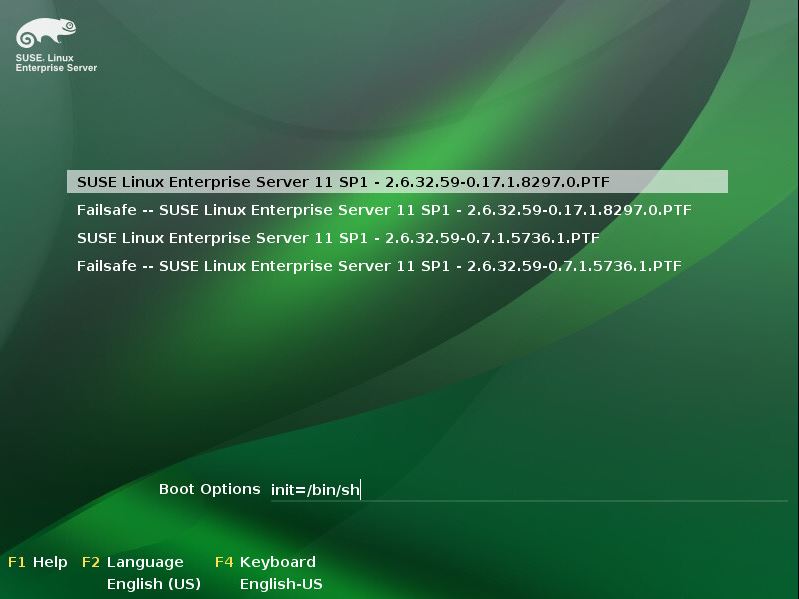
- 부팅 옵션 앞의 init=/bin/sh를 VBA 콘솔 하단으로 입력합니다(그림 1 참조).
- Return 키를 눌러 부팅 프로세스를 시작합니다.
- 부팅이 완료되면 VBA가 단일 사용자 모드로 기록됩니다.
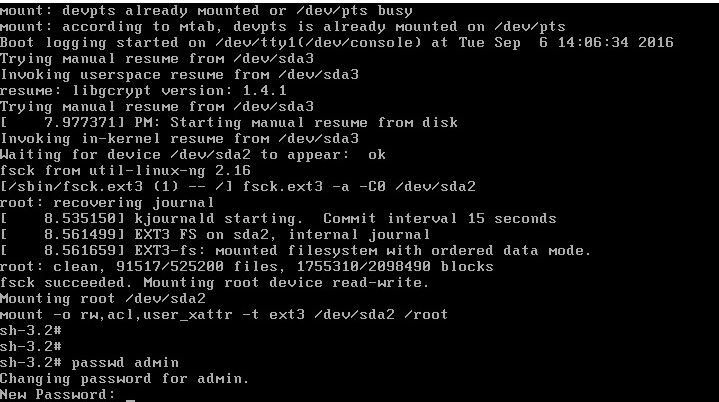
- 관리자 또는 루트 암호를 각각 재설정하려면 passwd admin 또는 passwd root 명령을 입력합니다(그림 2 참조).
- 암호가 확인되면 재부팅을 입력하고 Return 키를 눌러 VBA를 정상적으로 재시작합니다.
Additional Information
Affected Products
NetWorkerProducts
Avamar Virtual Edition, NetWorker, NetWorker SeriesArticle Properties
Article Number: 000022533
Article Type: How To
Last Modified: 29 Jul 2025
Version: 4
Find answers to your questions from other Dell users
Support Services
Check if your device is covered by Support Services.