Vba:如何變更 VBA/EBR 上管理員帳戶的密碼?
Summary: 如何變更 VBA/EBR 上管理員帳戶的密碼?Vba:如何重設作業系統密碼?
This article applies to
This article does not apply to
This article is not tied to any specific product.
Not all product versions are identified in this article.
Instructions
注意:VMware 備份應用裝置 (VBA) 已不再用於 VMware 保護。NetWorker VMware Protection (NVP) vProxy 現在用於 VMware 保護。從 NetWorker 19.7.x 開始,就無法再使用 vProxy 應用裝置復原 VBA 型 VM 備份。
請依照以下指示重設 VBA 的作業系統密碼:
- 確定 VBA VM 已關閉。
- 開啟主控台,並在裝入開機載入器後,立即在 VBA 擋片主控台上按下「Esc」鍵。
- 從 vCenter 開啟 VBA 裝置的電源。
- 一旦載入開機載入器,請按一下主控台並按下「Esc」鍵。如果您看到警告訊息,請再次按下「Esc」。
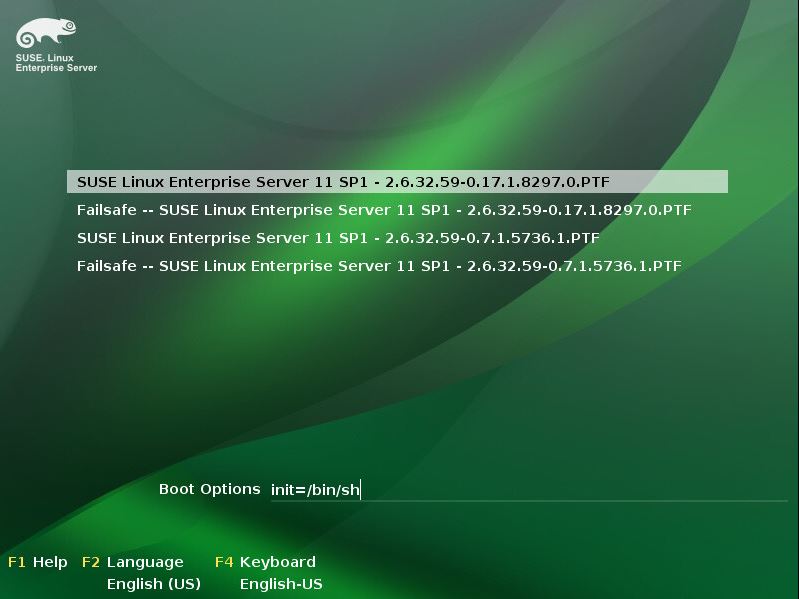
- 在 VBA 主控台底部的開機選項前輸入init=/bin/sh (請參閱圖 1)
- 按下[Return] (返回) 以啟動開機程式。
- 開機完成後,VBA 將會以單一使用者模式記錄。
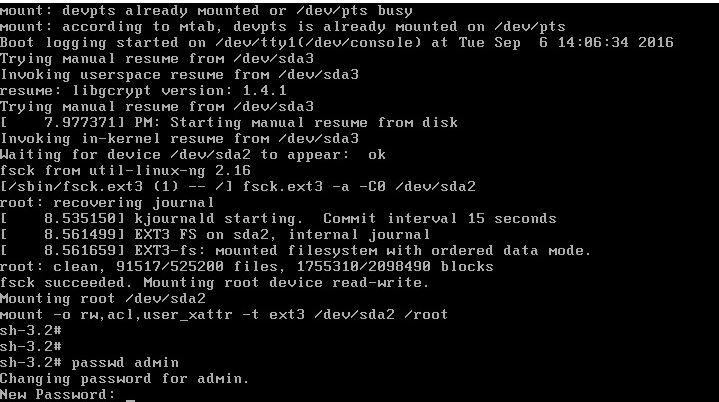
- 輸入命令passwd admin或passwd root以分別重設管理員或 root 密碼 (請參閱圖 2)
- 密碼確認後,輸入重新開機並按下「返回」以正常重新開機 VBA。
Additional Information
Affected Products
NetWorkerProducts
Avamar Virtual Edition, NetWorker, NetWorker SeriesArticle Properties
Article Number: 000022533
Article Type: How To
Last Modified: 29 Jul 2025
Version: 4
Find answers to your questions from other Dell users
Support Services
Check if your device is covered by Support Services.