VBA: Hoe wijzig ik het wachtwoord voor het beheerdersaccount op VBA/EBR?
Summary: Hoe wijzig ik het wachtwoord voor het beheerdersaccount op VBA/EBR? VBA: Het wachtwoord van het besturingssysteem opnieuw instellen
This article applies to
This article does not apply to
This article is not tied to any specific product.
Not all product versions are identified in this article.
Instructions
OPMERKING: De VMware Backup Appliance (VBA) wordt niet langer gebruikt voor VMware-bescherming. De NetWorker VMware Protection (NVP) vProxy wordt nu gebruikt voor VMware-bescherming. Vanaf NetWorker 19.7.x is het niet meer mogelijk om op VBA gebaseerde VM-back-ups te herstellen met behulp van het vProxy apparaat.
Volg de onderstaande instructies om het os-wachtwoord voor VBA opnieuw in te stellen:
- Zorg ervoor dat de VBA-VM is uitgeschakeld.
- Open de console en druk op de esc-toets op de lege VBA-console zodra de opstartlader is geladen.
- Schakel het VBA-apparaat in via vCenter.
- Klik op de console en druk op de esc-toets zodra de bootloader is geladen. Als u een waarschuwingsbericht ziet, drukt u nogmaals op 'Esc'.
- Typ init=/bin/sh voor de opstartopties naar de onderkant van de VBA-console (zie afbeelding 1)
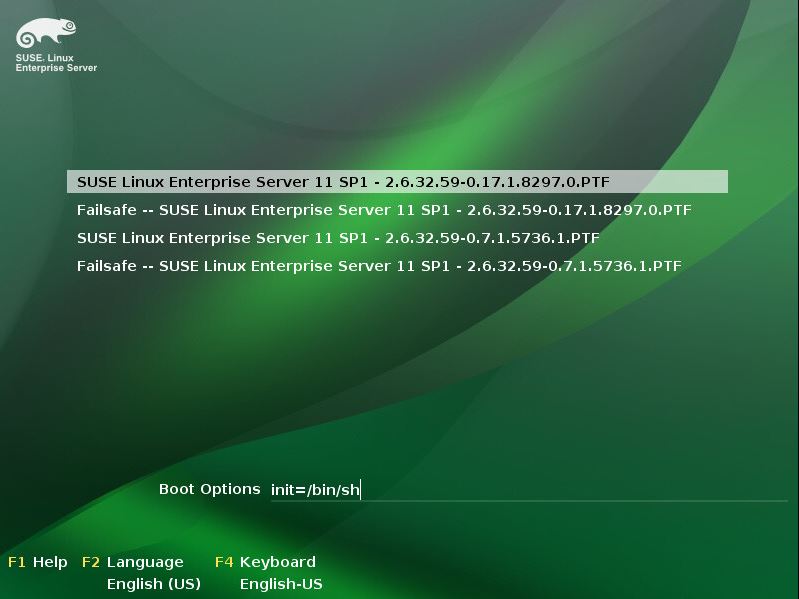
- Druk op Return om het opstartproces te starten.
- Zodra het opstarten is voltooid, wordt de VBA vastgelegd in een modus voor één gebruiker.
- Voer de opdracht passwd admin of passwd root in om respectievelijk het admin- of rootwachtwoord opnieuw in te stellen (zie afbeelding 2)
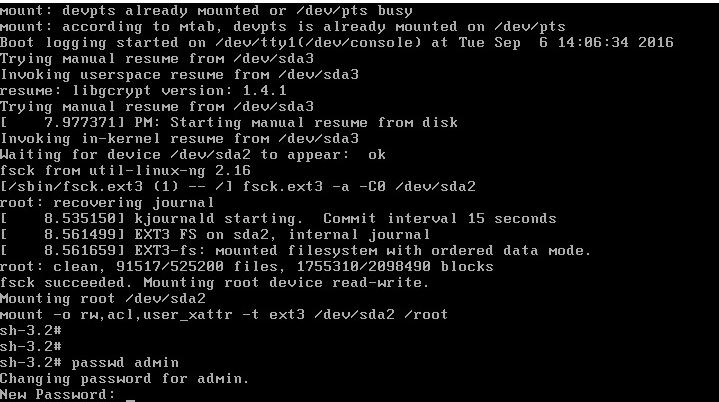
- Zodra het wachtwoord is bevestigd, typt u opnieuw opstarten en drukt u op Return om de VBA normaal opnieuw op te starten.
Additional Information
Affected Products
NetWorkerProducts
Avamar Virtual Edition, NetWorker, NetWorker SeriesArticle Properties
Article Number: 000022533
Article Type: How To
Last Modified: 29 Jul 2025
Version: 4
Find answers to your questions from other Dell users
Support Services
Check if your device is covered by Support Services.