Microsoft Application Agent용 SSMS 플러그인을 설치하지 못함
Summary: Microsoft Application Agent용 SSMS 플러그인이 설치되지 않습니다.
This article applies to
This article does not apply to
This article is not tied to any specific product.
Not all product versions are identified in this article.
Symptoms
Microsoft Application Agent 설치 중에 설치 시 다음 오류가 보고됩니다.
응용 프로그램 이벤트 로그에서 다음 오류도 보고합니다.
이 오류가 발생해도 애플리케이션 에이전트가 제대로 실행되는 것은 아닙니다.
"There is a problem with this Windows Installer Package. A program run as part of the setup did not finish as expected. Contact your support personnel or package vendor."
Product: Microsoft Application Agent -- Error 1722. There is a problem with this Windows Installer package. A program run as part of the setup did not finish as expected. Contact your support personnel or package vendor. Action AddinReg, location: C:\Program Files\DPSAPPS\MSAPPAGENT\bin\, command: "C:\Windows\Microsoft.NET\Framework\v4.0.30319\RegAsm.exe" /codebase /tlb "C:\Program Files\DPSAPPS\MSAPPAGENT\bin\DDSSMSAddin.dll"
- 백업은 애플리케이션 에이전트에서 실행할 수 있습니다.
- TSQ 및 명령줄 스크립트가 애플리케이션 에이전트에서 올바르게 생성됩니다.
- 애플리케이션 에이전트에서 복사된 TSQ 스크립트는 SSMS에서 정상적으로 실행됩니다.
Cause
근본 원인을 조사 중입니다.
Resolution
명령줄에서 수동으로 플러그인을 설치할 수 있습니다. 플러그인이 제대로 설치되도록 하려면 이 명령을 실행할 때 SSMS가 이 호스트에서 실행되고 있지 않은지 확인합니다.
- 시작을 클릭하고 cmd를 입력합니다.
- 명령 프롬프트 프로그램 개체를 마우스 오른쪽 단추로 클릭하고 자세히를 선택한 다음 관리자 권한으로 실행을 클릭합니다.
- VSIX 실행 파일이 있는 디렉터리 경로로 이동합니다.
- 예: C:\Program Files (x86)\Microsoft Visual Studio 14.0\Common7\IDE
- 이 경로는 호스트 시스템에 따라 약간 다를 수 있습니다.
- 다음 예제 명령을 사용하여 현재 VSIX를 제거합니다.
- vsixinstaller /a /uninstall:89089cd1-c652-42b2-8fd1-209e9ade1a2c
- 이 예제 명령을 사용하여 VSIX를 다시 설치합니다. 이는 호스트 시스템에 따라 다를 수 있습니다.
- vsixinstaller /a "C:\Program Files\DPSAPPS\MSAPPAGENT\bin\plugin\NWSSMSVSIXPackage.vsix"
- 메모: DDBMA가 기본 위치에 설치되어 있지 않은 경우 이 경로를 변경해야 합니다.
참고: 명령이 즉시 실행되지만 몇 분 정도 지연될 수 있습니다. 잠시 후 화면에 다음 상자가 나타납니다.
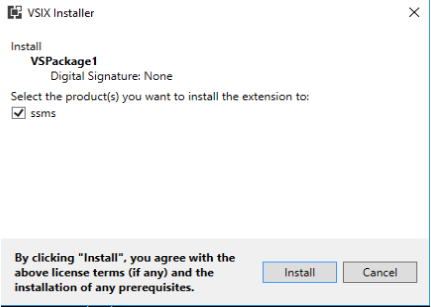
- 설치를 클릭합니다.

- SSMS를 시작하여 플러그인이 SSMS에 설치되어 있는지 확인합니다.

Affected Products
Data Backup & Protection SoftwareArticle Properties
Article Number: 000193124
Article Type: Solution
Last Modified: 31 Mar 2022
Version: 1
Find answers to your questions from other Dell users
Support Services
Check if your device is covered by Support Services.