ScaleIO: ESXi Minimum Requirements
Summary: ESXi minimum requirements for ScaleIO
Instructions
Question
What are the ESXi minimum requirements for ScaleIO deployments?
Facts
EMC ScaleIO is a software-only server-based storage area network (SAN) that converges storage and compute resources to form a single-layer, enterprise-grade storage product. ScaleIO storage is elastic and delivers linearly scalable performance. Its scale-out server SAN architecture can grow from a few to thousands of servers.
For supported EMC ScaleIO versions with ESXi releases, see the VMware Compatibility Guide.
Note: This ScaleIO 1.31 and 1.32 solution is only supported on ESXi 5.5 GA. The solution is not supported on any installations or upgrades to any other versions of ESXi.
Answer
These are the minimum system requirements for a ScaleIO 1.31 and 1.32 implementation:
- Three ESXi servers with 100 GB of free capacity per server
- Operating system: ESXi 5.5 GA
- 1 Gbps network
- Four 7,200 rpm SATA disks per node
The ScaleIO virtual SAN consists of a dedicated ScaleIO Virtual Machine (SVM) and three software components:
-
ScaleIO Virtual Machine (SVM): The SVM is a Linux-based virtual machine dedicated to ScaleIO and is used to host the different ScaleIO software components described here.
-
Meta Data Manager (MDM): Configures and monitors the ScaleIO system. The MDM can be configured in redundant Cluster Mode with three members on three servers (Primary MDM, Secondary MDM and a Tie-Breaker) or in Single Mode on a single server. The MDM is installed on the SVM.
-
ScaleIO Data Server (SDS): Manages the capacity of a single server and acts as a back-end for data access. The SDS is installed on all servers contributing storage devices to the ScaleIO system. These devices are accessed using SDS. The SDS is installed on the SVM.
-
ScaleIO Data Client (SDC): A lightweight device driver exposes ScaleIO volumes as block devices to the application located on the same server on which the SDC is installed. The SDC creates a logical adapter, which is an ESXi kernel construct. The logical adapter informs the ESXi about the arrival and disappearance of SCSI devices. These LUNs can be formatted with VMFS and then exposed using the ESXi host to the virtual machine or can be used as RDM devices. Figure 1 depicts the former while the latter could be depicted with the same figure without the VMFS layer.
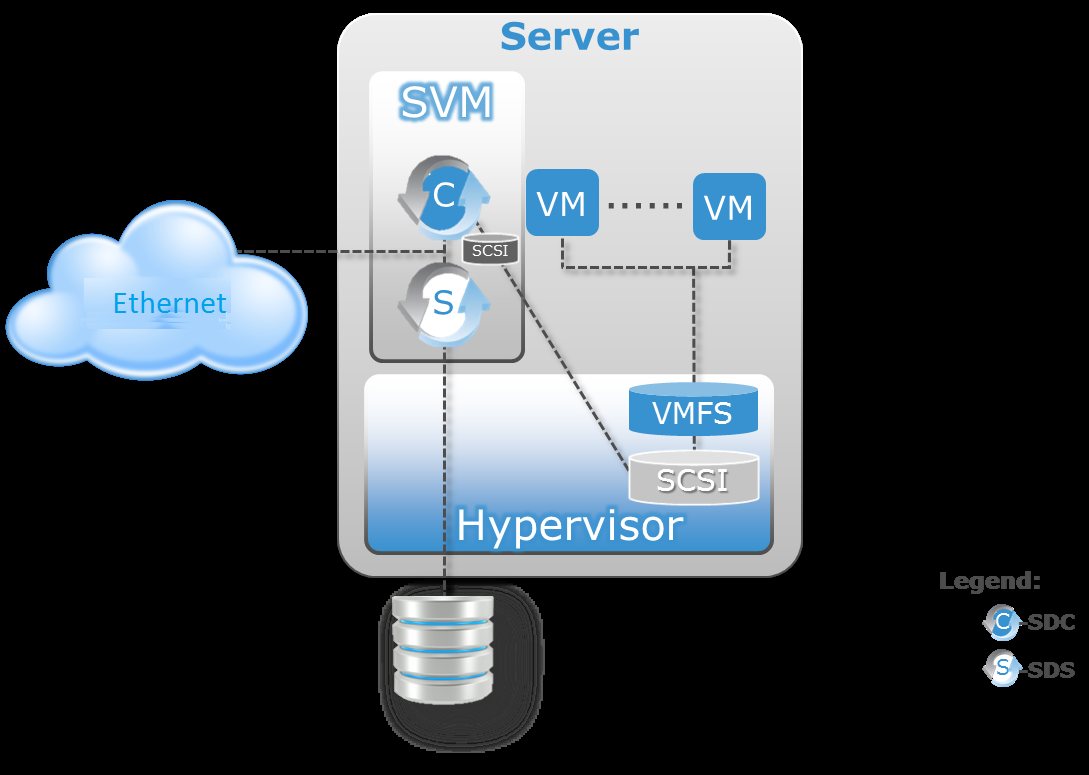
Figure above depicts ScaleIO implementation in ESXi with SDC in VMkernel.
Recommendations and limitationsThese recommendations must be taken into account when deploying a ScaleIO system:
-
When disks are connected to a RAID controller, each disk must be configured as a standalone RAID-0.
-
For better performance:
-
If cache is available on the RAID controller, it is recommended to configure it as READ cache.
-
If the cache is non-volatile, it is recommended to configure it as Write-Back cache.
-
-
The physical media must be exposed to the SVM through RDM.
-
For better performance and faster storage rebuild, use a 10 Gbps Ethernet network.