PowerStore:当存储网络扩展到 50(或更多)时,PowerStoreOS 升级可能会失败,并显示“未初始化”端口
Summary: 当存储网络扩展到大量 NVMe/TCP 端口(例如,大于 50)时,如果启用了自动发现 CDC 选项,所有 NVMe/TCP 端口上的 CDC 连接状态可能会显示为未初始化,后续 PowerStoreOS 升级可能会失败。
This article applies to
This article does not apply to
This article is not tied to any specific product.
Not all product versions are identified in this article.
Symptoms
示例:
当 NVMe/TCP 端口的数量大于 50 时,受影响 PowerStore 群集中所有 NVMe/TCP 端口上的 CDC 连接状态显示为“未初始化”。
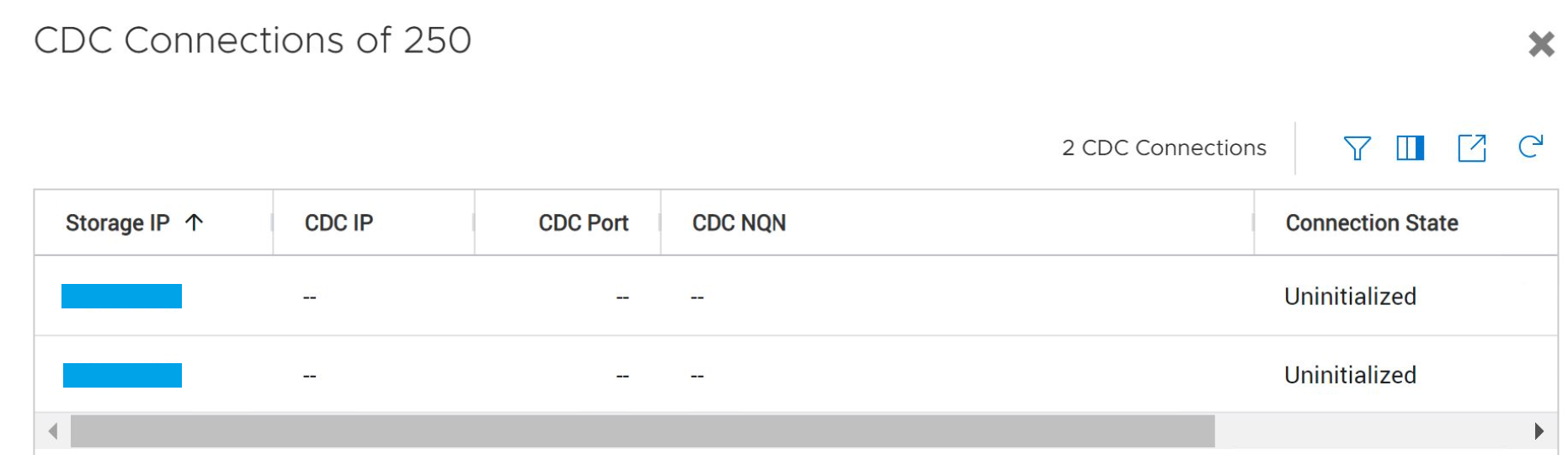
当 NVMe/TCP 端口的数量大于 50 时,受影响 PowerStore 群集中所有 NVMe/TCP 端口上的 CDC 连接状态显示为“未初始化”。
Cause
当存储网络扩展到大量 NVMe/TCP 端口(例如,大于 50)并且启用了自动发现 CDC 选项时,PowerStoreOS 升级过程可能会导致资源耗尽,从而可能导致后续升级失败。
Resolution
解决方法
升级到 PowerStoreOS 版本 3.2 或更高版本,其中包括此问题的修复(用于后续升级)。解决方法
在升级到 PowerStoreOS 版本 3.2 期间,请执行以下步骤以避免此问题:- 在升级开始之前,请禁用“自动发现 CDC”选项。选择以下两种方法之一:
- PowerStore Manager 用户界面 (UI):设置>存储>网络 IP


- PSTCLI:
network -id XXXX set -nvme_discovery_mode Auto_Discovery_Disabled
or
network -name XXXX set -nvme_discovery_mode Auto_Discovery_Disabled
- PowerStore Manager 用户界面 (UI):设置>存储>网络 IP
- 升级后,使用 UI 或 PSTCLI 重新启用 自动发现 CDC 选项(有关选项,请参阅 pstcli 网络集 -h )。
提醒:此步骤是可选的。仅当计划在升级到 PowerStoreOS 版本 3.2 后使用自动发现 CDC 选项时,才遵循此步骤。
Additional Information
禁用 自动查找 将禁用 mDNS。如果存在,将不会尝试向 CDC 注册。对于符合 NVMe-oF 1.1 的环境,这是一种兼容模式。
Affected Products
PowerStoreArticle Properties
Article Number: 000204710
Article Type: Solution
Last Modified: 13 Jun 2025
Version: 6
Find answers to your questions from other Dell users
Support Services
Check if your device is covered by Support Services.