Data Domain:System Manager 单击“BROWSE”不会显示文件资源管理器
Summary: 尝试使用 Data Domain System Manager UI 上传 RPM 文件时,单击“BROWSE”不执行任何操作。 预期的响应是显示文件资源管理器,从而允许选择和上传升级文件。 这种情况更是一种细微差别。
This article applies to
This article does not apply to
This article is not tied to any specific product.
Not all product versions are identified in this article.
Instructions
某些网络浏览器在尝试上传文件(按 BROWSE)时稍有特别。
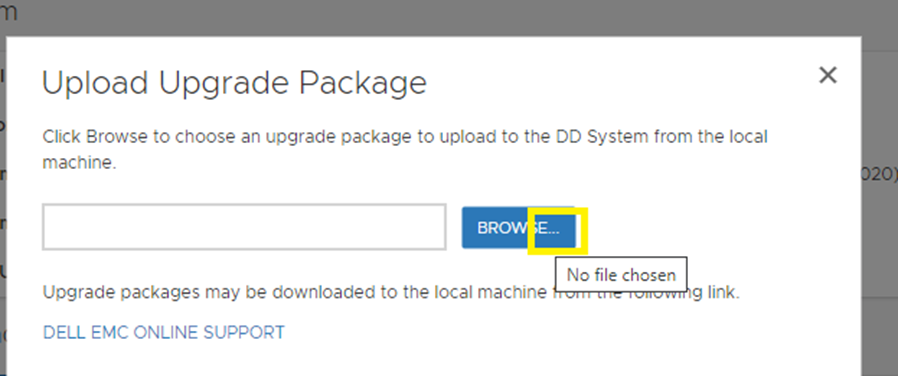
DD System Manager -> Maintenance -> System -> Upload Upgrade Package:
在编写本知识库文章时,观察到以下内容:
在测试期间,下面是以下版本:
DD System Manager -> Maintenance -> System -> Upload Upgrade Package:
在编写本知识库文章时,观察到以下内容:
- 在Chrome中,单击“BROWSE”(浏览)任何位置似乎会显示Windows资源管理器。
- 在 Firefox 中,单击“BROWSE”时,除左上角以外的任何位置都会显示 Windows 资源管理器。
- 在 Microsoft Edge 中,单击“BROWSE”,单击一次,并显示“未选择文件”。将鼠标悬停在“BROWSE”的右侧
在测试期间,下面是以下版本:
- DD2500 v6.1.2
- 台式机:Windows 11
- Firefox 115.1.0esr
- Chrome 116.0.5845.96
- 边缘 115.0.1901
Affected Products
Data Domain, DD OS 6.2, DD OS 7.0Article Properties
Article Number: 000216848
Article Type: How To
Last Modified: 09 Jan 2024
Version: 3
Find answers to your questions from other Dell users
Support Services
Check if your device is covered by Support Services.