AD user can connect NetWorker, but the NMC tabs are blank. Other AD users in the same AD group can see NetWorker without issue.
Summary: Microsoft Active Directory (AD) is integrated with the NetWorker server as an external authority resource. AD groups are defined in the NetWorker Management Console (NMC) Roles, and NetWorker server User Groups. One or more AD users can log in to the NMC; however, the NetWorker server tabs are blank. Other AD users in the same AD group can access the NetWorker server and no issue is observed. The AD users observing this issue are missing values from the AD memberOf attribute. ...
Symptoms
The NetWorker authentication server can see the AD user's groups:
authc_mgmt -u administrator -p 'NetWorker_Administrator_Password' -e query-ldap-groups-for-user -D query-tenant="Tenant_Name" -D query-domain="Domain_Name" -D user-name="AD_UserName"
Example:
nve:~ # authc_mgmt -u Administrator -p '!Password1' -e query-ldap-groups-for-user -D query-tenant=default -D query-domain=networker.lan -D user-name=bkupadmin
The query returns 1 records.
Group Name       Full Dn Name
NetWorker_Admins CN=NetWorker_Admins,OU=DELL,dc=networker,dc=lan
The AD group that the user belongs to is defined in the NMC roles:

The AD group that the user belongs to is defined in one or more of the NetWorker server User Groups:

- AD user is unable to log in to the NetWorker Management Console. An error may appear stating that the user does not have permissions to use the NMC.
- The AD user can log in to the NMC; however, after connecting to the NetWorker server, the NMC tabs are empty and show no data.
Other AD users in the same AD group can log in to the NMC and use the NetWorker server without issue.
Cause
The AD user belongs to the AD group; however, the AD user attribute memberOf is empty.
The following PowerShell command can be run on the AD server:
Get-ADUser -Identity "AD_UserName" -Properties MemberOf
Example:
PS C:\Scripts> Get-ADUser -Identity backupadmin -Properties MemberOf


DistinguishedName : CN=Backup Admin,CN=Users,DC=networker,DC=lan
Enabled           : True
GivenName         : Backup
MemberOf          : {}
Name              : Backup Administrator
ObjectClass       : user
ObjectGUID        : c3bdc763-1aed-40c9-84c1-3b50eeac6cb3
SamAccountName    : backupadmin
SID               : S-1-5-21-3856219763-2317145986-2559447504-1122
Surname           : Administrator
UserPrincipalName : backupadmin@networker.lan
This issue is occurring outside of NetWorker. It is not clear how the AD user was added to the AD group without the "memberOf" attribute set. This must be investigated by the domain administrator.
NetWorker external authority uses the memberOf attribute to correlate the AD user/group membership. Without this, NetWorker is unable to correctly determine which AD groups the user belongs to.
Resolution
The domain administrator must correct the MemberOf attribute for the AD user in Active Directory.
Removing the AD user from the AD group and readding the user back to the group may correct the issue.
If further assistance is required, engage with Microsoft Support.
Once the AD user shows the correct memberOf settings in Active Directory, the AD user can access the NMC and see NetWorker resources. The resources visible to the AD user are dependent on the NetWorker User Group the AD group/user is defined in.
Workaround:
Define the AD user Distinguished Name (DN) in the NMC roles and NetWorker User Groups. For example: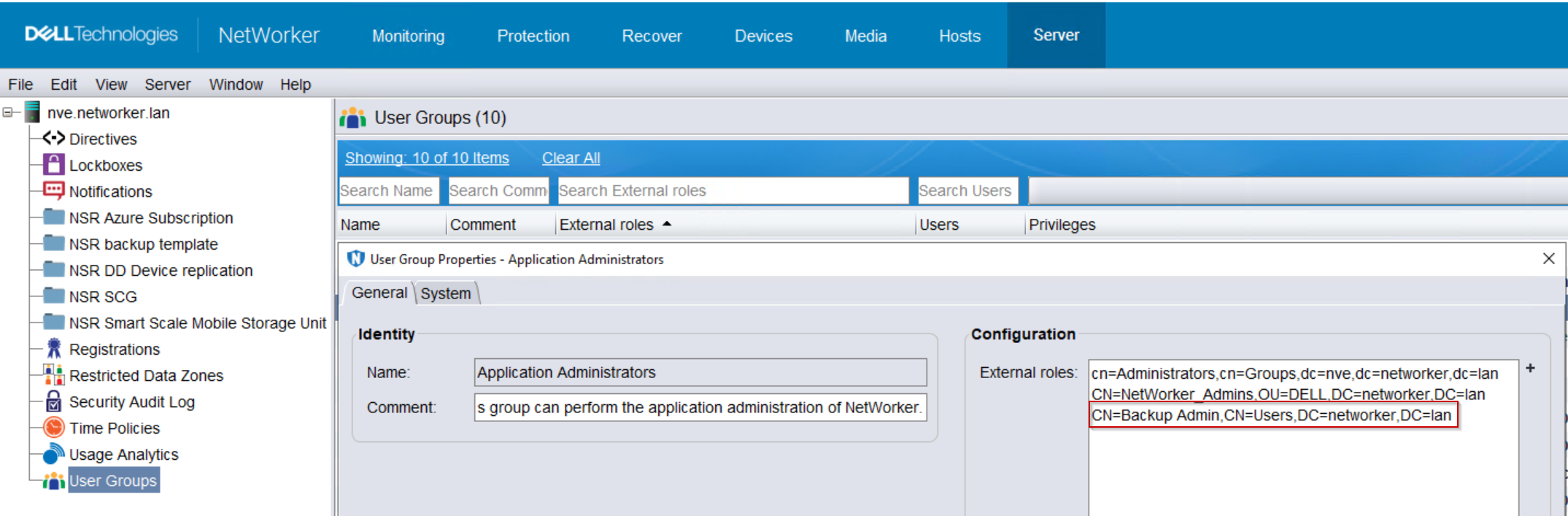
This will allow the AD user to access and use NetWorker until their memberOf attribute is corrected. Once the memberOf attribute is corrected, the User DN can be removed from the external roles field.
Additional Information
The following authc commands can be used to further review the external authority resource.
1. Get the external authority config-id number of the external authority resource:
authc_config -u Administrator -p 'NetWorker_Administrator_Password' -e find-all-configs
2. Display the configuration details:
authc_config -u Administrator -p 'NetWorker_Administrator_Password' -e find-config -D config-id=Config_ID#
authc_config -u Administrator -p 'NetWorker_Administrator_Password' -e find-tenant -D tenant-id=Tenant_ID#Using both the domain and tenant name values from the authc_mgmt command from the Symptoms field.