Windows Credential Manager 停止運作並出現錯誤代碼 0x80070003
Summary: 安裝 Dell Encryption Enterprise 原則型加密和 SDE 後,Windows Credential Manager 會停止運作並出現錯誤代碼 0x80070003。系統找不到指定的路徑。
This article applies to
This article does not apply to
This article is not tied to any specific product.
Not all product versions are identified in this article.
Symptoms
受影響的產品:
- Dell Encryption Enterprise
受影響的版本:
- v8.15 - 8.17
在已安裝 Dell Encryption Enterprise 原則型加密和 SDE 的電腦上,Windows Credentials Manager 會停止運作並出現以下錯誤訊息:
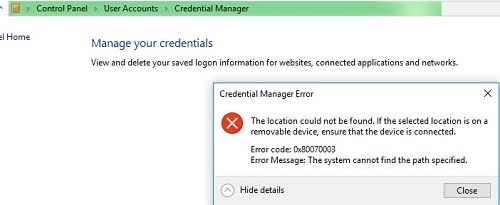
圖 1:(僅限英文) Credential Manager 錯誤
在移除 Dell Encryption Enterprise 原則式加密並將電腦解密之後,問題便會消失。
重現問題時,可在 Process Monitor 記錄中看到已連線使用者的檔案 policy.vpol 找不到路徑:

圖 2:(僅限英文) 找不到 Policy.vpol 路徑
注意:Process Monitor 是一個 Windows
Sysinternals 工具。
在 C:\ProgramData\Dell\Dell Data Protection\Encryption 的 CMGShiled.log 中,可能會看到相同 Policy.vpol 檔案的錯誤 0xC000003A:
[04.10.18 11:35:16:671 CredUMES.cpp:13281 H] CmgFFE CFDE: Queue CefDb update retry for path="\Device\HarddiskVolume3\Users\ddpusr2\AppData\Local\Microsoft\Vault\4BF4C442-9B8A-41A0-B380-DD4A704DDB28\Policy.vpol", status=0xC000003A
Cause
不適用
Resolution
若要修正此問題,請執行下列步驟:
- 連線至 Dell Security Management Server。
- 前往 填入 ->Enterprise ->原則式加密 ->SDE 加密規則。
- 捲動至清單的結尾,並在下方新增排除項目,然後按一下儲存:
-^%ENV:USERPROFILE%\AppData\Local\Microsoft\Vault
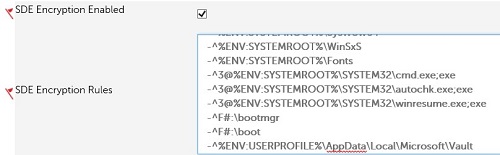
圖 3:(僅限英文) SDE 排除項目
- 前往 管理 ->認可 ,然後按一下 認可原則 以認可原則變更。
如要聯絡支援部門,請參閱 Dell Data Security 國際支援電話號碼。
請前往 TechDirect,以線上產生技術支援要求。
如需更多深入見解與資源,請加入 Dell 安全性社群論壇。
Affected Products
Dell EncryptionArticle Properties
Article Number: 000130912
Article Type: Solution
Last Modified: 19 Apr 2026
Version: 10
Find answers to your questions from other Dell users
Support Services
Check if your device is covered by Support Services.