Unisphere for PowerMax:无法在 Unisphere 360 中添加 Unisphere for PowerMax 实例
Summary:
由于证书错误,无法使用 FQDN 在 Unisphere 360 中添加 Unisphere for PowerMax 实例。仅 Unisphere 360 中的 IP 注册成功,但无法通过 FQDN 注册。收到的错误消息包括:“未知的 TLS 错误”和“与 Unisphere 的通信 https://:8443 failed due to
certificate error”
...
This article applies to
This article does not apply to
This article is not tied to any specific product.
Not all product versions are identified in this article.
Instructions
以下是尝试通过 FQDN 注册时的错误消息屏幕截图:

以下是可以遵循的解决方法和观察结果:
通过下面的 openssl 命令输出列出证书内容:openssl s_client -connect <fqdn>:8443 -showcerts
对证书进行解码,并观察 SAN 条目是否列出了 IP 地址(与相关的 FQDN 对应)、主 DNS 和辅助 DNS。
接下来,使用以下知识库文章重新创建 CSR 证书,然后在 Unisphere 360 中注册 Unisphere 实例:嵌入式 Unisphere for PowerMax 9.x:将默认证书替换为 CA 签名证书
提醒:如果使用 Unisphere for PowerMax 9.2 版本,则删除证书的选项将被禁用,因此我们可以忽略该步骤并重新创建 CSR 证书而不删除它。
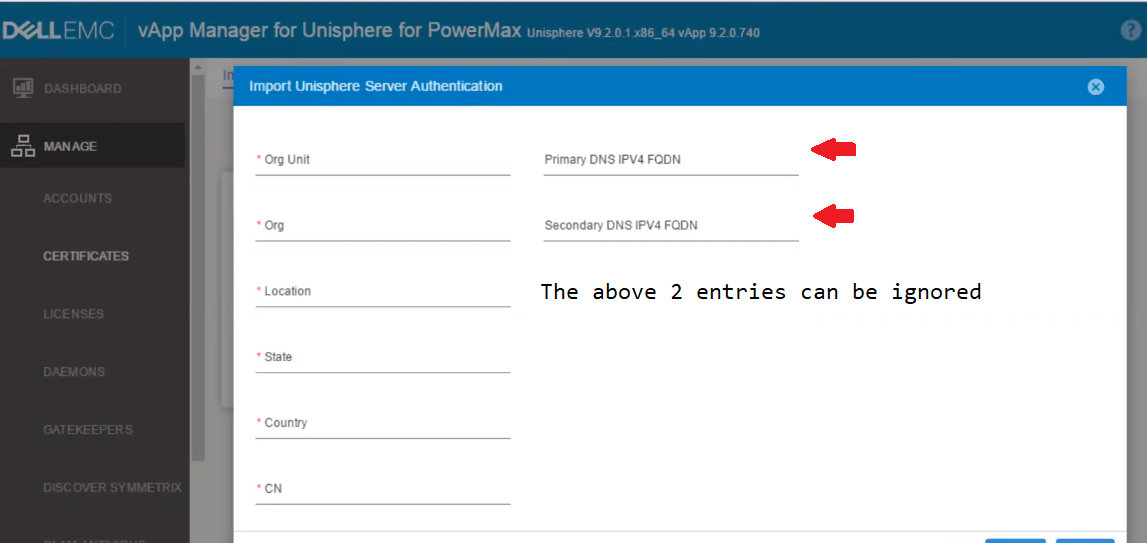
提醒:通过 vApp UI 重新创建 CSR 证书时,如果在之前的 openssl show cert 命令输出的解码内容中观察到主 DNS IPV4 FQDN 和次要 DNS IPV4 FQDN 的条目,则忽略它们列在 SAN 条目上。
Affected Products
Unisphere 360, Unisphere for PowerMaxArticle Properties
Article Number: 000181081
Article Type: How To
Last Modified: 29 Jan 2025
Version: 4
Find answers to your questions from other Dell users
Support Services
Check if your device is covered by Support Services.