Dell 管理伺服器虛擬核心伺服器不存在通知
Summary: 在部署或升級 Dell Management Server Virtual 至 v11.4 並啟用電子郵件通知時,電子郵件通知的收件者每小時都會收到錯誤通知。
This article applies to
This article does not apply to
This article is not tied to any specific product.
Not all product versions are identified in this article.
Symptoms
受影響的產品:
- Dell 管理伺服器虛擬
受影響的版本:
- v11.4
受影響的作業系統:
- Linux
收到的電子郵件範例:
Automatically generated alert from Dell Security Management Server Virtual – Service: Dell Core Server - HTTP / Event: Does not exist
Action: restart
Host: Server Hostname
Description: process is not running
Service: Dell Core Server - HTTP
Event: Does not exist
Cause
檢查 Dell Management Server Virtual 元件狀態的服務無法偵測到核心伺服器是否在聆聽,因為 netstat 網路工具套件的一部分並未安裝。
Resolution
- 登入 Dell 管理伺服器虛擬管理主控台。
注意:
- Dell Security Management Server Virtual 的預設登入資料為:
- 使用者名稱:
delluser - 密碼:
delluser
- 使用者名稱:
- 系統管理員可以變更在產品的虛擬裝置選單中的預設密碼。
- 從主功能表中,選取 「Launch Shell 」,然後按 下 Enter鍵。
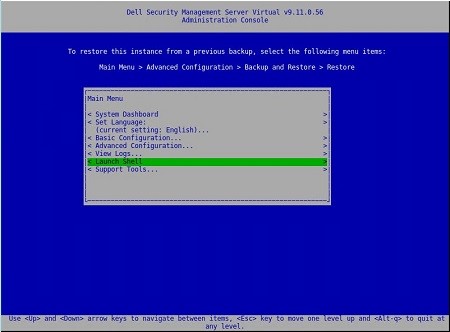
圖 1:(僅限英文版) 啟動 Shell
- 使用命令將使用者變更為
dellsupportsu dellsupport

圖 2:(僅限英文)執行命令 su dellsupport
注意:
- Dell Security Management Server Virtual 的預設登入資料為:
- 使用者名稱:
dellsupport - 密碼:
dellsupport
- 使用者名稱:
- 系統管理員可以變更在產品的虛擬裝置選單中的預設密碼。
- 確認
dellsupport使用者的密碼。

圖 3:(僅限英文)確認密碼
- 使用命令
netstat --version檢查狀態netstat。 - 如果
netstat未安裝,您會看到下列錯誤。

圖 4:(僅限英文)未 netstat 安裝錯誤
- 執行下列命令
sudo apt install net-tools以安裝 Net Tools。 - 再次執行
netstat --version以確認是否netstat已安裝。

圖 5:(僅限英文)運行 netstat --version
- 輸入
exit並按下 Enter 鍵以登出dellsupport。

圖 6:(僅限英文版) 類型 exit
- 輸入
exit並按 下 Enter 鍵,以登出 Shell 至主功能表。

圖 7:(僅限英文版) 類型 exit
Affected Products
Dell EncryptionArticle Properties
Article Number: 000202891
Article Type: Solution
Last Modified: 02 Aug 2023
Version: 2
Find answers to your questions from other Dell users
Support Services
Check if your device is covered by Support Services.