Dell Unity: How to check Drive End of Life (EOL) (User Correctable)
Summary: How to check Drive End Of Life (EOL) on Dell Unity arrays.
Instructions
Method 1: Unisphere
Step 1 - Choose the required Pool and select the Edit/View button:

Step 2 - Select "Drives" section on the Pool Properties:
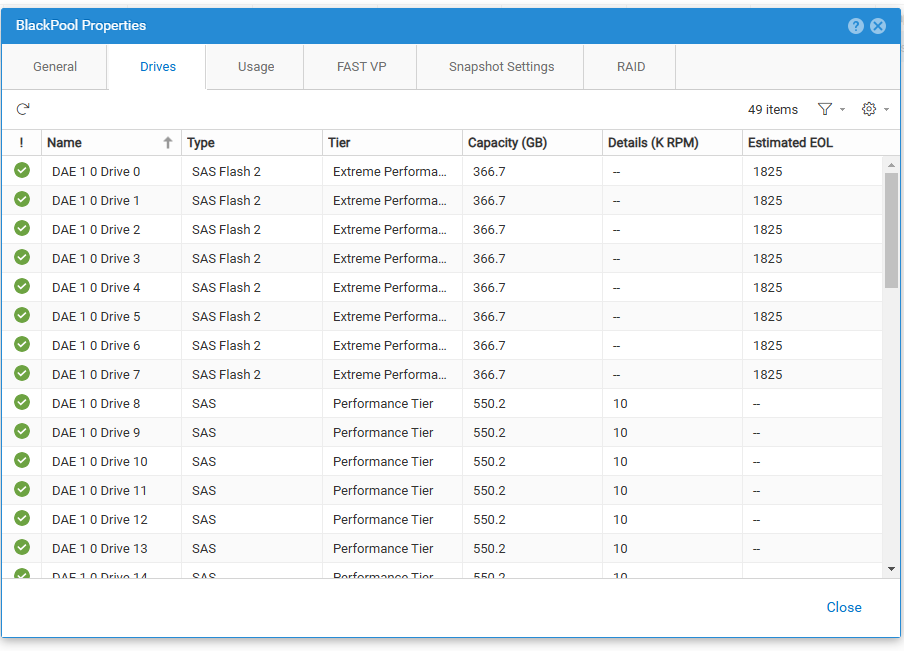
Step 3 - Refer to Column: Estimated EOL to find the number of days remaining for the drives to reach EOL status.
In case it is not possible to find the respective column, select the settings button on the upper right corner -> Columns -> Check column Estimated EOL.
NOTE: The solution may be available based on the Type of Drives and OE Code. In case it is not possible to find the information after applying the steps, schedule an upgrade to a supported Operating Environment version.
Method 2: Uemcli
Use the following command to find the Estimated End Of Life:
uemcli /env/disk -id <disk_id> show -detailLook for the entry Days remaining to EOL.
Example:
16:20:25 service@UnityXT380-R21 spb:~/user# uemcli /env/disk -id dpe_disk_2 show -detail
Storage system address: 127.0.0.1
Storage system port: 443
HTTPS connection

1:    ID                    = dpe_disk_2
      Enclosure             = dpe
      Slot                  = 2
      Bank slot             =
      Name                  = DPE Drive 2
      Health state          = OK (5)
      Health details        = "The component is operating normally. No action is required."
      Type                  = SAS Flash 3
      Tier                  = Extreme Performance
      Capacity              = 1575700986880 (1.4T)
      Rotational speed      = 0 rpm
      User capacity         = 1460880866304 (1.3T)
      Used by FAST Cache    = no
      Pool ID               = Unconfigured
      Pool                  = Unconfigured
      Current speed         = 12 Gbps
      Maximum speed         = 12 Gbps
      Manufacturer          = SAMSUNG
      Model                 = PA45S1T6 EMC1600
      Vendor capacity       = 1.6T
      Part number           = 005053685
      Serial number         = ZSNC0W502388
      Firmware revision     = EWA5
      WWN                   = 06:00:00:00:05:00:00:00:03:00:00:00:00:00:00:03
      Days remaining to EOL = 1825
If there is any doubt on what disk ID to use, the following command can be used to find out all of them:
uemcli /env/disk show