Avamar: GoAV Product Tool for Management and Troubleshooting
Summary: GoAV is a tool written for Avamar in the programming language, "Go." GoAV is a command-line interface (CLI) tool used on Avamar to gather information and troubleshoot the Avamar environment. ...
Instructions
Overview
GoAV is a tool written in Go that provides Avamar admins with a robust interface for managing environments and troubleshooting Avamar. It includes various features for automation and diagnostics, with frequent updates introducing new capabilities.
Downloading the latest GoAV Tool:
1. Browse to the GoAV Central Solution page to download the tool and documentation:

2. Download goav.zip from the page.
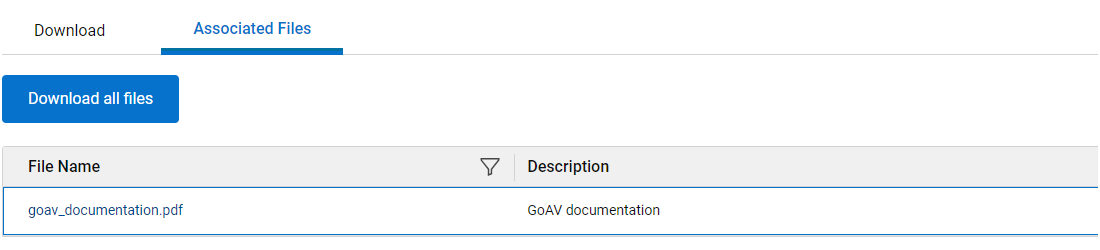
3. Click the "Associated Files" tab to download the associated GoAV Documentation:
Installing the GoAV Tool:
1. Upload goav.zip to the Avamar Utility Node
2. Extract the .zip file:
unzip -o goav.zip
3. Ensure that the GoAV binary executable:
chmod a+x goav
4. Verify the installed version:
./goav version show
===========================================================
GoAv    :        1.93
Avamar  :        19.12
Date    :        20 Mar 2025 12:03 EDT
===========================================================
COMMAND :  ./goav version show
NOTE: This tool was created and is maintained by the ISG Support Tools team
===========================================================
GoAV : 1.93
Updating the existing GoAV Version:
Run the following command to update GoAV:
./goav update
The update feature checks the current version of GoAV on the repository site and attempts to pull the latest version.
Command Structure:
GoAV follows a structured command hierarchy, allowing users to run various Avamar related tasks.
Command line tool for Avamar.

Usage:
  goav [command]

Available Commands:
  activity      Activity related operations.
  client        Client related operations.
  dataset       Dataset related operations.
  dd            DataDomain related operation
  documentation Generate GOAV PDF documentation.
  envinfo       Environment Information.
  help          Help about any command
  idpa          Allows a user to check or fix multiple internal client/policy issues
  mft           Allows for upload/download to or from Dell MFT.
  ndmp          NDMP related operations
  plugin        Avamar plugin related operation.
  policy        Policy related operations.
  proxy         Avamar VMImage proxy related operations.
  rabbitmq      RabbitMQ related operations.
  replication   Replication related operations.
  retention     Retention related operations.
  rule          Rules related operations.
  schedule      Schedule related operations.
  security      certificate, keystore, secure operations
  system        Avamar system related operations.
  update        Update GOAV to latest version.
  vcenter       vCenter related operations.
  version       Displays GoAV version information.
  vm            Virtual Machine related operations.

Flags:
  -d, --debug                debug output
  -f, --force                Ignore Configuration
  -h, --help                 help for goav
  -n, --noheader             Do not display header
  -s, --validate-signature   Validate GoAV digital Signature

Use "goav [command] --help" for more information about a command.
Getting Help for a Command:
For detailed help on any command, use "-h or --help":
./goav client show-gsan -h


Show Avamar clients in gsan, as opposed to mcdb
Gsan is where backups are actually stored, it is useful to get a list from gsan instead of mcdb sometimes!

Usage:
  goav client show-gsan [flags]

Aliases:
  show-gsan, list-gsan

Examples:
./goav client show-gsan
./goav client show-gsan --domain /REPLICATE
./goav client show-gsan --hasBackups
./goav client show-gsan --noBackups --domain /MC_RETIRED --hasbackups

Flags:
      --domain string   Specify domain root to start recursive search from (default "/")
      --hasBackups      List clients with backups in gsan, excluding clients without backups
  -h, --help            help for show-gsan
      --noBackups       List clients with no backups in gsan, excluding clients with backups
      --out string      Specify output filename for report (default "/home/admin/goav_clients/client_list_report_2023-07-10-1689007451.csv")

Global Flags:
  -d, --debug      debug output
  -f, --force      Ignore Configuration
  -n, --noheader   Do no display header
Example Usage:
To display all Avamar proxies:
./goav proxy show
===========================================================
GoAv    :        1.93
Avamar  :        19.12
Date    :        10 Jul 2023 12:48 EDT
===========================================================
COMMAND :  ./goav proxy show
NOTE: This tool was created and is maintained by the ISG Support Tools team
===========================================================
              name                 | domainFqdn |            vcenterHost            |                    id                    | activated | autoDsMapping | clientVersion
-------------------------------+------------+-----------------------------------+------------------------------------------+-----------+---------------+----------------
  abc-proxy-95.example.company.com | /clients   | xyz-test1-vcenter.lab.company.com | e90b74a9c0c4569d1a0b84fd6ff4f3026939bd12 | true      | false         | 19.12.100-83
  abc-proxy-96.example.company.com | /clients   | xyz-test1-vcenter.lab.company.com | 214d56edb74df890bd88f0c06360216b423ce5fd | true      | false         | 19.12.100-83
References:
GoAV features:
-
-
Article 000221404: Avamar: How to Use
GoAVsystem health-check menu -
Article 000215679: Avamar: Information About
GoAVdd check-ssl Feature -
Article 000220471: Avamar: How to Use
GoAVProxy Deployment Manager -
Article 000225881: Avamar: How to Use
GoAVIntegrated Data Protection Appliance feature -
Article 000223619: Avamar: How to Use
GoAVClient Bare Metal Recovery Menu -
Article 000216619: Avamar: How to Use
GoAVNetwork Data Management Protocol Firewall Menu -
Article 000210222: Avamar: How to use the
GoAVRabbitMQ feature set -
Article 000227896: Avamar: Client ID (CID) mismatches with
GoAVremediation -
Article 000188866: IDPA: How to Deploy IDPA 2.6 and Avamar Proxy Patches and Hotfixes with
GoAV -
Article 000317368: Avamar: How to Use
GoAVClient Windows Avamar Logs Collector Menu
-