PowerEdge: XE8545 with NVIDIA A100/80G 4-GPU performance throttling due to temperature
Summary: This article provides information about performance throttling seen on the NVIDIA A100/80G 4-GPU (Redstone+) due to higher ambient temperatures.
This article applies to
This article does not apply to
This article is not tied to any specific product.
Not all product versions are identified in this article.
Symptoms
If the system is equipped with the NVIDIA A100/80G 4-GPU (Redstone+), and the ambient temperature reaches 28°C (82.4°F), the GPU performance may drop to protect the system from damage.
Cause
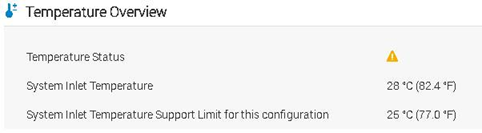
When the ambient temperature is higher than 28°C (82.4°F), the GPU full stress may reach 85°C (185°F) and trigger throttling.
Check GPU throttle status:
- Use the command "
nvidia-smi -q -d performance," to check throttle status as shown below: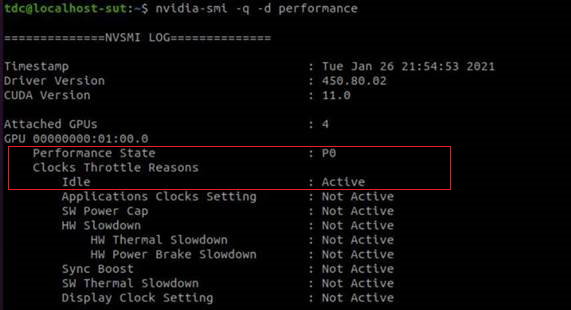
Clock Throttle Reasons:
- Retrieves information about factors that are reducing the frequency of clocks, only on supported Tesla devices from Kepler family
- If all throttle reasons are returned as "Not Active," it means that clocks are running as high as possible.
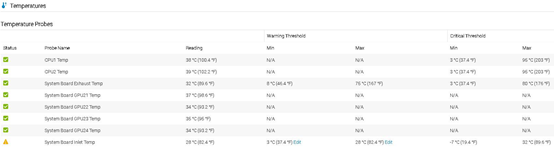
Check the iDRAC inlet temperature:
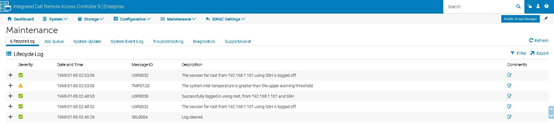
- The iDRAC System Event Log (SEL) and Lifecycle Log show "
The system inlet temperature is greater than the upper warning threshold" message.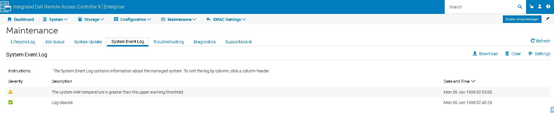
- The Temperature Overview’s Temperature Status and Temperature Probes show warning sign.
Resolution
To clear the error, you must lower the ambient temperature below 28°C (82.4°F).
Affected Products
PowerEdge XE8545Products
PowerEdge XE9680Article Properties
Article Number: 000182430
Article Type: Solution
Last Modified: 25 Jul 2025
Version: 3
Find answers to your questions from other Dell users
Support Services
Check if your device is covered by Support Services.