Dell Data Protection Encryption Reboot Prompt off Screen on Latitude 7280
Summary: This article describes a situation when Dell Data Protection | Encryption is installed on a Dell Latitude 7280, after a sweep the reboot prompt appears off the screen and cannot be clicked. ...
This article applies to
This article does not apply to
This article is not tied to any specific product.
Not all product versions are identified in this article.
Symptoms
Affected Products:
- Dell Data Protection | Encryption
Affected Versions:
- v8.12.1 and 8.13
Affected Platforms:
- Latitude 7280
Cause
Not Applicable
Resolution
On the Latitude 7280, with either Dell Data Protection | Enterprise Edition or Personal Edition, the reboot prompt after a sweep shows up off screen and unable to be clicked. You can reboot the computer as it is, but cannot get rid of that prompt. If you try to close the window, intermittently it shows up in the normal location, but cannot be postponed.
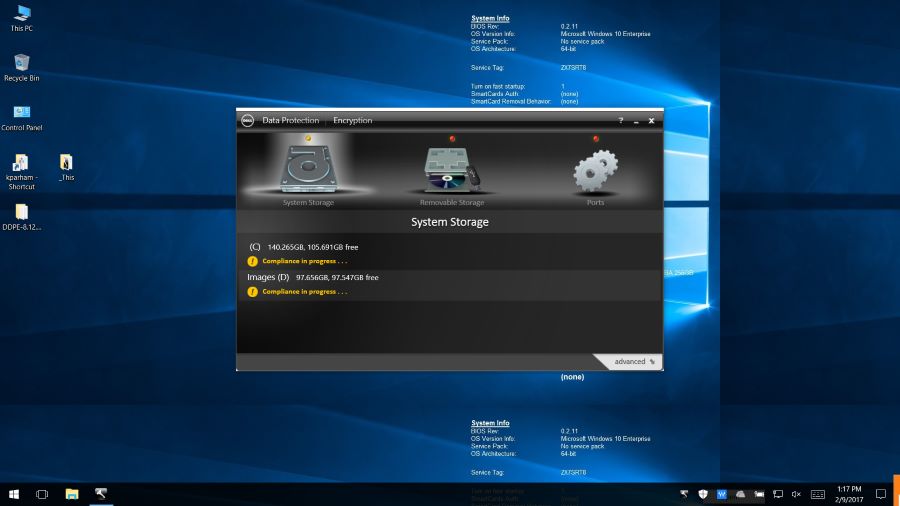
Figure 1: (English Only) Reboot prompt off screen
The resolution would be to reboot the computer without clicking the Dell Data Security prompt to reboot.
Note: This issue is resolved in v10.6 and later.
To contact support, reference Dell Data Security International Support Phone Numbers.
Go to TechDirect to generate a technical support request online.
For additional insights and resources, join the Dell Security Community Forum.
Affected Products
Dell Encryption, Latitude 7280Article Properties
Article Number: 000125013
Article Type: Solution
Last Modified: 08 May 2024
Version: 10
Find answers to your questions from other Dell users
Support Services
Check if your device is covered by Support Services.