NVP vProxy: 독립 실행형 ESXi의 VM 백업 실패 시 "Received an HTTP code: 400...."
Summary: NVP(NetWorker VMware Protection) vProxy 어플라이언스는 독립 실행형 VMware ESXi 하이퍼바이저(7.0U3) 호스트에 배포됩니다. 모든 VM 백업이 즉시 실패하고 "BackupVmSession 리소스를 생성하지 못했습니다. CIS 호스트에 로깅하는 동안 오류가 발생했으며 guestOSImage 세부 정보를 가져오지 않습니다." ...
This article applies to
This article does not apply to
This article is not tied to any specific product.
Not all product versions are identified in this article.
Symptoms
독립 실행형 ESXi 호스트가 NetWorker에 추가되었습니다(vCenter Server 아님).
ESXi 호스트는 버전 7.0U3입니다.
vProxy 버전은 4.3.0-46입니다.
ESXi 호스트는 루트 계정 및 "클라우드에 배포됨" 옵션(필수)을 사용하여 추가되었습니다.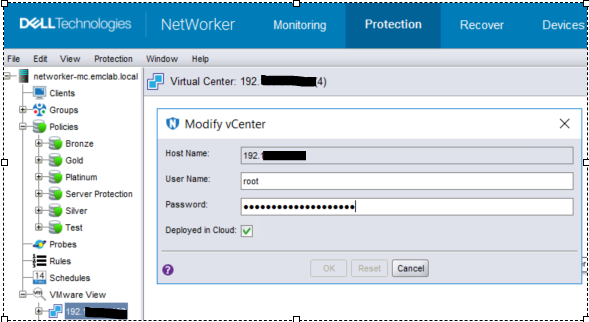
그림 1: vCenter 수정 페이지 스크린샷
VM 백업 작업이 즉시 실패하고 작업 로그에 다음 오류 메시지가 표시됩니다.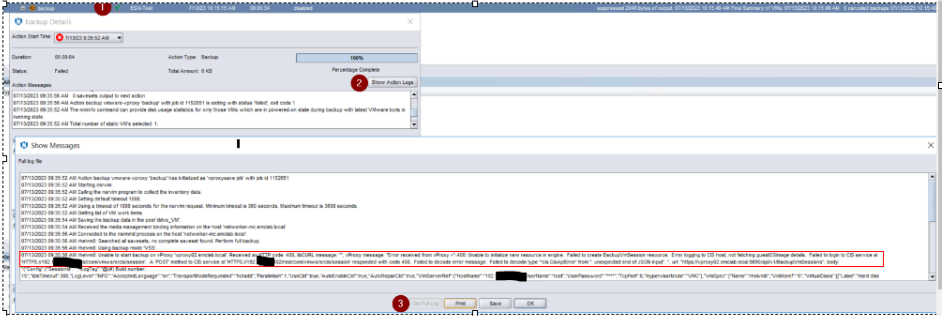
그림 2: 작업 로그의 백업 작업 실패 메시지
오류 메시지:
07/13/2023 09:35:56 AM rhelvm8: Unable to start backup on vProxy 'vproxy02.emclab.local': Received an HTTP code: 400, libCURL message: "", vProxy message: "Error received from vProxy ="-400: Unable to initialize new resource in engine. Failed to create BackupVmSession resource. Error logging to CIS host, not fetching guestOSImage details. Failed to login to CIS service at 'HTTPS://192.xxx.xx.xxx/rest/com/vmware/cis/session'. A 'POST' method to CIS service at 'HTTPS://192.xxx.xx.xxx/rest/com/vmware/cis/session' responded with code 400. Failed to decode error message: Failed to decode type '*cis.CisApiError' from '': unexpected end of JSON input". ", url: "https://vproxy02.emclab.local:9090/api/v1/BackupVmSessions",
Cause
메시지 처리
중 vProxy 오류 "Error logging to CIS host not fetching guestOSImage details" 메시지는 경고로 처리되어 백업을 계속 진행할 수 있도록 해야 합니다. 그러나 오류로 처리되어 백업 실행이 중지됩니다.
Resolution
임시 해결 방법은 vProxy 4.3.0-41로 다운그레이드하는 것입니다.
이 문제는 향후 vProxy 릴리스에서 해결될 예정입니다. https://www.dell.com/support/home/product-support/product/networker-family/drivers 에서 사용 가능 여부를 확인하십시오.
Affected Products
NetWorkerProducts
NetWorker Family, NetWorker SeriesArticle Properties
Article Number: 000215790
Article Type: Solution
Last Modified: 10 Apr 2024
Version: 7
Find answers to your questions from other Dell users
Support Services
Check if your device is covered by Support Services.