PowerStore: Expired or Stale Snapshot Check
Summary: This article describes the PowerStore alert for Expired or Stale Snapshot Check.
This article applies to
This article does not apply to
This article is not tied to any specific product.
Not all product versions are identified in this article.
Symptoms
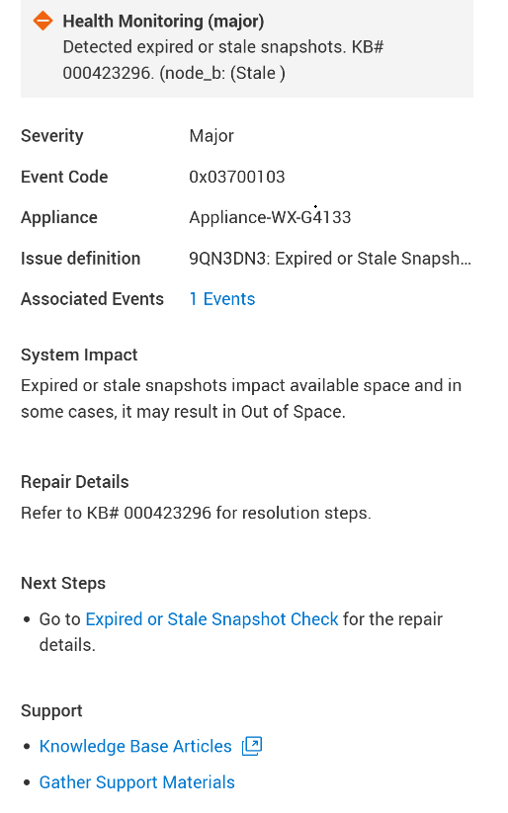
A health check detects this issue and raises an alert:
"Detected expired or stale snapshots."
Cause
Expired or Stale RPO snapshots impact available space and in some cases, may result in "Out of Space" situation. The alert is raised due to either one of the following cases:
- Expired snapshots: When there is at least 1 snapshot in the system, which has expiration date set to at least 24 hours before the current date and time.
- Stale RPO snapshots: When there are more than 10 RPO snapshots in the system, which were created at least 24 hours before the current date and time.
Resolution
This check does not support Auto-Repair. Deleting snapshots is a sensitive operation and requires explicit customer approval to mitigate the risk of removing important data.
Contact Technical Support to determine the best course of action. Mention this KB article ID to expedite processing.
Additional Information
See KB 000193518 PowerStore: Landing Page for RxDefinitions Issues for more information of the health check mechanism, the RxDefinitions package, and a complete list of RxDefinitions alerts.
Affected Products
PowerStoreArticle Properties
Article Number: 000423296
Article Type: Solution
Last Modified: 23 Jul 2026
Version: 1
Find answers to your questions from other Dell users
Support Services
Check if your device is covered by Support Services.