Avamar: VMware image backup fails "server could not find an appropriate proxy to service the job."
Summary: Some or all proxies failing to check-in with MCS. VMware image backups may fail or may run on a limited number of proxies.
This article applies to
This article does not apply to
This article is not tied to any specific product.
Not all product versions are identified in this article.
Symptoms
No changes were made to the environment.
VMware image backups may fail with any of the following messages in Activity Monitor:
Failed to initiate virtual machine backup or restore.
The server could not find an appropriate proxy to service the job.
Timeout - Start - the backup jobs sit in Waiting Queued until the end of the backup window and then are failed.
Cause
Issue #1
In the avagent logs (avagent.log or avagent_<#>.log on the proxy (/usr/local/avamarclient/var), the following can be seen:
2018-01-07 13:12:36 avagent Info <5964>: Requesting work from <avamar_fqdn>
2018-01-07 13:12:37 avagent Info <5264>: Workorder received: sleep
2018-01-07 13:12:37 avagent Info <5996>: Sleeping 15 seconds
2018-01-07 13:12:52 avagent Info <40019>: Checking certificate status.
2018-01-07 13:12:53 avagent Error <5320>: Received from MCS#100203:client does not exists and need to be unregistered.
2018-01-07 13:12:53 avagent Info <41054>: Received message from the Management Console 'mcs_address' to unregister the client
2018-01-07 13:12:53 avagent Info <5453>: Client ID erased
2018-01-07 13:12:53 avagent Info <5454>: MCS address erased, entering listen mode.
2018-01-07 13:12:53 avagent Info <18940>: Stopping listen thread (agentlisten(Snon-loopback):14504:39)
2018-01-07 13:12:53 avagent Info <18940>: Stopping listen thread (agentlisten(Sloopback):14503:38)
The MCS logs show the proxy attempt to validate with MCS and the receives the 100203 error forcing the proxy to un-register:
01/07-05:12:33.00816 [pool-7-thread-10#263] com.avamar.mc.cr.bcConnection.readClientMessage
FINE: Cl->MC <proxy_IP>:40584<client csn="<proxy_CSN" rsn="<proxy_rsn>" ack="yes" type="status" ipaddr="<proxy_IP>" msgver="1" hostname="<proxy_fqdn>" cid="<proxy_CID>" />
01/07-05:12:33.00816 [pool-7-thread-10#263] com.avamar.mc.cr.bcConnection.validatePageAddress
FINE: validating page address:<proxy_IP> provided by client
01/07-05:12:33.00816 [pool-7-thread-10#263] com.avamar.mc.cr.bcConnection.validatePageAddress
FINE: client connection called id indicates:<proxy_IP>
...
01/07-05:12:33.00988 [pool-7-thread-10#263] com.avamar.mc.cr.bcConnection._sendReply
FINE: MC->Cl <client_ip>:40584 <message  errno="100203" errdesc="client does not exists and need to be unregistered." ack="no" type="response" sync="fg"  />
01/07-05:12:33.00988 [pool-7-thread-10#263] com.avamar.asn.service.ServiceContainerImpl.getService
FINE: Service get initiated to service: com.avamar.mc.dpn.DPNProxyService
01/07-05:12:33.00988 [pool-7-thread-10#263] com.avamar.asn.service.ServiceContainerImpl.getService
FINE: Service get completed for service: com.avamar.mc.dpn.DPNProxyService
At the time of the client unregister event, the Avamar was performing a vCenter sync operation:
01/07-05:12:32.00944 [VmwareEventsMonitor for VC /<vcenter_fqdn>#1093587] com.avamar.mc.vmware.VmwareVirtualCenterSynchronizer.doResync
INFO: A resync is scheduled 1s later. vc - /<vcenter_fqdn>
01/07-05:12:32.00944 [VmwareEventsMonitor for VC /<vcenter_fqdn>#1093587] com.avamar.mc.vmware.VmwareVirtualCenterSynchronizer.requestForceResync
INFO: A force resync has been scheduled for vc - /<vcenter_fqdn>
01/07-05:12:32.00944 [VmwareEventsMonitor for VC /<vcenter_fqdn>#1093587] com.avamar.mc.vmware.VmwareEventHandler.processHostConnected
FINE: Processed HostConnectedEvent: com.vmware.vim25.HostConnectedEvent@691b4c9b for <esxhost_fqdn> (<esxhost_ID>/host-144).
01/07-05:12:32.00944 [VmwareEventsMonitor for VC /<vcenter_fqdn>#1093587] com.avamar.mc.vmware.cache.VcEntityCache.updateEsx_Ds_Cache
FINE: Processed HostEvent: com.vmware.vim25.HostConnectedEvent@691b4c9b for <vcenter_fqdn> (<esxhost_ID>/host-144).
...
01/07-05:12:33.00946 [VmwareEventsMonitor for VC /<vcenter_fqdn>#1093587] com.avamar.mc.vmware.VmwareEventsMonitor.printEvent
INFO: New vmware event:
----------
 Event ID: 2192577
 Event: com.vmware.vim25.HostConnectedEvent
 FullFormattedMessage: Connected to <esxhost_fqdn> in <data_center>
 VM Reference: Not VMEvent
----------


FINE: free connection[2]
01/07-05:12:33.00980 [pool-79-thread-2#1102898] com.avamar.mc.vmware.VCenterConnectionPool.freeConnection
FINE: using connection[2]
01/07-05:12:33.00972 [pool-79-thread-2#1102898] com.avamar.mc.vmware.VCenterConnectionPool.getConnection
FINE: free connection[2]
01/07-05:12:33.00972 [pool-79-thread-2#1102898] com.avamar.mc.vmware.VCenterConnectionPool.freeConnection
FINE: using connection[2]
01/07-05:12:33.00954 [pool-79-thread-2#1102898] com.avamar.mc.vmware.VCenterConnectionPool.getConnection
FINE: using connection[3]
01/07-05:12:33.00954 [pool-79-thread-3#1102899] com.avamar.mc.vmware.VCenterConnectionPool.getConnection
FINE: using connection[1]
1/07-05:12:33.00954 [pool-79-thread-1#1102897] com.avamar.mc.vmware.VCenterConnectionPool.getConnection
FINE: free connection[1]
01/07-05:12:33.00953 [VmwareEventsMonitor for VC /<vcenter_fqdn>#1093587] com.avamar.mc.vmware.VCenterConnectionPool.freeConnection
FINE: using connection[1]
01/07-05:12:33.00946 [VmwareEventsMonitor for VC /<vcenter_fqdn>#1093587] com.avamar.mc.vmware.VCenterConnectionPool.getConnection
Issue #2
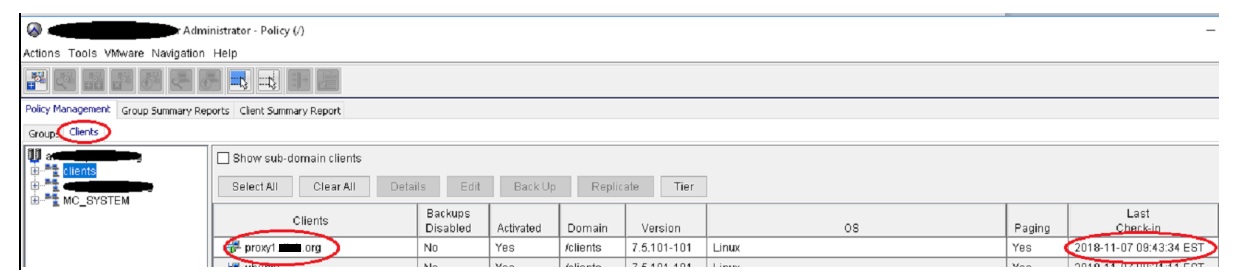
In the Avamar Administrator Console, some or all of the proxies may be grayed out. Checking the proxies in the Policy Window > Clients tab, the Last Check-in field for the proxy should have a date and timestamp that is close to the current time. Avamar Proxies Check-in every 15 to 60 seconds. If the Last Check-in field is more than five minutes old, the proxy may not be checking in.
Resolution
Apply the latest cumulative MCS hotfix for your Avamar server version. This is activity can be performed by customers.
Additional Information
This content is translated in other languages:
| https://downloads.dell.com/TranslatedPDF/ES_KB517039.pdf |
| https://downloads.dell.com/TranslatedPDF/DE_KB517039.pdf |
| https://downloads.dell.com/TranslatedPDF/FR_KB517039.pdf |
| https://downloads.dell.com/TranslatedPDF/IT_KB517039.pdf |
| https://downloads.dell.com/TranslatedPDF/JA_KB517039.pdf |
| https://downloads.dell.com/TranslatedPDF/KO_KB517039.pdf |
| https://downloads.dell.com/TranslatedPDF/NL_KB517039.pdf |
Affected Products
AvamarProducts
Avamar, Avamar Client for VMwareArticle Properties
Article Number: 000057021
Article Type: Solution
Last Modified: 17 Dec 2025
Version: 7
Find answers to your questions from other Dell users
Support Services
Check if your device is covered by Support Services.