Avamar: SQL AlwaysOn cluster browse failing
Summary: This KB article discusses a workaround to resolve Structured Query Language (SQL) AlwaysOn (AO) cluster browse and backup failures due to network-related or instance-specific errors when the SQL AlwaysOn cluster is configured to listen on a nondefault port. ...
This article applies to
This article does not apply to
This article is not tied to any specific product.
Not all product versions are identified in this article.
Symptoms
SQL AlwaysOn (AO) cluster may fail to browse or backup with an error message similar to the following:
avsql Error <9072>: sqlconnectimpl_smo::connect Microsoft.SqlServer.Management.Common.ConnectionFailureException: Failed to connect to server EMClistener. ---> System.Data.SqlClient.SqlException: A network-related or instance-specific error occurred while establishing a connection to SQL Server. The server was not found or was not accessible. Verify that the instance name is correct and that SQL Server is configured to allow remote connections. (provider: Named Pipes Provider, error: 40 - Could not open a connection to SQL Server) ---> System.ComponentModel.Win32Exception: The system cannot find the file specifiedCause
The SQL AO listener is configured to listen on a nondefault port. By default, it is configured to listen on TCP port 1433.
Resolution
Create an avsql.cmd file in the shared var folder designated for the Avamar SQL AlwaysOn availability group and add the following flag:
--sqlserver=<availability group listener's IP address>,<listener port>
Example:
--sqlserver=172.1.1.1,5123
The IP address and port configured for the AO listener port can be found by going into SQL Server Management Studio:
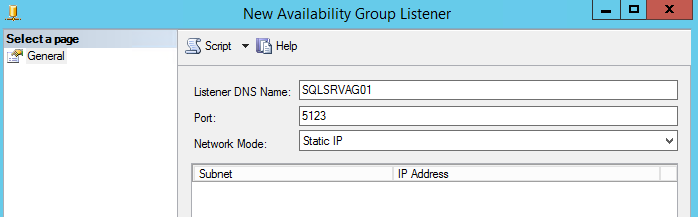
Affected Products
Avamar, Avamar Plug-in for SQLArticle Properties
Article Number: 000162984
Article Type: Solution
Last Modified: 23 Sept 2025
Version: 4
Find answers to your questions from other Dell users
Support Services
Check if your device is covered by Support Services.