Dell Unity: How To Activate CAVA On A NAS Server
Summary: This article goes over the activation procedures of the CAVA on a Dell Unity array.
This article applies to
This article does not apply to
This article is not tied to any specific product.
Not all product versions are identified in this article.
Instructions
- Log in to Unisphere (UI)
- Go to: STORAGE > File > NAS Servers
- Select the relevant NAS Server
- Edit (pencil icon)
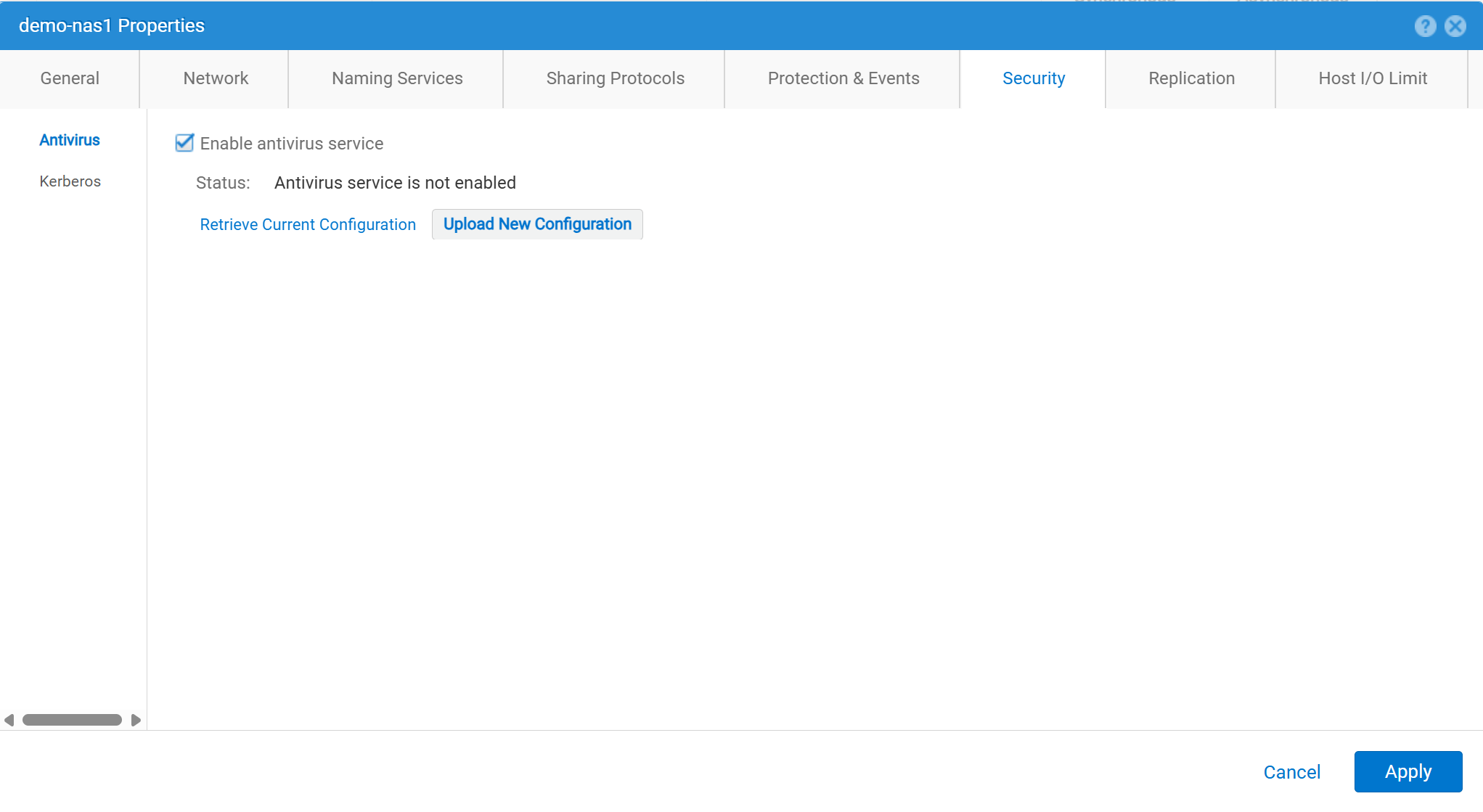
- Security > Antivirus
- Check "Enable antivirus service"
- Retrieve Current Configuration: Used to retrieve the current antivirus configuration file from the NAS Server. Then save it locally as
viruschecker.conf. If this file has never been edited, the first time the file is generated and retrieved, it is a generic template. If this file has ever been edited, the current configuration parameters are shown. - Edit the
viruschecker.conffile as appropriate. The first time the file is edited, remove the comments and specify the CAVA parameters. - Upload New Configuration: Upload the
viruschecker.conffile to the NAS server.
Affected Products
Dell EMC Unity, Dell EMC Unity Family |Dell EMC Unity All Flash, Dell EMC Unity HybridArticle Properties
Article Number: 000006038
Article Type: How To
Last Modified: 30 Oct 2025
Version: 4
Find answers to your questions from other Dell users
Support Services
Check if your device is covered by Support Services.