VxRail: iSM이 "실행되고 있지 않음", "제한된 기능 실행 중" 또는 "비활성 상태(작동하지 않음)"
Summary: iSM이 "실행 중이 아님" 또는 "제한된 기능 실행 중" 상태입니다. 이 문서에서는 해결 방법에 대해 설명합니다.
Symptoms
iSM(iDRAC Service Module)은 모니터링을 위해 iDRAC에서 정보를 수집할 수 있는 호스트의 중요한 서비스입니다.
이는 iDRAC에 다음과 같이 나타날 수 있습니다.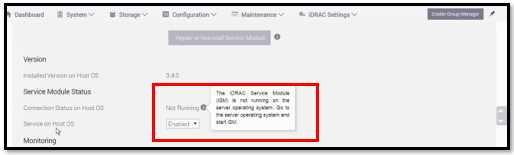
iSM 서비스 상태 확인:
모든 VxRail - 7.0.x
/etc/init.d/dcism-netmon-watchdog status
8.0+
/etc/init.d/dellism status
다음 상태 중 하나일 수 있습니다.
- iSM이 활성(실행 중)
- 이는 완전히 작동하는 상태입니다.
- iSM is active (not running)
- iSM이 활성 상태입니다(제한된 기능 실행).
- iSM이 비활성 상태(작동하지 않음)
Cause
이 문제의 가능한 원인은 여러 가지가 있습니다. 이러한 예 중 하나는 iDRAC의 서비스가 제대로 작동하지 않아 iSM과 통신할 수 없는 경우입니다.
모든 개별 근본 원인은 일반적인 기술 검토(로그, 릴리스 노트, KB(Knowledge Base 문서) 등)를 거쳐 조사되고 표준 프로세스(CTE, DE, EE)를 사용하여 필요한 경우 에스컬레이션해야 합니다.
Resolution
이 문제를 해결하려면 아래 단계를 수행하십시오.
-
iDRAC에서 실행되지 않는 iSM이 있는 각 노드에 대한 SSH 세션을 엽니다.
각 노드에서 아래 단계를 따르십시오.
-
먼저 iDRAC를 콜드 재부팅하여 운영 체제를 재부팅합니다. 다음 각 방법은 이 작업을 수행하는 방법입니다. 이 때문에 반드시 세 가지를 모두 실행할 필요는 없습니다.
/opt/vxrail/tools/ipmitool mc reset cold

SSH into iDRAC (same login as web)
racadm> racreset hard
-
노드에서 iSM 서비스를 중지합니다.
7.0.x and earlier
# /etc/init.d/dcism-netmon-watchdog stop
8.0
# /etc/init.d/dellism stop
-
iSMPKIHelper를 설치합니다.
# cd /opt/dell/srvadmin/iSM/bin
# ./Invoke-iSMPKIHelper -install
-
노드에서 iSM 서비스를 시작합니다.
7.0.x and earlier
# /etc/init.d/dcism-netmon-watchdog start
8.0
# /etc/init.d/dellism start
-
0에서 1로 서비스 설정
# esxcli system wbem set -e 0
# esxcli system wbem set -e 1
-
SupportAssistCollection 스크립트를 실행하여 iDRAC 로그 수집
# cd /opt/dell/srvadmin/iSM/bin
# ./Invoke-SupportAssistCollection
SupportAssist log Collection is in progress..
[||||||||||||||||||||||||||||||||||||||||||||||||||||||||||||]100%
Downloading the collected log file is in progress..
SupportAssist Collection logs can be found in path /tmp/TSR20190826xxxxxx_xxxxxx.zip
iSM이 "활성(실행 중이 아님)"이고 "로 복구할 수 없는 경우/etc/init.d/dcism-netmon-watchdog restart" 또는 "/etc/init.d/dellism": 다음 서비스와 관련이있을 수 있습니다.
다음 단계를 시도해 보십시오.
/etc/init.d/dcism-netmon-watchdog status
/etc/init.d/sfcbd-watchdog stop
/etc/init.d/sfcbd-watchdog start
/etc/init.d/dcism-netmon-watchdog restart
/etc/init.d/dcism-netmon-watchdog status
위와 동일한 작업 :
7.0.x 및 이전 버전
/opt/vxrail/tools/ipmitool mc reset cold ; sleep 300 ; /etc/init.d/sfcbd-watchdog stop ; /etc/init.d/dcism-netmon-watchdog stop; /etc/init.d/vxrail-pservice stop; rm /var/run/log/vxps_cache.dat ; sleep 10 ; /etc/init.d/sfcbd-watchdog start ; /etc/init.d/dcism-netmon-watchdog start; sleep 120 ; /etc/init.d/vxrail-pservice start
8.0
/opt/vxrail/tools/ipmitool mc reset cold ; sleep 300 ; /etc/init.d/sfcbd-watchdog stop ; /etc/init.d/dellism stop; /etc/init.d/vxrail-pservice stop; rm /var/run/log/vxps_cache.dat ; sleep 10 ; /etc/init.d/sfcbd-watchdog start ; /etc/init.d/dellism start; sleep 120 ; /etc/init.d/vxrail-pservice start
8.0.3xx 크랙:
/opt/platformsvc/bin/ipmitool.sh mc reset cold ; sleep 300 ; /etc/init.d/sfcbd-watchdog stop ; /etc/init.d/dellism stop; esxcli daemon control stop -s platformsvc; rm /var/run/log/vxps_cache.dat ; sleep 10 ; /etc/init.d/sfcbd-watchdog start ; /etc/init.d/dellism start; sleep 120 ; esxcli daemon control start -s platformsvc
iSM 상태가 "비활성(비활성)"인 경우 iSM 서비스를 재시작해도 상태가 비활성 상태에서 변경되지 않습니다. iSM을 통해 제거, 업그레이드 또는 설치를 시도하면 다음 오류가 발생합니다.
It is not safe to continue. Please reboot the host immediately to discard the unfinished update.
cause = ('DEL-dcism(4.1.0.0.2410-DEL.700.0.0.15843807)', "Failed to unmount tardisk dcism.v00 of VIB DEL_bootbank_dcism_4.1.0.0.2410-DEL.700.0.0.15843807: Error in running [rm /tardisks/dcism.v00]:\nReturn code: 1\nOutput: rm: can't remove '/tardisks/dcism.v00': Device or resource busy\n")
vibs = ['DEL_bootbank_dcism_4.1.0.0.2410-DEL.700.0.0.15843807']
Please refer to the log file for more details.
[root@nl93vh1012:/tardisks] localcli software vib remove -n dcism
Errors:
[LiveInstallationError]
DEL_bootbank_dcism_4.1.0.0.2410-DEL.700.0.0.15843807: Failed to unmount tardisk dcism.v00 of VIB DEL_bootbank_dcism_4.1.0.0.2410-DEL.700.0.0.15843807: Error in running [rm /tardisks/dcism.v00]:
Return code: 1
Output: rm: can't remove '/tardisks/dcism.v00': Device or resource busy
서비스를 중지하여 위의 tardisk에 대한 액세스를 해제합니다. iSM 프로세스는 이 후에 백업을 시작할 수 있습니다.
/etc/init.d/sfcbd-watchdog stop
그런 다음 업그레이드를 다시 시도하거나 다음과 같이 iSM을 수동으로 즉시 업데이트할 수 있습니다.
esxcli software vib update -d /vmfs/volumes/vsan\:*/upgradeBundles-*/<ISM version being upgraded to>.zip
vSAN upgradeBundles 폴더에 UUID가 포함되고 ISM 버전은 VxRail 업그레이드가 수행되는 대상에 따라 다릅니다.
그래도 문제가 해결되지 않으면 노드의 전원을 방전시켜야 할 수 있습니다.
원격으로 수행할 수 있으므로 먼저 가상 전력 방전을 시도하는 것이 좋습니다. 물리적 전력 소모에는 물리적 액세스가 필요합니다.
Dell EMC VxRail: iDRAC를 통해 노드의 원격 보조 전원 방전을 수행하는 방법 (이 문서를 보려면 Dell 지원 계정 필요)
문제가 계속되면 Dell 기술 지원 부서에 문의하여 지원을 받는 것이 좋습니다. 이 KB를 참조하십시오.