Precision 3930 Rack Workstation: Visual guide to your computer
Summary: This article is a visual guide to the external ports and features of the Precision 3930 Rack Workstation as it ships from Dell.
This article applies to
This article does not apply to
This article is not tied to any specific product.
Not all product versions are identified in this article.
Symptoms
This article is a visual guide to the external ports and features of the Precision 3930 Rack Workstation as it ships from Dell.
Cause
None
Resolution
The following article provides a visual guide to your Precision Rack 3930 Workstation and lists the external ports and features of your PC.
 Note: For a more detailed description about each location, please go to the system manuals at www.dell.com/support
Table of Contents:
Front View
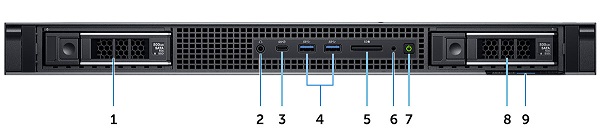
(Fig.1 Front View)
| 1 | Hard Drive Slot 0 | 2 | Audio Connector |
| 3 | USB Type-C 3.1 Gen2 Connector | 4 | USB Type-A 3.1 Gen1 Connector x2 |
| 5 | SD Card Reader Slot | 6 | Drive Activity LED |
| 7 | Power Button | 8 | Hard Drive Slot 1 |
| 9 | Service Tag Location |
Rear View
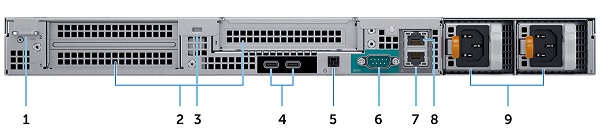
(Fig.2 Rear View)
| 1 | Padlock Ring | 2 | Expansion Card Slots x3 |
| 3 | Security Cable Slot | 4 | USB Type-C 3.1 Gen2 (w/UMA Video Support) Connector x2 |
| 5 | Remote Power Switch | 6 | Serial Connector |
| 7 | 10GB Network Connector (NIC) | 8 | 1GB Network Connector (NIC) |
| 9 | Power Supply Units x2 |
Service Tag Location
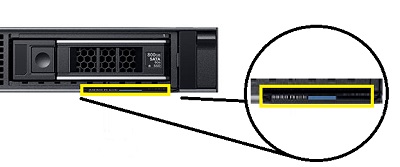
(Fig.3 Service Tag Location)
Additional Info:
- Precision Rack 3930 Customer Replaceable Unit (CRU) part removal guide
- Precision Rack 3930 System Manual
Affected Products
Precision 3930 RackArticle Properties
Article Number: 000144106
Article Type: Solution
Last Modified: 24 Jul 2025
Version: 4
Find answers to your questions from other Dell users
Support Services
Check if your device is covered by Support Services.