PowerStore:升級前健全狀況檢查可偵測重新開機是否使用了不正確的開機項目選項
Summary: 此升級前執行狀況檢查 (PUHC) 會檢查 PowerStore 500T 上是否使用了正確的開機項目選項。
This article applies to
This article does not apply to
This article is not tied to any specific product.
Not all product versions are identified in this article.
Symptoms
如果目前的開機選項不正確,PUHC 檢查將會失敗,並顯示下列訊息:
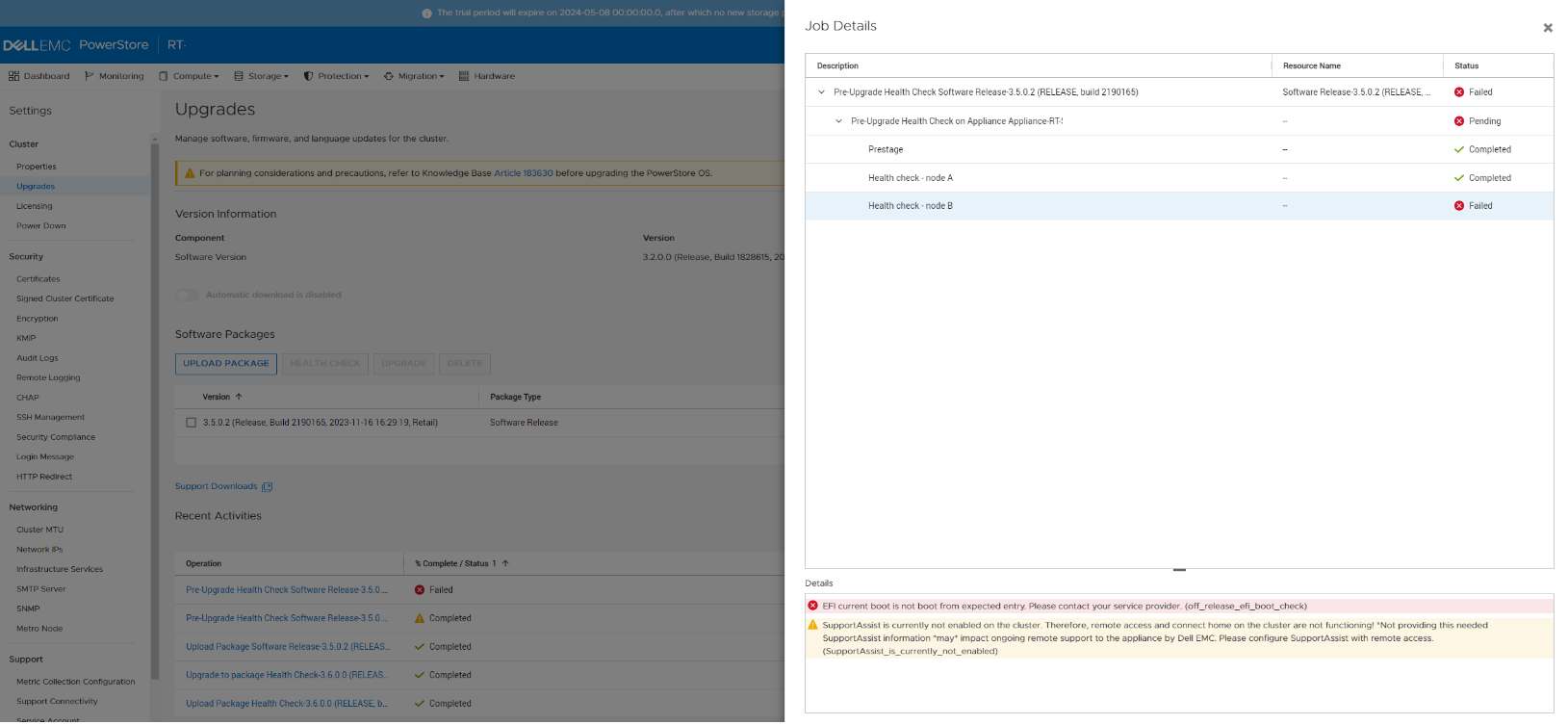
失敗的 PUHC 詳細資料:

EFI current boot is not boot from expected entry. Please contact your service provider (efi_boot_check).

Or

EFI current boot is not boot from expected entry. Please contact your service provider (off_release_efi_boot_check).
PUHC 檢查的螢幕擷取畫面:
失敗的 PUHC 詳細資料:
Cause
在 PowerStore 升級期間,變更內部作業系統後,可能會設定錯誤的開機選項。此不正確的開機選項,會導致節點重新開機時因重新開機迴圈而導致不中斷升級 (NDU) 失敗。
Resolution
僅限 PowerStore 500T 機型:
- 重新啟動失敗的節點。請參閱 PowerStore 500T 安裝與維修指南一節,瞭解如何重新啟動 PowerStore 節點的程序。
- 節點重新開機後重新執行 PUHC。
- 若問題持續存在,請聯絡 Dell 技術支援部門。
如果在兩個節點上都偵測到此問題,則:
- 確認對等節點運行狀況良好。使用系統檢查來確認節點的健全狀況。
- 重新開機一個節點。請參閱「500T 安裝與維修指南」一節,瞭解如何為 PowerStore 節點重新開機程序。
- 確認節點已成功重新開機,並正在為輸入和/或輸出提供服務。
- 等待十 (10) 分鐘。
- 重新開機第二個節點。
- 節點重新開機後重新執行 PUHC。
- 若問題持續存在,請聯絡 Dell 技術支援部門。
Additional Information
請參閱 Dell 文章:
- KB 000192601、PowerStore:如何使用升級前執行狀況檢查和系統檢查,在軟體升級前檢查叢集的執行狀況
- KB 000214752、PowerStore:商店內 (非發行版) 登陸頁面 系統執行狀況檢查 精簡套件會列出所有執行狀況檢查。
Affected Products
PowerStoreArticle Properties
Article Number: 000222187
Article Type: Solution
Last Modified: 14 Jun 2025
Version: 11
Find answers to your questions from other Dell users
Support Services
Check if your device is covered by Support Services.