Connectrix: Cisco: CA certificate is missing Basic constraints extension
Summary: Error while authenticating the CA certificate to configure AAA service on Switch.
This article applies to
This article does not apply to
This article is not tied to any specific product.
Not all product versions are identified in this article.
Symptoms
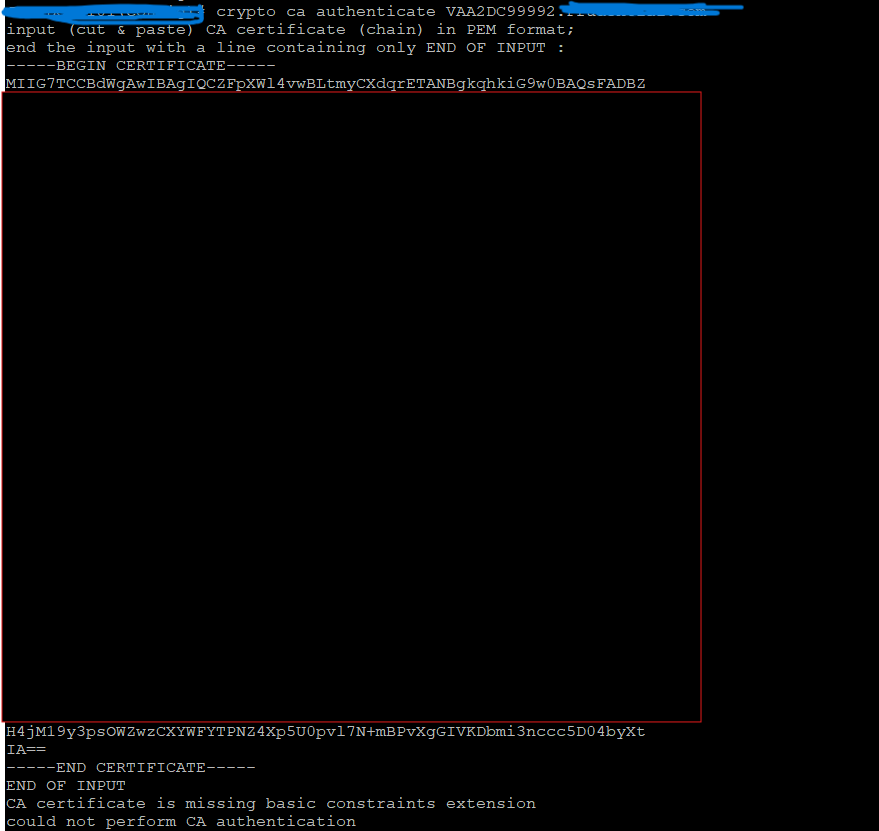
While authenticating the CA signed certificate, the below error is seen:
CA certificate is missing Basic constraints extension, could not perform CA authentication
Cause
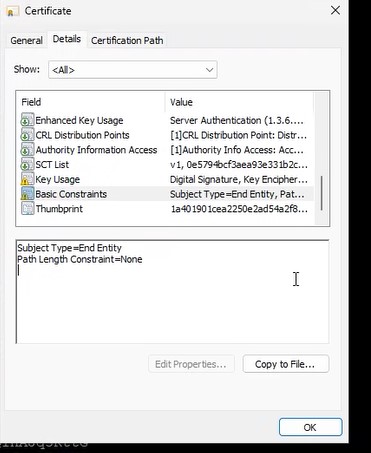
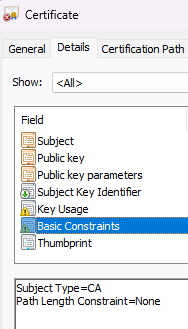
Subject Type under Basic Constraints was set to NONE instead of CA.
Problematic Certificate:
Correct CA certificate as expected:
Resolution
Action Plan:
- Review the certificate for any errors or missing attributes.
- Remove any existing related configuration from the switches.
- Re-attempt the configuration from the beginning with a corrected certificate.
Additional Information
To open basic constraints of a CA certificate, use a web browser by visiting a secure (HTTPS) website. Click the padlock icon and select the certificate. Then navigating to the "Details" or "Extensions" tab to find the "Basic Constraints" section.
Affected Products
Connectrix MDS-Series HardwareArticle Properties
Article Number: 000368416
Article Type: Solution
Last Modified: 15 Sep 2025
Version: 1
Find answers to your questions from other Dell users
Support Services
Check if your device is covered by Support Services.