SupportAssist 4.10.1 Showing Invalid Message: We can’t reach the internet right now
Summary: Learn what to do if SupportAssist v4.10.1 shows an invalid message relating to the Internet not working.
This article applies to
This article does not apply to
This article is not tied to any specific product.
Not all product versions are identified in this article.
Symptoms
The following message or banner on SupportAssist UI may be seen: We can’t reach the internet right now. Let’s get you back online.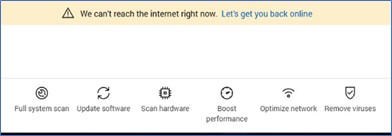
The message displayed is invalid as the Internet connectivity should be fine.
Affected Application:
- SupportAssist 4.10.1
Cause
A glitch in codes has been identified while validating network connectivity levels.
Resolution
This is an invalid message or banner that can be ignored.
- The issue occurs in Windows 10. To resolve the issue, see the following article to upgrade your computer to Windows 11: Windows 11 Upgrade Walk-through for Dell Computers
- If your computer is not eligible for upgrade or your IT team manage your computer, then the issue is resolved with our upcoming release version 4.10.5 scheduled for November 2025.
Note: You might not be able to run update or driver scan manually however the schedule scan continues to work and share updates or latest driver recommendations.
Affected Products
Chromebox, Alienware, Dell Pro All-in-One, Dell Pro Max Micro, Dell Pro Max Slim, Dell Pro Max Tower, Dell Pro Micro, Dell Pro Slim, Dell Pro Tower, Dell Slim, Dell Tower, Inspiron, OptiPlex, Vostro, XPS, G Series, Chromebook, G Series, Alienware
, Dell Laptops, Dell Plus, Dell Pro, Dell Pro Max, Dell Pro Plus, Dell Pro Premium, Inspiron, Latitude, Dell Pro Rugged, Vostro, XPS, SupportAssist, Dell Pro Max Micro XE FCM2250
...
Article Properties
Article Number: 000379372
Article Type: Solution
Last Modified: 22 Oct 2025
Version: 2
Find answers to your questions from other Dell users
Support Services
Check if your device is covered by Support Services.