PowerFlex: SIOC SIOSC NIOC are not supported
Summary: Storage I/O Control (SIOC), Storage I/O Statistics Collection (SIOSC), and Network I/O Control (NIOC) are not supported.
Symptoms
One of the VMware features of vDS is NIOC Network I/O control (NIOC)
NIOC according to VMware docs:
Network resource pools determine the bandwidth that different network traffic types are given on a vSphere distributed switch. When network I/O control is enabled, distributed switch traffic is divided into the following predefined network resource pools: Fault Tolerance traffic, iSCSI traffic, vMotion traffic, management traffic, vSphere Replication (VR) traffic, NFS traffic, and virtual machine traffic
You can also create custom network resource pools for virtual machine traffic. You can control the bandwidth each network resource pool is given by setting the physical adapter shares and host limit for each network resource pool.
While Storage I/O Control (SIOC), Storage I/O Statistics Collection (SIOSC) and Network I/O Control (NIOC) are useful for vSan environments, their implementation may cause significant issues in a PowerFlex environment, so use of these options is not supported.
PowerFlex provides built-in capabilities to limit network bandwidth and IOPS limits for each volume for each SDC.
Cause
Resolution
Disable SIOC and SIOSC on datastores residing on PowerFlex volumes.
How to disable NIOC from the UI:
1. Navigate to Network DSwitch Name Click Edit.

2. On "Network I/O Control:" choose disabled and Click OK
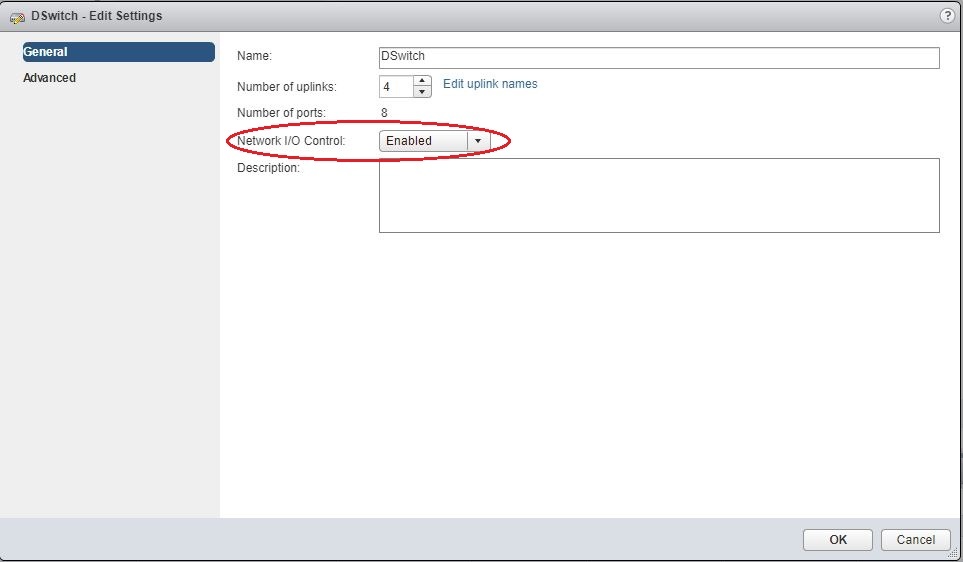
3. Verify if the NIOC is disabled on the DVS.

Alternitavly from PowerCLI connects to vCenter and run the following command to disable it on all datastores.
$si = Get-View ServiceInstance
$storMgr = Get-View -Id $si.Content.StorageResourceManager
$spec = New-Object VMware.Vim.StorageIORMConfigSpec
$spec.Enabled = $false
$spec.StatsAggregationDisabled = $true
$spec.StatsCollectionEnabled = $false
foreach($ds in (Get-View -ViewType Datastore -Filter @{'Summary.MultipleHostAccess'='True'})){
    Write-Output "Configuring datastore $($ds.Name)"
    $storMgr.ConfigureDatastoreIORM($ds.MoRef,$spec)
}