Touchpad Buttons on the Keyboard Dock for Latitude Rugged Extreme Tablets Can Pop off and Reattach
Summary: The following article provides information about the touchpad buttons on the keyboard dock for Rugged Tablets. The touchpad buttons on the dock for the Latitude 7202 Rugged, Latitude 7212 Rugged Extreme, and Latitude 7220 Rugged Extreme tablets can pop off and reattach. ...
This article applies to
This article does not apply to
This article is not tied to any specific product.
Not all product versions are identified in this article.
Symptoms
Touchpad buttons on the Dell Keyboard with Kickstand for Rugged Extreme Tablet can be reattached
Latitude 7202 Rugged, 7212 Rugged Extreme, and 7220 Rugged Extreme tablet owners may experience an issue with the touchpad buttons on their keyboard dock.
The buttons are flush to the front of the keyboard dock and can be reseated or reattached. (See Figure.1)
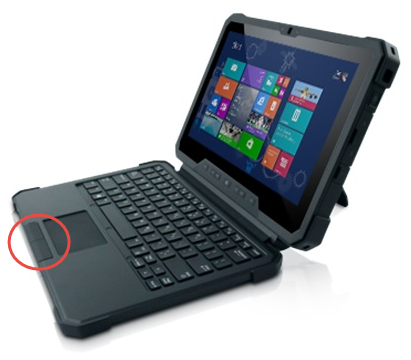
(Figure.1 Keyboard dock for Rugged Tablets)
Cause
This is working as designed. The touchpad buttons are flush with the front of the keyboard dock to keep the form factor small.
Resolution
The dock is working as designed. If one or both of the touchpad buttons pop off, you can align the touchpad button to the empty slot and press down firmly to reseat it.
Note: This keyboard dock is designed for use with the Latitude Rugged Extreme tablets. The design must consider the uses to which the tablets are put.
Affected Products
Latitude 7212 Rugged Extreme Tablet, Latitude 7220 Rugged Extreme Tablet, Latitude 7202 Rugged TabletArticle Properties
Article Number: 000141772
Article Type: Solution
Last Modified: 16 Apr 2025
Version: 7
Find answers to your questions from other Dell users
Support Services
Check if your device is covered by Support Services.