PowerFlex: get_info logs from Gateway fails when the file system on which the /tmp resides is created with ftype 0
Summary: Collecting get_info logs from Gateways Fails with Error: The logs file in node x.x.x.x was not found running command.LogCollectionCommand.
Symptoms
Getinfo log collection from the Gateway fails with below error:
(scaleio.log from Gateway)
[executor-4] INFO  c.e.s.s.i.s.i.c.LIANodeConnection - downloadInfo called on UnknownSystemNode[nodeName=4640301440918548081,nodeIPs=[192.168.180.x, 192.168.190.x],credentials=<null>].
[executor-4] INFO  c.e.s.s.i.s.i.c.LIANodeConnection - getLogFilePathByUniqueFlowId called on UnknownSystemNode[nodeName=4640301440918548081,nodeIPs=[192.168.180.x, 192.168.190.x],credentials=<null>]. uniqueFlowId: getInfoDump
[executor-4] ERROR c.e.s.s.d.i.c.LogCollectionCommand - Error The logs file in node 192.168.180.x,192.168.190.x wasnt found executing command .LogCollectionCommand (retry) : com.emc.s3g.scaleio.im.services.installation.connectors.LIANodeConnection.getLogs(LIANodeConnection.java:1850)
com.emc.s3g.scaleio.im.services.installation.connectors.LIANodeConnection.downloadInfo(LIANodeConnection.java:1522)
Log in to the ScaleIO node on which the get_info log collection in failing. In trace logs, LIA is unable to find any relevant files under the directory, though the getinfo file was created:
# ls -l

total 50508
-rw-------. 1 root root 51717813 Oct 16 03:57 getInfoDump.tgz
# date
Fri Oct 16 03:57:01 CDT 2020

* /opt/emc/scaleio/lia/logs/trc.0 logs from LIA folder or node 192.168.180.x **
7f17ac10bdb0:liaNet_RecvRequest:00351: 10 minutes since last login
7f17ac10bdb0:liaNet_RecvRequest:01112: GET LOG FILES START
7f17ac10bdb0:liaCmd_GetLogFilesHelper:01239: Number of files 0     <<<-----------
7f17ac10bdb0:liaNet_RecvRequest:01145: GET LOG FILES END
Cause
LIA code uses "Directory Entry" in order to locate the getInfoDump.tgz created as part of the collection. LIA uses a certain function called "readdir()" in order to get the content of the directory.
Once LIA calls "readdir()," it expects to get the field "d_type." This field indicates if "getInfoDump.tgz" is a regular file ("DT_REG"). Not all file systems support d_type
In cases where the file system created does not support "d_type," the returned value once the "readdir()" function call is: "DT_UNKNOWN" and LIA finds zero number of files in the directory.
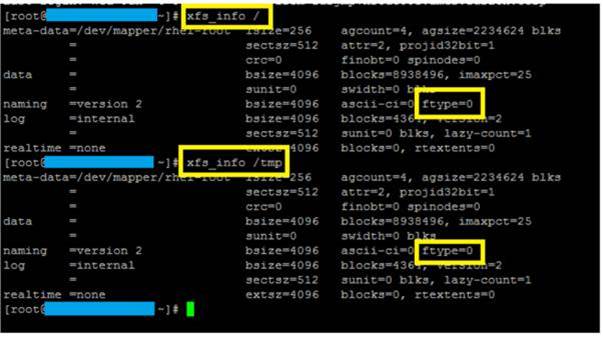
If you have an XFS file system created, run the below command to check for the ftype=0:
Resolution
Workaround:
Ensure that the file system created where /tmp resides is Btrfs, ext2, ext3, and ext4.
For the XFS file system, ensure that the file system is created with "ftype=1"