PowerFlex: a mix of LACP and non-LACP port groups are not allowed VXFM00529
Summary: PowerFlex Manager Update Service Details fails with error "a mix of LACP, and non-LACP port groups are not allowed" caused by duplicate port group names or Fault Tolerant port group active uplink. ...
Symptoms
Duplicate port group names may cause Update Service Details to fail in PowerFlex Manager.
The issues occur when the MGMT and PROD DC/Cluster have duplicate names for their port groups when on a single vCenter.
For appliance and rack builds, a single vCenter is used. The names of the LAG are different for MGMT (for example, LAG) and PROD (for example, lag1).
This results in the PowerFlex Manager Inventory Data reading the port groups incorrectly. This, in turn, causes Update Service Details to fail with error "a mix of LACP and non-LACP port groups are not allowed."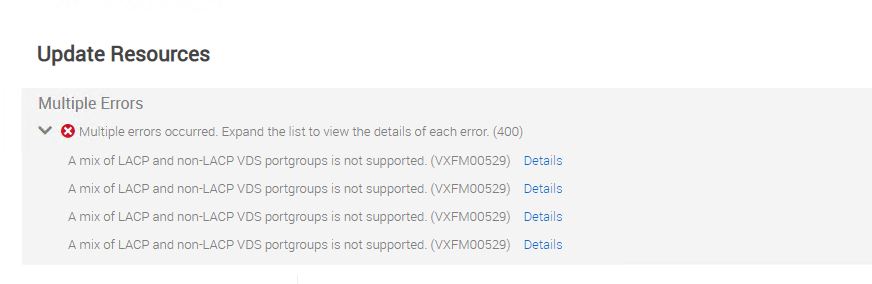
The same error may also occur if a port group is manually created in vCenter and it does not have its active uplink set to the same as the PROD port group (for example, lag1).
In the attachment below, the Fault Tolerant port group was manually created and it does not have its active uplink the same as the PROD port group (for example, lag1). 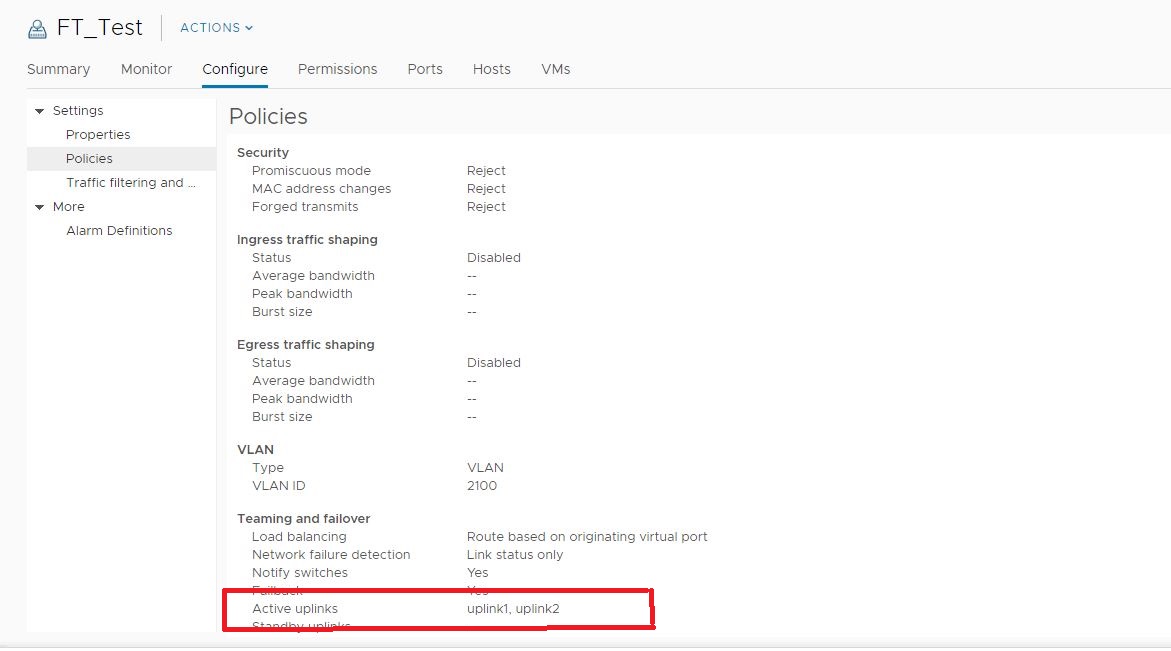
In the attachment below, the Fault Tolerant port group now has its active uplink the same as the PROD port group (for example, lag1). 
Cause
Resolution
Check all port groups in the vCenter to confirm that the lag is the active uplink and that there are no duplicate port group names. If there are, rename the MGMT port group to a unique name and update vCenter inventory in PowerFlex Manager.
Verify that if the port group is manually created, that its active uplink is the same as the PROD port group (for example, lag1).
This issue is expected to be addressed in a future PowerFlex Manager release.