使用 ClickOnce 部署的應用程式無法在執行 Dell Encryption Enterprise 或 Dell Encryption Personal 的電腦上啟動
Summary: 在執行 Dell Encryption Enterprise 或 Dell Encryption Personal 的電腦上重新開機後,使用 ClickOnce 部署的應用程式可能無法啟動。
This article applies to
This article does not apply to
This article is not tied to any specific product.
Not all product versions are identified in this article.
Symptoms
受影響的產品:
- Dell Encryption Enterprise
- Dell Encryption Personal
受影響的版本:
- v10.2 至 11.0
受影響的作業系統:
- Windows
觀察到使用 ClickOnce 部署的應用程式在重新開機後無法在具有 Dell 加密的電腦上啟動,並出現錯誤,表示應用程式無法啟動,因為其並排組態不正確。當使用者嘗試啟動應用程式時,可能會顯示以下錯誤:
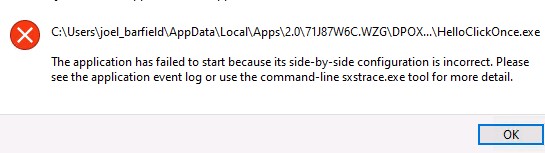
圖 1:(僅限英文)嘗試啟動應用程式時發生錯誤
Cause
這是因為 ClickOnce 應用程式 .config 所使用的檔案或 .manifest 檔案損毀結束。加密驅動程式無法正確連結這些中繼資料檔案。
Resolution
此問題已在 Dell Encryption Enterprise 和 Dell Encryption Personal Edition 的 v11.1 中解決。
如要聯絡支援部門,請參閱 Dell Data Security 國際支援電話號碼。
請前往 TechDirect,以線上產生技術支援要求。
如需更多深入見解與資源,請加入 Dell 安全性社群論壇。
Affected Products
Dell EncryptionArticle Properties
Article Number: 000191189
Article Type: Solution
Last Modified: 06 Sept 2023
Version: 3
Find answers to your questions from other Dell users
Support Services
Check if your device is covered by Support Services.