Dell Networking SONiC: como configurar o MC-LAG de vários chassis
Summary: Este artigo explica como configurar o grupo de agregação de links de vários chassis (MC-LAG) no Dell Networking SONiC.
Instructions
Pré-requisitosEstamos usando a nomenclatura de interface padrão para demonstrar os conceitos. Consulte o artigo Dell Networking série S: Configuração básica da interface — SONiC 4.0 para obter mais informações sobre nomenclatura de interface |
Índice
O que é MCLAG?
Sintaxe de
configuraçãoConfigurar uma porta/PortChannel de tronco para o link de par
MCLAGConfigurar domínio
MCLAGConfigurando o Port Channel
MCLAGTopologia
de amostraExemplo de configuração
Verificar a operação
O que é um MCLAG
Um port channel (LAG) nos permite agrupar várias interfaces em um grupo agregado para redundância e maior largura de banda. Todos os links estão no mesmo switch. Um LAG de vários chassis (MCLAG) nos permite criar um switch lógico no qual várias interfaces em switches peer são agrupadas. Os switches par MCLAG são gerenciados separadamente como dispositivos independentes. O MCLAG fornece redundância e balanceamento de carga entre os pares MCLAG. Um switch ou servidor downstream conecta-se aos pares MCLAG por meio de um port channel de vários chassis.
Veja abaixo um exemplo de topologia MCLAG. Consulte o artigo Terminologia do Dell EMC Networking SONiC Multi-Chassis Link Aggregation Group (MCLAG) para entender mais sobre as terminologias do MCLAG. 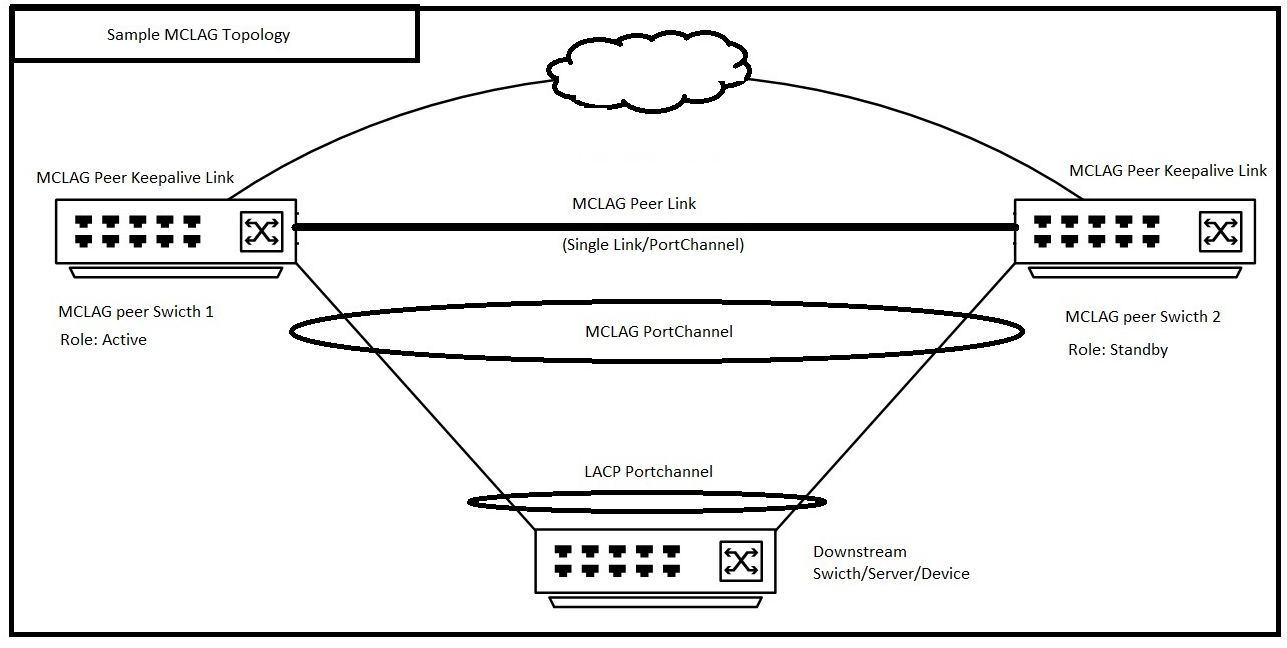 |
Sintaxe de configuração
Configurar uma porta/PortChannel de tronco para o link de par MCLAG
| Configuração | Explicação |
|---|---|
admin@DELLSONiC:~$ sonic-cli |
Faça log-in no Dell MF-CLI |
DELLSONiC# configure |
Entra no modo de configuração. |
DELLSONiC(config)# interface <Portchannel/Ethernet> |
Insira a Interface ou Port Channel. |
DELLSONiC(conf-if-XXX)# switchport trunk allowed Vlan <Vlan-id/all> |
Configure o link de par MCLAG como um link de tronco. Você também pode configurar a VLAN específica. |
DELLSONiC(conf-if-XXX)# no shutdown |
Abra a interface. |
Configurar domínio MCLAG
Em cada par MCLAG, crie um domínio MCLAG e entre no modo de configuração de domínio. Apenas um domínio MCLAG é compatível em um switch.
| Configuração | Explicação |
|---|---|
DELLSONiC# configure |
Entra no modo de configuração. |
DELLSONiC(config)# mclag domain <Domain ID> |
Configure o ID do domínio MCLAG. O ID do domínio pode ser 1-4095. |
Definir MCLAG Peer link Um link de par MCLAG conecta switches de mesmo nível MCLAG e atua como caminho de backup de dados entre pares MCLAG. |
|
DELLSONiC(config-mclag-domain-<ID>)# peer-link <Interface Number> |
Configure a interface de link de par MCLAG. Pode ser uma interface única ou um PortChannel. |
Configurar o link de keepalive do par MCLAGO link de Keepalive do MCLAG é um link de camada 3 que conecta switches pares do MCLAG. Ele carrega mensagens periódicas de heartbeat entre pares MCLAG. |
|
DELLSONiC(config-mclag-domain-<ID>)# source-ip <IP address> |
Configure o link de keepalive do par MCLAG no final do switch. |
DELLSONiC(config-mclag-domain-<ID>)# peer-ip <IP address> |
Configure o link MCLAG Peer keepalive na extremidade do switch par. |
Configurar o endereço MAC do sistema MCLAG (opcional) A Dell Technologies recomenda configurar um endereço MAC do sistema para evitar que o port channel MCLAG oscile no par em espera quando o par ativo for reinicializado. |
|
DELLSONiC(config-mclag-domain-<ID>)# mclag-system-mac nn:nn:nn:nn:nn:nn |
Configure o mesmo endereço MAC do sistema MCLAG em ambos os pares MCLAG. Se não configurarmos um endereço MAC do sistema, o endereço MAC do par ativo será usado como o endereço MAC MCLAG em ambos os pares. |
(Opcional) Configure o MAC do gateway MCLAGConsulte o artigo Como configurar um endereço MAC de gateway no Dell EMC Networking SONiC MF-CLI para obter mais detalhes sobre o gateway-mac. |
|
DELLSONiC(config)# mclag gateway-mac xx:xx:xx:xx:xx:xx |
Configurar o endereço mac do gateway |
Configurando o Port Channel MCLAG
| Configuração | Explicação |
|---|---|
DELLSONiC# configure |
Entra no modo de configuração. |
DELLSONiC(config)# interface PortChannel X |
Configurar o PortChannel do MCLAG |
DELLSONiC(conf-if-poX)# mclag <Domain ID> |
Defina o PortChannel no domínio MCLAG. |
DELLSONiC(conf-if-poX )# no shutdown |
Abra o PortChannel. |
Configurar as interfaces como parte do PortChannel |
|
DELLSONiC(config)# interface range Eth 1/X-1/Y |
Configure a interface/intervalo de interfaces no PortChannel. |
DELLSONiC(conf-if-range-eth**)# channel-group <Portchannel number> |
Configure o número de PortChannel. |
ELLSONiC(conf-if-range-eth**)# no shutdown |
Abra as interfaces. |
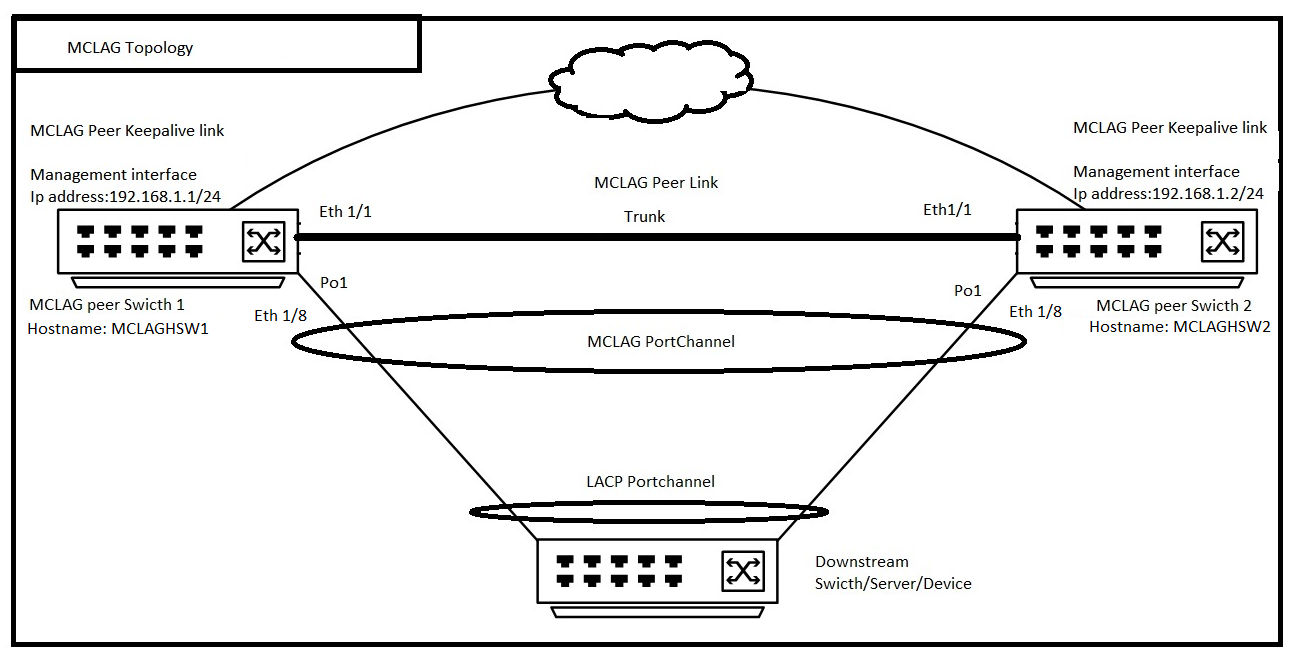
Topologia de amostra
Exemplo de configuração
Considere que estamos configurando a topologia acima, e o ID de domínio MCLAG é 1.
| Switch par MCLAG 1 (nome do host: MCLAGSW1) | MCLAG Peer switch 2 (nome do host: MCLAGSW2) |
|---|---|
Logging to Dell MF-CLI admin@MCLAGSW1:~$ sonic-cli MCLAGSW1# |
Logging to Dell MF-CLI admin@MCLAGSW2:~$ sonic-cli MCLAGSW2# |
Configure a Trunk port/PortChannel for MCLAG Peer Link MCLAGSW1# configure MCLAGSW1(config)# interface Eth 1/1 MCLAGSW1(conf-if-Eth1/1)# switchport trunk allowed Vlan all MCLAGSW1(conf-if-Eth1/1)# no shutdown MCLAGSW1(conf-if-Eth1/1)# exit MCLAGSW1(config)# exit |
Configure a Trunk port/PortChannel for MCLAG Peer Link MCLAGSW2# configure MCLAGSW2(config)# interface Eth 1/1 MCLAGSW2(conf-if-Eth1/1)# switchport trunk allowed Vlan all MCLAGSW2(conf-if-Eth1/1)# no shutdown MCLAGSW2(conf-if-Eth1/1)# exit MCLAGSW2(config)# exit |
Configure MCLAG Domain MCLAGSW1# configure MCLAGSW1(config)# mclag domain 1 MCLAGSW1(config-mclag-domain-1)# peer-link Eth 1/1 MCLAGSW1(config-mclag-domain-1)# source-ip 192.168.1.1 MCLAGSW1(config-mclag-domain-1)# peer-ip 192.168.1.2 MCLAGSW1(config-mclag-domain-1)# mclag-system-mac 00:11:22:33:44:55 MCLAGSW1(config-mclag-domain-1)# exit MCLAGSW1(config)# exit |
Configure MCLAG Domain MCLAGSW2# configure MCLAGSW2(config)# mclag domain 1 MCLAGSW2(config-mclag-domain-1)# peer-link Eth 1/1 MCLAGSW2(config-mclag-domain-1)# source-ip 192.168.1.2 MCLAGSW2(config-mclag-domain-1)# peer-ip 192.168.1.1 MCLAGSW2(config-mclag-domain-1)# mclag-system-mac 00:11:22:33:44:55 MCLAGSW2(config-mclag-domain-1)# exit MCLAGSW2(config)# exit |
Configuring MCLAG PortChannel MCLAGSW1# configure MCLAGSW1(config)# interface PortChannel 1 MCLAGSW1(conf-if-po1)# mclag 1 MCLAGSW1(conf-if-po1)# no shutdown MCLAGSW1(conf-if-po1)# exit MCLAGSW1(config)# Configure The interface Eth 1/8 as part of PortChannel 1 MCLAGSW1(config)# interface range Eth 1/8 %Info: Configuring only existing interfaces in range MCLAGSW1(conf-if-range-eth**)# channel-group 1 MCLAGSW1(conf-if-range-eth**)# no shutdown MCLAGSW1(conf-if-range-eth**)# exit MCLAGSW1(config)# exit |
Configuring MCLAG PortChannel MCLAGSW2# configure MCLAGSW2(config)# interface PortChannel 1 MCLAGSW2(conf-if-po1)# mclag 1 MCLAGSW2(conf-if-po1)# no shutdown MCLAGSW2(conf-if-po1)# exit MCLAGSW2(config)# Configure The interface Eth 1/8 as part of PortChannel 1 MCLAGSW2(config)# interface range Eth 1/8 %Info: Configuring only existing interfaces in range MCLAGSW2(conf-if-range-eth**)# channel-group 1 MCLAGSW2(conf-if-range-eth**)# no shutdown MCLAGSW2(conf-if-range-eth**)# exit MCLAGSW2(config)# exit |
Verificar a operação
Vamos verificar mostrar o resumo do mclag de ambos os switches
MCLAGSW1# show mclag brief Domain ID : 1 Role : active Session Status : up Peer Link Status : up Source Address : 192.168.1.1 Peer Address : 192.168.1.2 Session Vrf : default Peer Link : Eth1/1 Keepalive Interval : 1 secs Session Timeout : 30 secs Delay Restore : 300 secs System Mac : 0c:de:4c:81:00:0a Mclag System Mac : 00:11:22:33:44:55 Number of MLAG Interfaces:1 ----------------------------------------------------------- MLAG Interface Local/Remote Status ----------------------------------------------------------- PortChannel1 up/up |
MCLAGSW2# show mclag brief Domain ID : 1 Role : standby Session Status : up Peer Link Status : up Source Address : 192.168.1.2 Peer Address : 192.168.1.1 Session Vrf : default Peer Link : Eth1/1 Keepalive Interval : 1 secs Session Timeout : 30 secs Delay Restore : 300 secs System Mac : 0c:de:4c:81:00:0a Mclag System Mac : 00:11:22:33:44:55 Number of MLAG Interfaces:1 ----------------------------------------------------------- MLAG Interface Local/Remote Status ----------------------------------------------------------- PortChannel1 up/up |
Observe o status Local e Remote na saída acima para PortChannel1. Está em alta e ou em alta. Com isso, podemos entender que o PortChannel local e remoto do par MCLAG está ativo.