MC-LAG Active-Standby Role Election in Dell Networking SONiC
Summary: This article explains the Active or Standby Role election in MC-LAG in DELL SONiC.
This article applies to
This article does not apply to
This article is not tied to any specific product.
Not all product versions are identified in this article.
Instructions
The MC-LAG Peers should be in Active or standby mode. Active or Standby is the concept of a control plane. However in the data plane, each MC-LAG peer determines the data forward path individually irrespective of the role.
MC-LAG Role is determined by the Peer based on the IPV4 source-ip and peer-ip configured.
- If the source-ip is less than the peer-ip, then the unit becomes Active
- If the source-ip is greater than the peer-ip, then the unit becomes Standby
NOTE: The Active or Standby role is independent of the Peers operational status or Peer link connection state. If the Active MC-LAG peer is rebooting, the Standby does not become Active and Vice Versa.
For example: Consider Switch-1 is using Source IP 10.0.0.1 and Switch-2 has Source IP 10.0.0.2.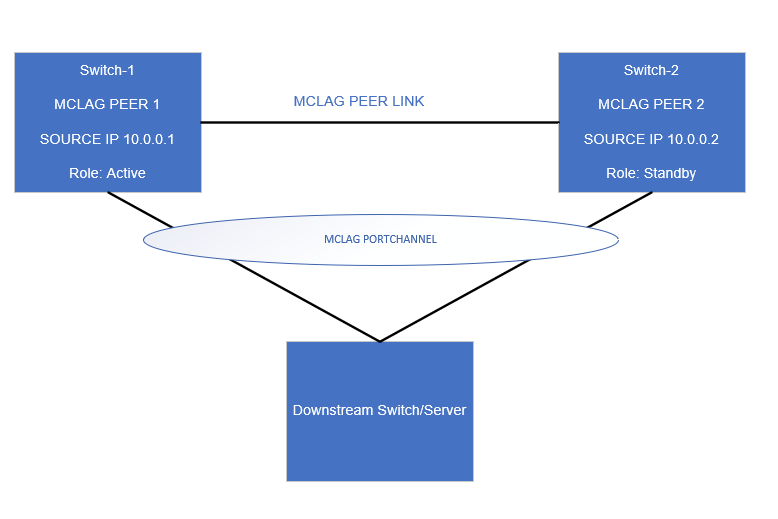
MC-LAG Configuration of Switch-1
Swicth-1# show running-configuration mclag
!
mclag domain 1
source-ip 10.0.0.1
peer-ip 10.0.0.2
peer-link PortChannel1
mclag-system-mac xx:xx:xx:xx:xx:xx
keepalive-interval 1

Swicth-1# show running-configuration mclag

Domain ID            : 1
Role                 : active
Session Status       : up
Peer Link Status     : up
Source Address       : 10.0.0.1
Peer Address         : 10.0.0.2
Peer Link            : PortChannel1
Keepalive Interval   : 1 secs
Session Timeout      : 30 secs
Delay Restore        : 300 secs
System Mac           : xx:xx:xx:xx:xx:xx
Mclag System Mac     : xx:xx:xx:xx:xx:xx
Since Switch-1 has a lower source-ip (10.0.0.1) than its peer ip (10.0.0.2) its taking Active Role.
MC-LAG Configuration of Switch-2
Swicth-2# show running-configuration mclag
!
mclag domain 1
source-ip 10.0.0.2
peer-ip 10.0.0.1
peer-link PortChannel1
mclag-system-mac xx:xx:xx:xx:xx:xx
keepalive-interval 1

Swicth-2# show running-configuration mclag

Domain ID            : 1
Role                 : standby
Session Status       : up
Peer Link Status     : up
Source Address       : 10.0.0.2
Peer Address         : 10.0.0.1
Peer Link            : PortChannel1
Keepalive Interval   : 1 secs
Session Timeout      : 30 secs
Delay Restore        : 300 secs
System Mac           : xx:xx:xx:xx:xx:xx
Mclag System Mac     : xx:xx:xx:xx:xx:xx
Since Switch-2 has a higher source-ip (10.0.0.2) than its peer ip (10.0.0.1) its taking a standby role.
Affected Products
Enterprise SONiC Distribution, PowerSwitch E3200-ON Series, Dell EMC Networking N3200-ON, PowerSwitch S5212F-ON, PowerSwitch S5224F-ON, PowerSwitch S5232F-ON, PowerSwitch S5248F-ON, PowerSwitch Z9264F-ON, PowerSwitch Z9432F-ONArticle Properties
Article Number: 000206830
Article Type: How To
Last Modified: 12 Jan 2024
Version: 4
Find answers to your questions from other Dell users
Support Services
Check if your device is covered by Support Services.