MC-LAG Aktive-Stand-by-Rollenwahl in Dell Networking SONiC
Summary: In diesem Artikel wird die Auswahl der aktiven oder Stand-by-Rolle in MC-LAG in DELL SONiC erläutert.
This article applies to
This article does not apply to
This article is not tied to any specific product.
Not all product versions are identified in this article.
Instructions
Die MC-LAG-Peers sollten sich im aktiven oder Stand-by-Modus befinden. Aktiv oder Standby ist das Konzept einer Steuerungsebene. In der Datenebene bestimmt jedoch jeder MC-LAG-Peer den Daten-Weiterleitungspfad unabhängig von der Rolle einzeln.
Die MC-LAG-Rolle wird vom Peer basierend auf der IPV4-Quell-IP und der konfigurierten Peer-IP bestimmt.
- Wenn die Quell-IP kleiner als die Peer-IP ist, wird die Einheit aktiv.
- Wenn die Quell-IP größer als die Peer-IP ist, wird die Einheit in den Standby-Modus versetzt.
HINWEIS: Die Aktive oder Stand-by-Rolle ist unabhängig vom Peers-Betriebsstatus oder Peer-Verbindungsstatus. Wenn der aktive MC-LAG-Peer neu gestartet wird, wird der Standby-Modus nicht aktiv und umgekehrt.
Zum Beispiel: Angenommen, Switch-1 verwendet Quell-IP 10.0.0.1 und Switch-2 hat Quell-IP 10.0.0.2.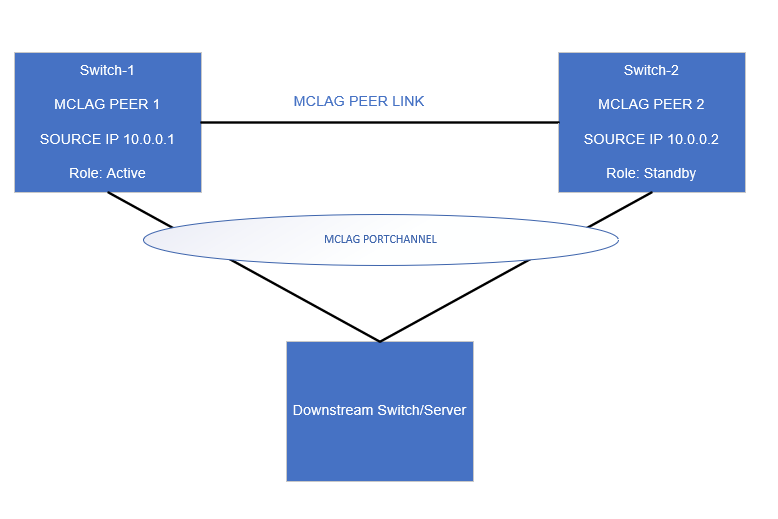
MC-LAG-Konfiguration von Switch-1
Swicth-1# show running-configuration mclag
!
mclag domain 1
source-ip 10.0.0.1
peer-ip 10.0.0.2
peer-link PortChannel1
mclag-system-mac xx:xx:xx:xx:xx:xx
keepalive-interval 1

Swicth-1# show running-configuration mclag

Domain ID            : 1
Role                 : active
Session Status       : up
Peer Link Status     : up
Source Address       : 10.0.0.1
Peer Address         : 10.0.0.2
Peer Link            : PortChannel1
Keepalive Interval   : 1 secs
Session Timeout      : 30 secs
Delay Restore        : 300 secs
System Mac           : xx:xx:xx:xx:xx:xx
Mclag System Mac     : xx:xx:xx:xx:xx:xx
Da Switch-1 eine niedrigere Quell-IP (10.0.0.1) als die Peer-IP (10.0.0.2) aufweist, nimmt er die aktive Rolle ein.
MC-LAG-Konfiguration von Switch-2
Swicth-2# show running-configuration mclag
!
mclag domain 1
source-ip 10.0.0.2
peer-ip 10.0.0.1
peer-link PortChannel1
mclag-system-mac xx:xx:xx:xx:xx:xx
keepalive-interval 1

Swicth-2# show running-configuration mclag

Domain ID            : 1
Role                 : standby
Session Status       : up
Peer Link Status     : up
Source Address       : 10.0.0.2
Peer Address         : 10.0.0.1
Peer Link            : PortChannel1
Keepalive Interval   : 1 secs
Session Timeout      : 30 secs
Delay Restore        : 300 secs
System Mac           : xx:xx:xx:xx:xx:xx
Mclag System Mac     : xx:xx:xx:xx:xx:xx
Da Switch-2 eine höhere Quell-IP (10.0.0.2) als die Peer-IP (10.0.0.1) aufweist, nimmt er eine Stand-by-Rolle ein.
Affected Products
Enterprise SONiC Distribution, PowerSwitch E3200-ON Series, Dell EMC Networking N3200-ON, PowerSwitch S5212F-ON, PowerSwitch S5224F-ON, PowerSwitch S5232F-ON, PowerSwitch S5248F-ON, PowerSwitch Z9264F-ON, PowerSwitch Z9432F-ONArticle Properties
Article Number: 000206830
Article Type: How To
Last Modified: 12 Jan 2024
Version: 4
Find answers to your questions from other Dell users
Support Services
Check if your device is covered by Support Services.