Dell Networking SONiC 如何設定多機箱 LAG MC-LAG
Summary: 本文說明如何在 Dell Networking SONiC 中設定多機箱連結聚合群組 (MC-LAG)。
This article applies to
This article does not apply to
This article is not tied to any specific product.
Not all product versions are identified in this article.
Instructions
先決條件我們使用標準介面命名來演示概念。請參閱文章 Dell Networking S 系列:基本介面組態 - SONiC 4.0,以取得有關介面命名的詳細資訊 |
索引
什麼是 MCLAG?
組態語法
為 MCLAG 對等鏈路設定中繼連接埠/連接埠通道
設定 MCLAG 網域
設定 MCLAG 連接埠通道
範例拓撲
範例組態
驗證操作
什麼是 MCLAG
埠通道 (LAG) 允許我們將多個介面捆綁到聚合組中,以實現冗餘和增加頻寬。所有鏈路都在同一個交換機上。多機箱 LAG (MCLAG) 可讓我們建立邏輯交換器,在對等交換器上捆綁多個介面。MCLAG 對等交換器可作為獨立裝置個別管理。MCLAG 可在 MCLAG 對等體之間提供冗餘和負載平衡。下游交換機或伺服器通過多機箱埠通道連接到 MCLAG 對等體。
注意:
以下是 MCLAG 拓撲範例。請參閱文章 Dell EMC Networking SONiC 多機箱連結聚合群組 (MCLAG) 術語, 以進一步瞭解 MCLAG 術語。 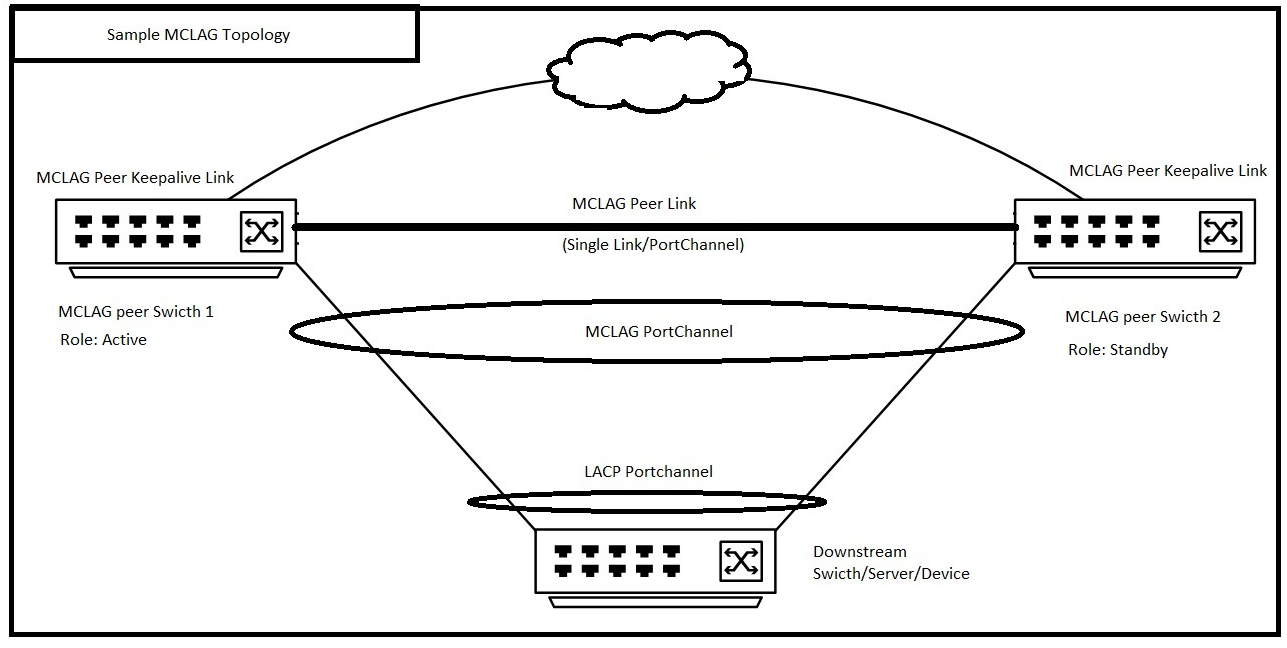 |
組態語法
為 MCLAG 對等鏈路設定中繼連接埠/連接埠通道
| 組態 | 說明 |
|---|---|
admin@DELLSONiC:~$ sonic-cli |
登入 Dell MF-CLI |
DELLSONiC# configure |
進入組態模式。 |
DELLSONiC(config)# interface <Portchannel/Ethernet> |
輸入介面或連接埠通道。 |
DELLSONiC(conf-if-XXX)# switchport trunk allowed Vlan <Vlan-id/all> |
將 MCLAG 對等鏈路配置為中繼鏈路。 您也可以設定特定的 VLAN。 |
DELLSONiC(conf-if-XXX)# no shutdown |
調出介面。 |
設定 MCLAG 網域
在每個 MCLAG 對等體上,建立 MCLAG 網域並進入網域組態模式。交換器上僅支援一個 MCLAG 網域。
| 組態 | 說明 |
|---|---|
DELLSONiC# configure |
進入組態模式。 |
DELLSONiC(config)# mclag domain <Domain ID> |
設定 MCLAG 網域 ID。網域 ID 可以是 1-4095。 |
定義 MCLAG 對等連結 MCLAG 對等鏈路連接 MCLAG 對等交換器,並充當 MCLAG 對等之間的資料備份路徑。 |
|
DELLSONiC(config-mclag-domain-<ID>)# peer-link <Interface Number> |
設定 MCLAG 對等連結介面。這可以是單個介面或埠通道。 |
設定 MCLAG 對等保持連接連結 MCLAG Keepalive 連結是連接 MCLAG 對等交換器的第 3 層連結。它會在 MCLAG 對等方之間定期傳送活動訊號訊息。 |
|
DELLSONiC(config-mclag-domain-<ID>)# source-ip <IP address> |
在交換器端設定 MCLAG 對等保持連接連結。 |
DELLSONiC(config-mclag-domain-<ID>)# peer-ip <IP address> |
在對等交換器端設定 MCLAG 對等保持連接連結。 |
設定 MCLAG 系統 MAC 位址 (選用) Dell Technologies 建議設定系統 MAC 位址,以防止在使用中對等體重新開機時,MCLAG 連接埠通道在待機對等體上變動。 |
|
DELLSONiC(config-mclag-domain-<ID>)# mclag-system-mac nn:nn:nn:nn:nn:nn |
在兩個 MCLAG 對等節點上設定相同的 MCLAG 系統 MAC 位址。如果我們沒有配置系統 MAC 位址,則活動對等方的 MAC 位址將用作兩個對等方的 MCLAG MAC 位址。 |
(選用) 設定 MCLAG 閘道 MAC 如需閘道 MAC 的更多詳細資料,請參閱文章如何在 Dell EMC Networking SONiC MF-CLI 中設定閘道 MAC 位址。 |
|
DELLSONiC(config)# mclag gateway-mac xx:xx:xx:xx:xx:xx |
設定閘道 MAC 位址 |
設定 MCLAG 連接埠通道
| 組態 | 說明 |
|---|---|
DELLSONiC# configure |
進入組態模式。 |
DELLSONiC(config)# interface PortChannel X |
設定 MCLAG 連接埠通道 |
DELLSONiC(conf-if-poX)# mclag <Domain ID> |
在 MCLAG 網域下定義連接埠通道。 |
DELLSONiC(conf-if-poX )# no shutdown |
開啟連接埠通道 |
將介面設定為連接埠通道的一部分 |
|
DELLSONiC(config)# interface range Eth 1/X-1/Y |
在連接埠通道中設定介面/介面範圍。 |
DELLSONiC(conf-if-range-eth**)# channel-group <Portchannel number> |
配置連接埠通道編號。 |
ELLSONiC(conf-if-range-eth**)# no shutdown |
啟動介面。 |
範例拓撲
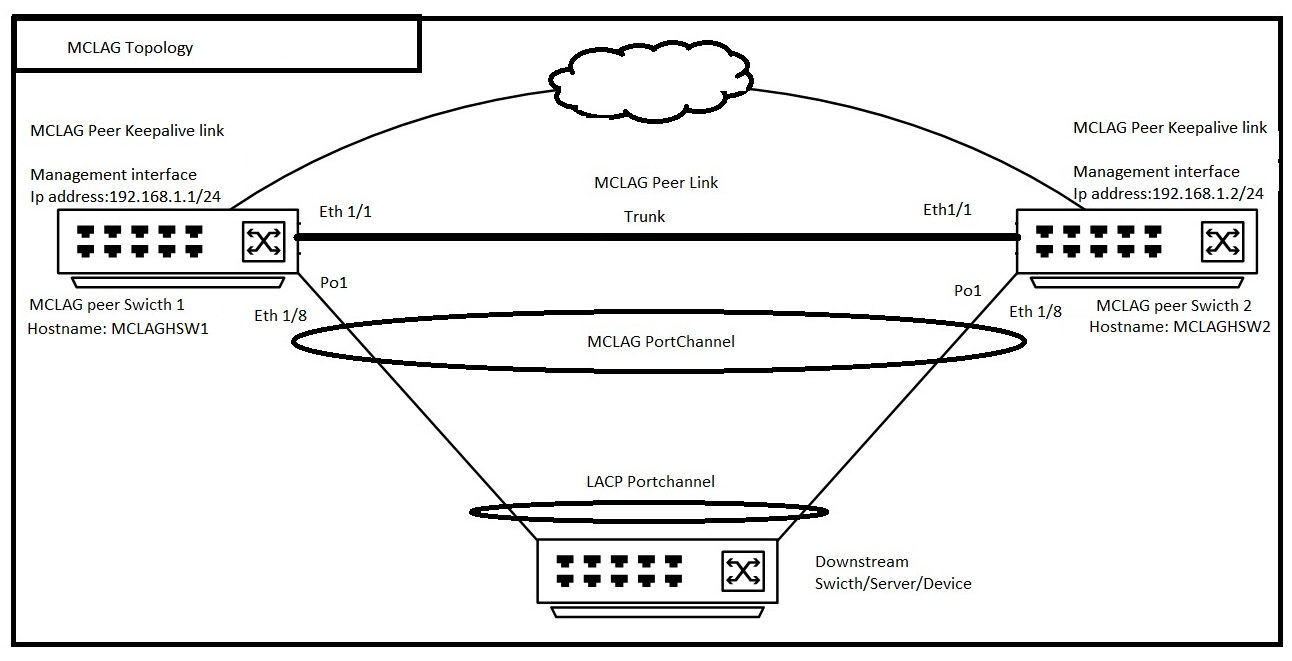
範例組態
假設我們正在設定上述拓撲,且 MCLAG 網域 ID 為 1。
| MCLAG 對等交換器 1 (主機名稱:MCLAGSW1) | MCLAG 對等交換器 2 (主機名稱:MCLAGSW2) |
|---|---|
Logging to Dell MF-CLI admin@MCLAGSW1:~$ sonic-cli MCLAGSW1# |
Logging to Dell MF-CLI admin@MCLAGSW2:~$ sonic-cli MCLAGSW2# |
Configure a Trunk port/PortChannel for MCLAG Peer Link MCLAGSW1# configure MCLAGSW1(config)# interface Eth 1/1 MCLAGSW1(conf-if-Eth1/1)# switchport trunk allowed Vlan all MCLAGSW1(conf-if-Eth1/1)# no shutdown MCLAGSW1(conf-if-Eth1/1)# exit MCLAGSW1(config)# exit |
Configure a Trunk port/PortChannel for MCLAG Peer Link MCLAGSW2# configure MCLAGSW2(config)# interface Eth 1/1 MCLAGSW2(conf-if-Eth1/1)# switchport trunk allowed Vlan all MCLAGSW2(conf-if-Eth1/1)# no shutdown MCLAGSW2(conf-if-Eth1/1)# exit MCLAGSW2(config)# exit |
Configure MCLAG Domain MCLAGSW1# configure MCLAGSW1(config)# mclag domain 1 MCLAGSW1(config-mclag-domain-1)# peer-link Eth 1/1 MCLAGSW1(config-mclag-domain-1)# source-ip 192.168.1.1 MCLAGSW1(config-mclag-domain-1)# peer-ip 192.168.1.2 MCLAGSW1(config-mclag-domain-1)# mclag-system-mac 00:11:22:33:44:55 MCLAGSW1(config-mclag-domain-1)# exit MCLAGSW1(config)# exit |
Configure MCLAG Domain MCLAGSW2# configure MCLAGSW2(config)# mclag domain 1 MCLAGSW2(config-mclag-domain-1)# peer-link Eth 1/1 MCLAGSW2(config-mclag-domain-1)# source-ip 192.168.1.2 MCLAGSW2(config-mclag-domain-1)# peer-ip 192.168.1.1 MCLAGSW2(config-mclag-domain-1)# mclag-system-mac 00:11:22:33:44:55 MCLAGSW2(config-mclag-domain-1)# exit MCLAGSW2(config)# exit |
Configuring MCLAG PortChannel MCLAGSW1# configure MCLAGSW1(config)# interface PortChannel 1 MCLAGSW1(conf-if-po1)# mclag 1 MCLAGSW1(conf-if-po1)# no shutdown MCLAGSW1(conf-if-po1)# exit MCLAGSW1(config)# Configure The interface Eth 1/8 as part of PortChannel 1 MCLAGSW1(config)# interface range Eth 1/8 %Info: Configuring only existing interfaces in range MCLAGSW1(conf-if-range-eth**)# channel-group 1 MCLAGSW1(conf-if-range-eth**)# no shutdown MCLAGSW1(conf-if-range-eth**)# exit MCLAGSW1(config)# exit |
Configuring MCLAG PortChannel MCLAGSW2# configure MCLAGSW2(config)# interface PortChannel 1 MCLAGSW2(conf-if-po1)# mclag 1 MCLAGSW2(conf-if-po1)# no shutdown MCLAGSW2(conf-if-po1)# exit MCLAGSW2(config)# Configure The interface Eth 1/8 as part of PortChannel 1 MCLAGSW2(config)# interface range Eth 1/8 %Info: Configuring only existing interfaces in range MCLAGSW2(conf-if-range-eth**)# channel-group 1 MCLAGSW2(conf-if-range-eth**)# no shutdown MCLAGSW2(conf-if-range-eth**)# exit MCLAGSW2(config)# exit |
驗證操作
讓我們檢查一下,顯示兩個交換器的 MCLAG 簡介
MCLAGSW1# show mclag brief Domain ID : 1 Role : active Session Status : up Peer Link Status : up Source Address : 192.168.1.1 Peer Address : 192.168.1.2 Session Vrf : default Peer Link : Eth1/1 Keepalive Interval : 1 secs Session Timeout : 30 secs Delay Restore : 300 secs System Mac : 0c:de:4c:81:00:0a Mclag System Mac : 00:11:22:33:44:55 Number of MLAG Interfaces:1 ----------------------------------------------------------- MLAG Interface Local/Remote Status ----------------------------------------------------------- PortChannel1 up/up |
MCLAGSW2# show mclag brief Domain ID : 1 Role : standby Session Status : up Peer Link Status : up Source Address : 192.168.1.2 Peer Address : 192.168.1.1 Session Vrf : default Peer Link : Eth1/1 Keepalive Interval : 1 secs Session Timeout : 30 secs Delay Restore : 300 secs System Mac : 0c:de:4c:81:00:0a Mclag System Mac : 00:11:22:33:44:55 Number of MLAG Interfaces:1 ----------------------------------------------------------- MLAG Interface Local/Remote Status ----------------------------------------------------------- PortChannel1 up/up |
請注意上述輸出中 PortChannel1 的本機和遠端狀態。它已啟動或向上。由此我們可以瞭解 MCLAG 對等節點的本機和遠端 PortChannel 已啟動。
Affected Products
Enterprise SONiC Distribution, PowerSwitch S6000 ON, PowerSwitch S5232F-ON, PowerSwitch S5248F-ON, PowerSwitch S5296F-ON, PowerSwitch S6010-ON, PowerSwitch S6100-ON, PowerSwitch Z9100-ON, PowerSwitch Z9264F-ON, PowerSwitch Z9332F-ON
, PowerSwitch Z9432F-ON
...
Article Properties
Article Number: 000191811
Article Type: How To
Last Modified: 10 Nov 2025
Version: 5
Find answers to your questions from other Dell users
Support Services
Check if your device is covered by Support Services.