Dell Networking SONiC 如何配置多机箱 LAG MC-LAG
Summary: 本文介绍如何在 Dell Networking SONiC 中配置多机箱链路聚合组 (MC-LAG)。
This article applies to
This article does not apply to
This article is not tied to any specific product.
Not all product versions are identified in this article.
Instructions
前提条件我们使用标准接口命名来演示概念。请参阅文章 Dell Networking S 系列:基本接口配置 - SONiC 4.0,了解有关接口命名的更多信息 |
索引
什么是MCLAG?
配置语法
为 MCLAG 对等链路配置中继端口/PortChannel
配置 MCLAG 域
配置 MCLAG 端口通道
样例拓扑
示例配置
验证作
什么是 MCLAG
端口通道 (LAG) 允许我们将多个接口捆绑到一个聚合组中,以实现冗余和增加带宽。所有链路都位于同一交换机上。多机箱 LAG (MCLAG) 允许我们创建一个逻辑交换机,其中捆绑了对等交换机上的多个接口。MCLAG 对等交换机作为独立设备单独管理。MCLAG 在 MCLAG 对等节点之间提供冗余和负载平衡。下游交换机或服务器通过多机箱端口通道连接到 MCLAG 对等体。
提醒:
下面是一个示例 MCLAG 拓扑。请参阅文章 Dell EMC Networking SONiC Multi-Chassis Link Aggregation Group (MCLAG) 术语,了解有关 MCLAG 术语的更多信息。 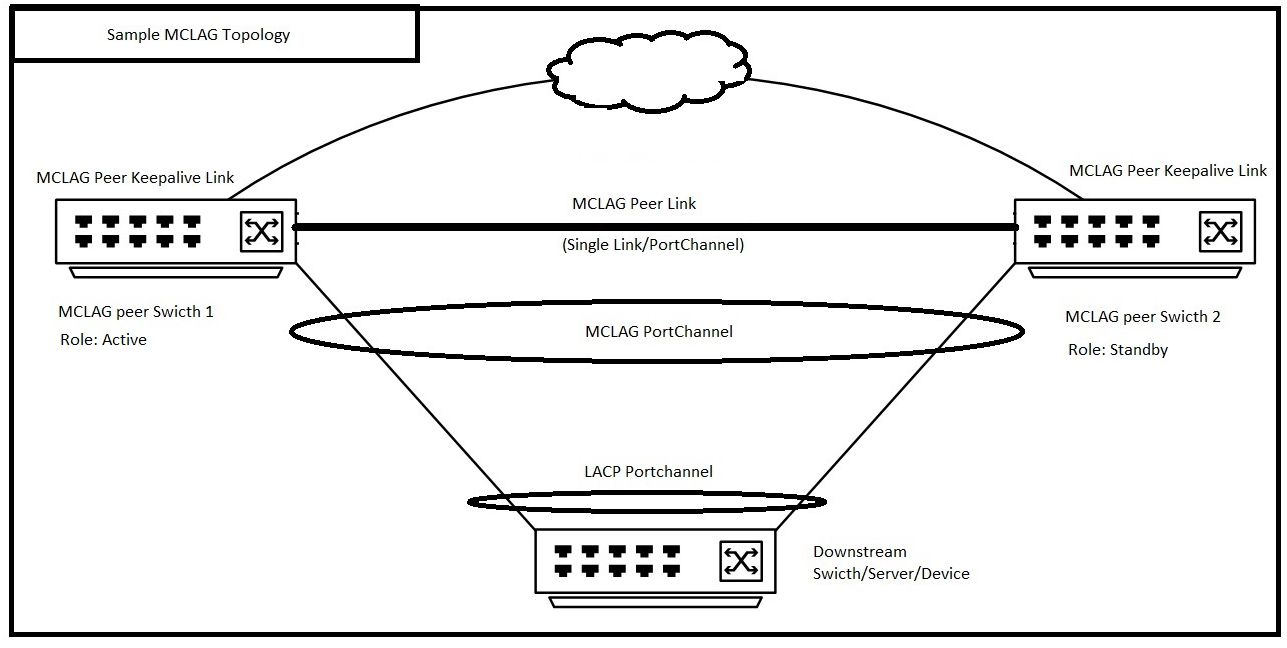 |
配置语法
为 MCLAG 对等链路配置中继端口/PortChannel
| 配置 | 说明 |
|---|---|
admin@DELLSONiC:~$ sonic-cli |
登录 Dell MF-CLI |
DELLSONiC# configure |
输入配置模式。 |
DELLSONiC(config)# interface <Portchannel/Ethernet> |
输入接口或端口通道。 |
DELLSONiC(conf-if-XXX)# switchport trunk allowed Vlan <Vlan-id/all> |
将 MCLAG 对等链路配置为中继链路。 您还可以配置特定的 VLAN。 |
DELLSONiC(conf-if-XXX)# no shutdown |
打开界面。 |
配置 MCLAG 域
在每个 MCLAG 对等体上,创建一个 MCLAG 域并进入域配置模式。一台交换机仅支持一个 MCLAG 域。
| 配置 | 说明 |
|---|---|
DELLSONiC# configure |
输入配置模式。 |
DELLSONiC(config)# mclag domain <Domain ID> |
配置 MCLAG 域 ID。域 ID 可以是 1-4095。 |
定义 MCLAG 对等链接 MCLAG 对等链路连接 MCLAG 对等交换机,并充当 MCLAG 对等节点之间的数据备份路径。 |
|
DELLSONiC(config-mclag-domain-<ID>)# peer-link <Interface Number> |
配置 MCLAG 对等链路接口。这可以是单个接口或 PortChannel。 |
配置 MCLAG 对等 keepalive 链接 MCLAG Keepalive 链路是连接 MCLAG 对等交换机的第 3 层链路。它在 MCLAG 对等节点之间定期传输心跳消息。 |
|
DELLSONiC(config-mclag-domain-<ID>)# source-ip <IP address> |
在交换机端配置 MCLAG 对等 keepalive 链路。 |
DELLSONiC(config-mclag-domain-<ID>)# peer-ip <IP address> |
在对等交换机端配置 MCLAG 对等 keepalive 链路。 |
配置 MCLAG 系统 MAC 地址(可选) Dell Technologies 建议配置系统 MAC 地址,以防止在活动对等节点重新启动时 MCLAG 端口通道在备用对等节点上摆动。 |
|
DELLSONiC(config-mclag-domain-<ID>)# mclag-system-mac nn:nn:nn:nn:nn:nn |
在两个 MCLAG 对等节点上配置相同的 MCLAG 系统 MAC 地址。如果我们未配置系统 MAC 地址,则活动对等体的 MAC 地址将用作两个对等体之间的 MCLAG MAC 地址。 |
(可选)配置 MCLAG 网关 MAC 请参阅文章 如何在 Dell EMC Networking SONiC MF-CLI 中配置网关 MAC 地址,了解有关 gateway-mac 的更多详细信息。 |
|
DELLSONiC(config)# mclag gateway-mac xx:xx:xx:xx:xx:xx |
配置网关 MAC 地址 |
配置 MCLAG 端口通道
| 配置 | 说明 |
|---|---|
DELLSONiC# configure |
输入配置模式。 |
DELLSONiC(config)# interface PortChannel X |
配置 MCLAG PortChannel |
DELLSONiC(conf-if-poX)# mclag <Domain ID> |
在 MCLAG 域下定义 PortChannel。 |
DELLSONiC(conf-if-poX )# no shutdown |
启动 PortChannel。 |
将接口配置为 PortChannel 的一部分 |
|
DELLSONiC(config)# interface range Eth 1/X-1/Y |
在 PortChannel 中配置接口/接口范围。 |
DELLSONiC(conf-if-range-eth**)# channel-group <Portchannel number> |
配置 PortChannel 号码。 |
ELLSONiC(conf-if-range-eth**)# no shutdown |
启动接口。 |
样例拓扑
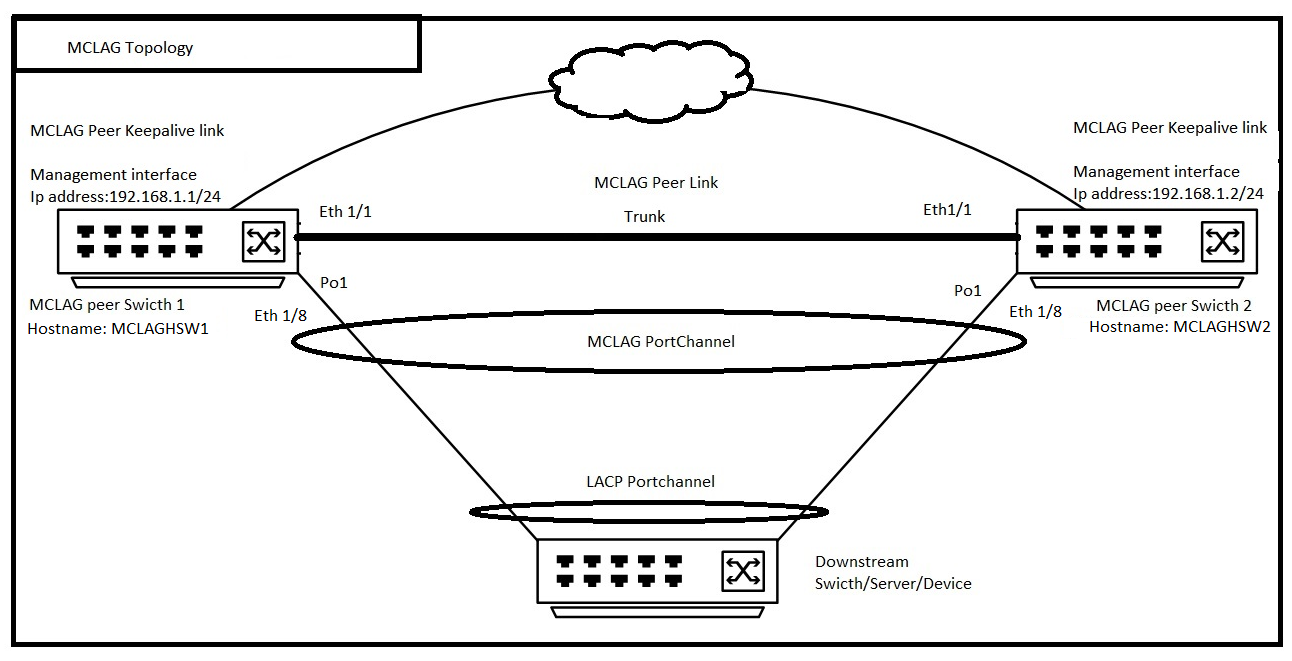
示例配置
考虑到我们正在配置上述拓扑,并且 MCLAG 域 ID 为 1。
| MCLAG 对等交换机 1(主机名:MCLAGSW1) | MCLAG 对等交换机 2(主机名:MCLAGSW2) |
|---|---|
Logging to Dell MF-CLI admin@MCLAGSW1:~$ sonic-cli MCLAGSW1# |
Logging to Dell MF-CLI admin@MCLAGSW2:~$ sonic-cli MCLAGSW2# |
Configure a Trunk port/PortChannel for MCLAG Peer Link MCLAGSW1# configure MCLAGSW1(config)# interface Eth 1/1 MCLAGSW1(conf-if-Eth1/1)# switchport trunk allowed Vlan all MCLAGSW1(conf-if-Eth1/1)# no shutdown MCLAGSW1(conf-if-Eth1/1)# exit MCLAGSW1(config)# exit |
Configure a Trunk port/PortChannel for MCLAG Peer Link MCLAGSW2# configure MCLAGSW2(config)# interface Eth 1/1 MCLAGSW2(conf-if-Eth1/1)# switchport trunk allowed Vlan all MCLAGSW2(conf-if-Eth1/1)# no shutdown MCLAGSW2(conf-if-Eth1/1)# exit MCLAGSW2(config)# exit |
Configure MCLAG Domain MCLAGSW1# configure MCLAGSW1(config)# mclag domain 1 MCLAGSW1(config-mclag-domain-1)# peer-link Eth 1/1 MCLAGSW1(config-mclag-domain-1)# source-ip 192.168.1.1 MCLAGSW1(config-mclag-domain-1)# peer-ip 192.168.1.2 MCLAGSW1(config-mclag-domain-1)# mclag-system-mac 00:11:22:33:44:55 MCLAGSW1(config-mclag-domain-1)# exit MCLAGSW1(config)# exit |
Configure MCLAG Domain MCLAGSW2# configure MCLAGSW2(config)# mclag domain 1 MCLAGSW2(config-mclag-domain-1)# peer-link Eth 1/1 MCLAGSW2(config-mclag-domain-1)# source-ip 192.168.1.2 MCLAGSW2(config-mclag-domain-1)# peer-ip 192.168.1.1 MCLAGSW2(config-mclag-domain-1)# mclag-system-mac 00:11:22:33:44:55 MCLAGSW2(config-mclag-domain-1)# exit MCLAGSW2(config)# exit |
Configuring MCLAG PortChannel MCLAGSW1# configure MCLAGSW1(config)# interface PortChannel 1 MCLAGSW1(conf-if-po1)# mclag 1 MCLAGSW1(conf-if-po1)# no shutdown MCLAGSW1(conf-if-po1)# exit MCLAGSW1(config)# Configure The interface Eth 1/8 as part of PortChannel 1 MCLAGSW1(config)# interface range Eth 1/8 %Info: Configuring only existing interfaces in range MCLAGSW1(conf-if-range-eth**)# channel-group 1 MCLAGSW1(conf-if-range-eth**)# no shutdown MCLAGSW1(conf-if-range-eth**)# exit MCLAGSW1(config)# exit |
Configuring MCLAG PortChannel MCLAGSW2# configure MCLAGSW2(config)# interface PortChannel 1 MCLAGSW2(conf-if-po1)# mclag 1 MCLAGSW2(conf-if-po1)# no shutdown MCLAGSW2(conf-if-po1)# exit MCLAGSW2(config)# Configure The interface Eth 1/8 as part of PortChannel 1 MCLAGSW2(config)# interface range Eth 1/8 %Info: Configuring only existing interfaces in range MCLAGSW2(conf-if-range-eth**)# channel-group 1 MCLAGSW2(conf-if-range-eth**)# no shutdown MCLAGSW2(conf-if-range-eth**)# exit MCLAGSW2(config)# exit |
验证作
让我们检查两个交换机的 show mclag brief
MCLAGSW1# show mclag brief Domain ID : 1 Role : active Session Status : up Peer Link Status : up Source Address : 192.168.1.1 Peer Address : 192.168.1.2 Session Vrf : default Peer Link : Eth1/1 Keepalive Interval : 1 secs Session Timeout : 30 secs Delay Restore : 300 secs System Mac : 0c:de:4c:81:00:0a Mclag System Mac : 00:11:22:33:44:55 Number of MLAG Interfaces:1 ----------------------------------------------------------- MLAG Interface Local/Remote Status ----------------------------------------------------------- PortChannel1 up/up |
MCLAGSW2# show mclag brief Domain ID : 1 Role : standby Session Status : up Peer Link Status : up Source Address : 192.168.1.2 Peer Address : 192.168.1.1 Session Vrf : default Peer Link : Eth1/1 Keepalive Interval : 1 secs Session Timeout : 30 secs Delay Restore : 300 secs System Mac : 0c:de:4c:81:00:0a Mclag System Mac : 00:11:22:33:44:55 Number of MLAG Interfaces:1 ----------------------------------------------------------- MLAG Interface Local/Remote Status ----------------------------------------------------------- PortChannel1 up/up |
请注意上面针对 PortChannel1 的输出中的本地和远程状态。它已启动和/或向上。通过这种方式,我们可以了解 MCLAG 对等体的本地和远程 PortChannel 已启动。
Affected Products
Enterprise SONiC Distribution, PowerSwitch S6000 ON, PowerSwitch S5232F-ON, PowerSwitch S5248F-ON, PowerSwitch S5296F-ON, PowerSwitch S6010-ON, PowerSwitch S6100-ON, PowerSwitch Z9100-ON, PowerSwitch Z9264F-ON, PowerSwitch Z9332F-ON
, PowerSwitch Z9432F-ON
...
Article Properties
Article Number: 000191811
Article Type: How To
Last Modified: 10 Nov 2025
Version: 5
Find answers to your questions from other Dell users
Support Services
Check if your device is covered by Support Services.